I don’t want the marketing talk – I just want to know from real users if OpenMTP is a decent replacement for the basic Google transfer tool.
 OpenMTP – Android File Transfer for Mac
If you’ve ever tried to move a folder of photos or a few movies from an Android phone to a Mac, you already know that macOS doesn’t support this natively. You usually end up looking for a third-party app because the official Google “Android File Transfer” tool hasn’t been updated in years and is famously buggy. OpenMTP is a free, open-source project that tries to solve this. It’s a basic utility for Mac users who need to manage their phone’s storage via a USB cable without paying for a subscription.
 What I Liked
In my experience, the app is pretty straightforward once you get it running. It uses a dual-pane interface, so you see your Mac’s files on one side and your phone’s folders on the other. It’s easy enough to just drag a file from one side to the other. I’ve used it to move larger video files, and for the most part, it handles the transfer fine. One of the things people on Reddit seem to appreciate is that you don’t have to install any “helper” apps on your phone; as long as the phone is in MTP mode, the app should see it. Since it’s open-source, there are no ads or hidden costs, which is a big reason why it stays a popular choice in most Android communities.

 Issues I run up against
However, there are some real frustrations that come up quite often in user discussions. The first is that transfers tend to freeze or hang midway through. The app doesn’t always give you a clear error message; it just stops progressing, and you’re left wondering if the cable came loose or if the software just gave up. You then have to hunt through your folders to figure out which file caused the crash, which is a tedious process if you’re moving hundreds of photos.
The second major headache is connection failure after a system update. Whenever macOS or Android gets a significant version jump, OpenMTP sometimes stops recognizing the phone entirely. Because this is a project maintained by a single developer in their spare time, there isn’t a 24/7 support team to fix these bugs. If a new update breaks the connection, you might be stuck waiting weeks or months for a patch, which makes it hard to rely on if you need to move files for work or an urgent project.
 Tips That Actually Help
If you do decide to use it, a couple of things might save you some trouble. First, it helps to enable USB Debugging on your phone (you do this by going to Settings > About Device and tapping the ‘Build Number’ seven times until the developer options appear). Sometimes this is the only way to get the Mac to acknowledge the device is plugged in. Second, try to keep your filenames clean. If you have files with slashes or weird symbols in the title, rename them before you start the transfer; it significantly lowers the chance of the app freezing up halfway through.
 Alternatives to Know About
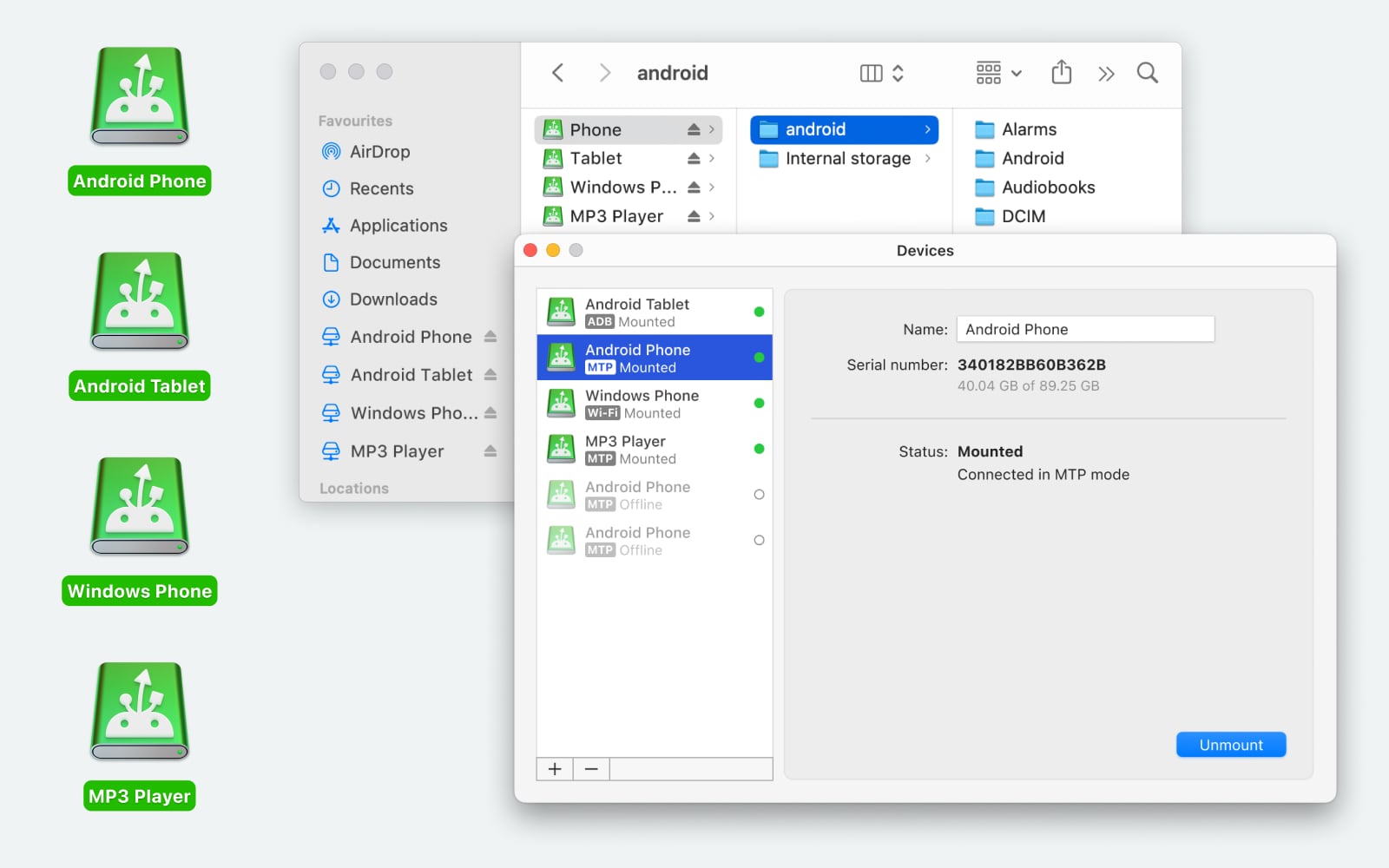
If OpenMTP is giving you too much trouble, there are other directions you can go. I’ve looked into MacDroid, which is a paid option but has a free tier for basic use. It works differently by mounting your Android phone directly as a disk in the macOS Finder. This means you don’t use a separate app window; you just browse your phone like a regular USB drive. It’s strictly for accessing the file system rather than syncing your whole library, but it feels a bit more “native” to the Mac experience. MacDroid supports both MTP and ADB, with ADB recommended for faster, more stable, and advanced file management (allowing editing directly on the device), while MTP is best for simpler, universal, and more secure transfers. ADB is ideal for large file transfers, while MTP offers a simpler plug-and-play setup
Another option – NearDrop, a free, open-source tool that’s worth a look. It essentially brings Android’s “Nearby Share” to the Mac. It’s a one-way street – you can only send files from your phone to your Mac – but for quickly moving a screenshot or a single video over Wi-Fi, it gets the job done without any setup or cables. It just sits in your menu bar and waits for an incoming file.
 My Overall Experience
OpenMTP is a capable tool that serves a specific purpose, especially if you prefer open-source software and don’t want to pay for a utility. It works well for a lot of people, but the transfer freezes and the risk of it breaking after a macOS update are real downsides. It’s a “use at your own risk” kind of tool – handy when it works, but worth having a backup plan for when it doesn’t.
I hit the same wall with OpenMTP on a Pixel 7 and an M1 Mac, so here is what ended up stable for me long term. I agree with a lot of what @mikeappsreviewer said, but I went a bit more aggressive on changing my setup instead of nursing OpenMTP along.
-
Stop trusting a single long USB session
I stopped doing one giant 40 or 80 GB copy. I queue one folder at a time, then verify counts on both sides.
Example from my last run:
DCIM/Camera on phone: 3,242 items, 61.3 GB
After transfer to Mac: use Finder “Get Info” to check item count and size. If the count is off, I re run only the missing date range.
It feels slower, but I have not had silent data loss since. -
Use a “staging” folder on the phone
Instead of dragging from many folders, I move the stuff I want to transfer into a single “TRANSFER_OUT” folder on the phone first, using the phone’s file manager.
Then I pull only that folder in OpenMTP or another tool.
This avoids weird path issues and filenames spread all over the place. If the transfer dies, I still know everything in TRANSFER_OUT is “not yet safe on Mac”. -
Turn your phone screen timeout way up
OpenMTP gets flaky for me when the phone goes to sleep mid transfer, even with MTP mode active.
I set screen timeout to 10 or 30 minutes before big transfers and plug the phone into power.
Sounds trivial, but my disconnects dropped a lot after I did this. More than when I played with file names. -
Avoid flakey hubs and long cables
I had more failures with:- USB C hub with HDMI and power
- 2 meter third party cable
Once I switched to a short certified USB C cable directly into the Mac, the random disconnects almost stopped.
If your Mac has only a couple of ports, try unplugging other high draw stuff during big copies.
-
Use OpenMTP only for pull, not push
I stopped writing data to the phone with OpenMTP except for quick tests.- Phone to Mac: OK, if it fails I still have the source
- Mac to phone: risk of partial files and no easy checksum
For pushing media back to the phone, I switched to ADB based tools instead.
-
Add an ADB based option
This is where I differ a bit from @mikeappsreviewer. They mentioned MacDroid as one option among others, but for me MacDroid with ADB turned on is the main workhorse now.- Turn on USB debugging on the phone
- Connect with MacDroid in ADB mode
It mounts the phone like a drive in Finder. Then you copy files with Finder or rsync.
My success rate for 50+ GB transfers went from “fails every few times” with OpenMTP to “fails only when the cable is bad” with MacDroid.
It is not free if you want all features, but if your time is worth anything, the stability is worth more than one evening of debugging OpenMTP crashes.
-
Use a simple verification method
For important sets, I run a basic check:- Sort by size on both sides and eyeball the largest files
- Spot check by opening some random videos and photos from the Mac copy
For work projects I go further and runmd5orshasumin Terminal for the big chunks, but that is overkill for most people.
-
Keep OpenMTP, but treat it as “backup tool”
Right now my stack looks like this:- Primary wired: MacDroid in ADB mode for anything over a few GB
- Secondary wired: OpenMTP for quick pull of a few folders when it behaves
- Wireless: Nearby Share to Windows or a Linux box, then SMB to the Mac if I am desperate
If you are worried about data loss and time, my honest take is this. Stop trying to “fix” OpenMTP for huge transfers. Keep it for light use. For big archival pulls, move to something like MacDroid in ADB mode, use short direct cables, keep the phone awake, and structure transfers so you can verify them in chunks.
Yeah, OpenMTP has gone from “nice hacky tool” to “I really hope this doesn’t eat my evening” for me too.
I’m mostly on the same page as @mikeappsreviewer and @sognonotturno, but I actually ended up taking a slightly different route instead of just babying OpenMTP forever.
A few points from long‑term use:
-
Stop trusting MTP for critical transfers
MTP on macOS is just brittle. It’s not only OpenMTP. When you see random disconnects and stalled progress bars, that’s usually the protocol + macOS combo, not only the app.
Personally, I treat OpenMTP like a “quick grab a few gigs of photos” tool, not a backup or archive tool. If the stuff matters, I don’t rely on it. -
I don’t fully agree on “small batches fix it”
Breaking things into tiny chunks like 200 photos helps, sure, but in my experience it just spreads the failure out over more attempts. If the underlying issue is flaky MTP or USB, you’ll still get a hang, just later.
What did help more for me:- Avoid copying from too many nested folders at once
- Avoid copying while camera apps / gallery apps are actively indexing in the background
- Kill heavy apps on the phone before big transfers
-
OpenMTP settings you might be overlooking
Hidden in the preferences there are a couple of knobs that changed stability a bit for me:- Turn off any “parallel” or multi‑threaded transfer option if enabled
- Reduce the number of concurrent operations to 1
It makes things slower but for me it cut down on the “stalled at 73% forever” problem.
-
Do a quick “preflight” test before you trust a long run
Before I launch a 40 GB copy, I do:- One 1–2 GB test transfer
- If that one hangs or the device disconnects even once, I don’t try to brute force it. I switch method instead of wasting an hour.
OpenMTP is not the kind of tool that “magically gets more stable” with larger jobs.
-
MacDroid is basically the adult in the room
Since you’re on macOS, MacDroid is the only thing that has consistently behaved like a proper bridge for me.
Difference from OpenMTP in real use:- It integrates with Finder, so you copy files like any other drive
- In ADB mode it bypasses a lot of the MTP nonsense that causes exactly the random disconnects you’re seeing
I know it’s not free, but after losing half a night to redoing transfers, the price looked tiny. If you care about “no more mid‑transfer freakouts,” MacDroid is honestly the most stable Android file transfer solution I’ve used on a Mac.
-
Verification so you don’t discover missing files a week later
Instead of obsessing over OpenMTP logs, do low‑tech verification:- Compare item count in the source folder on the phone vs the folder on the Mac
- Sort by size on both sides and eyeball the biggest files
If counts or big files don’t match, you know the session borked and you can re‑pull just that folder.
-
When I still use OpenMTP at all
- Grabbing a few screenshots, PDFs, ringtones, etc
- Quick one‑off “I don’t feel like mounting with MacDroid right now” jobs
I don’t use it anymore for anything above ~5–10 GB in one sitting. Not worth the stress.
So, if your main fear is data loss and redoing large transfers:
- Keep OpenMTP installed, but mentally reclassify it as a lightweight utility, not your main pipeline.
- Use MacDroid (preferably in ADB mode) for the big, important pulls where stability actually matters.
- Do simple post‑copy checks instead of trusting that “no error popup” means “everything copied fine.”
Once I switched that mindset and made MacDroid the primary tool, the whole “is this transfer going to die at 87% again” anxiety basically disappeared.
For a simpler option, skip MTP entirely. Use a USB-C flash drive or SSD formatted as exFAT.
Connect it to your Android phone, copy files with the phone’s Files app, then plug it into your Mac. A 20 GB photo folder transfers without OpenMTP, ADB, Wi-Fi, or subscriptions.
Check the file count before deleting anything from your phone. For frequent transfers, create folders by date, such as “Photos 2026-08.” It adds one extra step, but it’s stable and easy to verify. Cheap USB-C drives work fine, tho an SSD handles large videos faster.
A phone with nothing but camera photos and a phone loaded with mixed junk (WhatsApp media, app exports, downloaded PDFs) are two totally different transfer jobs, and half the advice here only works cleanly for the first one. Clean DCIM folders pull fine over almost any method. The moment you’re grabbing files scattered across app directories with long unicode names, that’s when MTP starts choking, no matter which app is sitting on top of it.
The USB-C flash drive idea from @cybertiger9625x is genuinely the lowest-stress option for most people, but there’s a catch nobody mentioned. When you copy photos through the phone’s own Files app onto an exFAT drive, some phones reset the file modified date to ‘now.’ So you plug it into the Mac and every photo says it was created today. If you sort or back up by date, that’s annoying to untangle later. Check one folder before you trust the whole batch. exFAT also has no problem with big video files, so at least the old 4GB limit isn’t in play here.
On the verification point that keeps coming up, comparing item counts is fine as a first pass but it does not catch a file that copied halfway and stopped. Same count, one broken video. If the set actually matters, open the biggest files, not the smallest. Corruption tends to show up on the large media that got cut off mid-write, not on a 30kb screenshot.
I’m not going to argue against MacDroid in ADB mode being the steadier wired option, that tracks with what @sognonotturno and @viajeroceleste said. I’d just frame it as: use it when you’re doing this often enough that reliability is worth paying for. If you pull photos off your phone twice a year, buying a tool is overkill and the flash drive wins on pure effort. If you’re moving big sets regularly for work, the paid ADB route pays for itself the first time OpenMTP would have died at 80 percent. Pick based on how often you actually do this, not on which app is technically ‘best.’