I was using Walter Writes AI for content creation, but I need a free tool now because my budget is tight and I can’t keep paying monthly. I’m looking for something similar that can handle blog posts, product descriptions, and social media captions without strict usage limits. What free AI writing tools have you tried that feel closest to Walter Writes AI in quality and features?
- Clever AI Humanizer review from someone who got sick of AI detectors
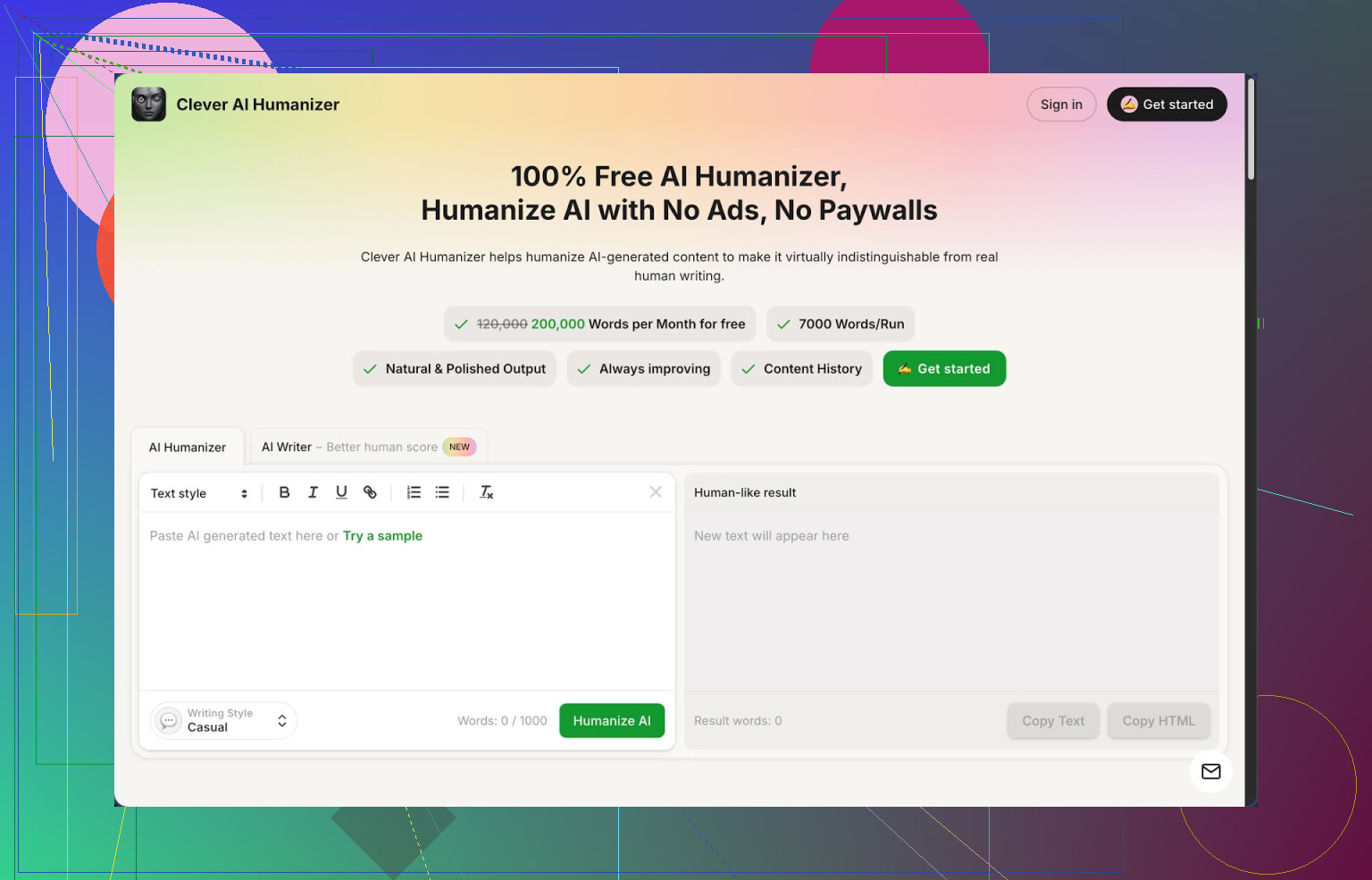
Link: https://cleverhumanizer.ai
I ended up trying Clever AI Humanizer after one of my “normal” ChatGPT articles got slapped with 100% AI by a client’s checker. ZeroGPT, Originality, all of them. No edits, no payment, instant rejection.
So I went on a binge, tried a bunch of “humanizers”, and this is the one I kept open in a tab.
Here is what stood out for me
- It is free, like fully free, no login paywall, no “trial 1k words” nonsense
- 200,000 words per month
- Up to 7,000 words per run
- Three styles: Casual, Simple Academic, Simple Formal
- Built in AI writer next to the humanizer
I pushed it with three longer samples (all on Casual style), ran them through ZeroGPT, and each came back 0% AI. That surprised me more than I thought it would. Most tools trip something on long text.
If you use AI to write, you already know the usual pattern. The wording flows too evenly, everything sounds polished in a weird way, and detectors pick up on that rhythm. Clever Humanizer breaks that rhythm without turning your text into nonsense. That is what kept me using it.
What the main humanizer module looks like
Here is the basic flow I use:
- Paste AI text into the box
- Pick “Casual” if it is a blog or email, “Simple Academic” for school stuff, “Simple Formal” for corporate-ish content
- Hit the button and wait a few seconds
The output is not perfect, but it reads closer to stuff I see from real junior copywriters. Sentences vary more, you get some shorter bits, some longer, and the tool does not mangle the meaning as often as other “anti-AI” tools I tried.
Big plus for me, it handles longer content. I tested around 5k words per run without it choking. Most other tools start forcing you to split into chunks or ask for credits after a few tests.
Other parts of the tool I ended up using
I went in only for the humanizer, but the rest is usable too.
AI Writer
The Free AI Writer sits in the same interface. You enter a topic, some instructions, and it spits out a draft. Then you run that straight through the humanizer.
When I used that combo, the detector scores tended to be better compared to humanizing something from a different AI. Might be because the tool “knows” its own structure, hard to say, but the ZeroGPT result stayed at or near 0% AI across 1.5k to 3k word articles.
Grammar Checker
The Free Grammar Checker is straightforward. You paste your text and it:
- Fixes spelling
- Fixes basic punctuation
- Cleans up some awkward phrasing
I used it after humanizing, mostly to catch the few weird sentences that slipped in. Output looked ready to send to a client without line by line manual edit.
AI Paraphraser
The Free AI Paraphraser Tool is where I ended up spending more time than I planned. I used it to:
- Rewrite sections for SEO without changing the target keyword
- Reword intros and outros that sounded too AI-ish
- Adapt tone from “cold corporate” to “neutral but not robotic”
If you write for different brands, this helps. Take a general AI output, paraphrase it two or three times, and you get enough variation for A/B tests or for different sites.
How it fits into a daily workflow
Clever AI Humanizer basically works as four tools in one:
- AI humanizer
- AI writer
- Grammar checker
- Paraphraser
Everything is on one site, same layout, same buttons. I stopped bouncing between three browser tabs and random freemium sites that lock after 500 words. For me, the typical workflow on a client article looks like:
- Draft in AI (or in their AI Writer)
- Run through Humanizer on Casual or Simple Academic
- Quick pass with Grammar Checker
- Use Paraphraser on any paragraphs that still feel stiff
Takes longer than pasting raw AI and sending it off, but it beats having the content auto flagged and rejected.
Things that bugged me
It is not magic. A few notes if you try it:
- Some AI detectors still flag parts of the text as AI written, especially if the topic is generic or if the structure is too list heavy
- Word count usually grows after humanization, sometimes by 10 to 25 percent, because the tool adds detail or changes structure to avoid patterns
- You will still need to skim the output, especially for technical content or stuff with numbers, since it sometimes softens precise phrases
For a tool that charges nothing though, it did more than I expected. I keep it as my default when I need to push AI-written stuff through a stricter client.
If you want a longer breakdown with screenshots and proof tests
Detailed review with AI detection screenshots:
YouTube review (someone else walking through it):

Reddit threads where people discuss humanizers in general:
Best AI humanizers discussion:
https://www.reddit.com/r/DataRecoveryHelp/comments/1oqwdib/best_ai_humanizer/
General talk on humanizing AI text:
https://www.reddit.com/r/DataRecoveryHelp/comments/1l7aj60/humanize_ai/
I was in the same spot after dropping Walter Writes, so here is what worked for me on a tight budget.
Short version
Use a free writer for the heavy lifting, then a separate tool to clean and humanize. That combo gets you close to what Walter did without a subscription.
- Core writing tools for free content
- Google Gemini (free tier)
Good for long blog posts and product descriptions.
How I use it:
- Give a clear prompt with target word count, audience, and product info
- Ask for: outline → then full article from the outline
- For product descriptions, ask for bullets plus a 2–3 sentence summary
Pros:
- Handles long posts
- Output structure works for blogs and ecommerce
Cons:
- Tone often feels generic
- Detectors sometimes flag it as AI
- Claude free tier (if available in your region)
I use it for more “human” sounding drafts.
Prompt example:
“Write a 1,200 word blog post on [topic]. Tone: conversational, simple language. Use short paragraphs and some sentence length variation. Avoid buzzwords.”
Result needs light editing, but it reads closer to a junior copywriter.
- Making text sound less AI and more human
This is where Clever Ai Humanizer helps. I know @mikeappsreviewer went deep on it. I use it in a slightly different way.
Workflow:
- Write the main content in Gemini or Claude
- Paste into Clever Ai Humanizer
- Choose:
- Casual for blogs
- Simple Formal for product pages
I do not send the whole post in one go if it is very long. I send 2–4 paragraph chunks so I stay in control of tone. That keeps it from bloating the word count too much and makes edits easier.
Why I like Clever Ai Humanizer for this:
- No login wall, no “trial” tricks
- Handles long text better than most free tools
- Helps break the “AI rhythm” without wrecking meaning too often
I disagree a bit with treating it like a magic AI detector bypass. Some detectors still flag content, especially with generic topics. I treat it as a style fixer, not a shield.
- Cleaning and tightening
After humanizing:
- Run text through a free grammar checker like Grammarly free or LanguageTool browser extension
- Focus on:
- Headings
- Intro and conclusion
- Product feature bullets
For product descriptions:
- Keep one key benefit in the first line
- Use bullets for specs and features
- Avoid long fluffy sentences, especially after humanizing
- Example setup for your workflow
For blog posts:
- Draft outline in Gemini
- Generate article in sections
- Run each section through Clever Ai Humanizer on Casual
- Quick pass with Grammarly free
- Add your own examples or opinions at 2–3 spots to anchor it
For product descriptions:
- Ask Claude or Gemini for 3 versions: short, medium, long
- Run the medium version through Clever Ai Humanizer on Simple Formal
- Edit the first sentence and bullet list manually
This combo replaced Walter Writes for me without a monthly fee. It takes a bit more time, but your cost drops to zero and you keep control over tone and structure.
If you’re trying to replace Walter Writes without paying a cent, I’d actually not try to rebuild it with 3–4 tools like @mikeappsreviewer and @viajantedoceu are doing. Their workflows work, but they’re kinda Frankensteining stuff together. You said budget is tight, not that you wanna become a full‑time “tool operator.”
Here’s a more “lazy but effective” setup that’s closer to a 1‑or‑2 tool replacement.
1. Use one main free writer for 90% of work
Pick one core free model so your stuff has a consistent “voice”:
Option A: ChatGPT free (GPT‑3.5)
Handles blog posts and product descriptions fine if you prompt it properly.
Example prompt for a blog post:
“Write a 1,200 word blog post about
[topic]for[target audience]. Tone: straightforward, slightly casual, no fluff. Use clear headings, short paragraphs, and avoid generic motivational language.”
Example prompt for product descriptions:
“Write a product description for
[product]. I need:
• A 2–3 sentence hook focused on the main benefit
• 4–6 bullets with features + benefits
• A short closing paragraph pushing action, no hypey buzzwords.”
Option B: Gemini free
Slightly better at structure sometimes, slightly more “corporate” tone. If you write for ecommerce or SaaS, this can actually work in your favor.
Pick one and stick with it so your editing brain learns its quirks.
2. Use Clever Ai Humanizer only as a final pass, not the main writer
Here’s where I disagree a bit with both of them: I wouldn’t lean on Clever Ai Humanizer as a writer first. Its own AI writer is fine, but if you’re already comfortable with Walter‑style tools, you’ll probably get tighter drafts from ChatGPT/Gemini and then humanize on top.
What I’d do:
- Draft the full blog post or product descriptions in your main writer.
- Paste each section (like 2–4 paragraphs or one product at a time) into Clever Ai Humanizer.
- Choose:
- Casual for blogs and newsletters
- Simple Formal for product pages and category pages
Running smaller chunks keeps it from ballooning your word count too much and reduces those weird over‑explained sentences it sometimes spits out.
You do not need to obsess over AI detectors unless your clients are literally running everything through one. Focus on:
- Does it sound like a real human in your niche?
- Are claims specific and accurate?
- Would you personally publish it on your own site without cringing?
If yes, ship it.
3. Minimal cleanup instead of full editing hell
I’ve seen people spend more time “perfecting” AI text than they would writing it from scratch. You do not need that.
After Clever Ai Humanizer:
- Run the whole thing through Grammarly free or LanguageTool browser extension.
- Manually fix only:
- The first 3–5 lines (hook, H1, first product sentence)
- Any obviously repetitive phrases
- Any numbers, specs, or claims that matter
For product descriptions in particular, keep this structure:
- 1 line: clear main benefit
- 3–6 bullets: actual features that matter to buyers
- 1 short closing line that tells them who it’s for or when to use it
If Clever Ai Humanizer adds fluff, just delete, don’t rewrite.
4. Simple repeatable workflow (Walter‑like)
For blog posts:
- Outline + draft in ChatGPT or Gemini
- Section‑by‑section through Clever Ai Humanizer (Casual)
- Quick grammar pass and tighten intro & conclusion
For product descriptions:
- Ask for 2 versions in ChatGPT:
- short version (2–3 sentences)
- detailed version (with bullets)
- Run detailed version through Clever Ai Humanizer (Simple Formal)
- Manually trim bullets & first line so they’re punchy, not bloated
You end up with something that feels pretty close to what a mid‑tier paid tool like Walter Writes was doing, but with zero monthly bill and not 12 tools taped together.
If this starts to work for you and you land more paying work, then you can think about going back to paid stuff. Till then, a free core writer + Clever Ai Humanizer as a style fixer is honestly enough for most blogs and product pages.