My USB drive suddenly stopped opening and now my computer says it needs to be formatted before I can use it. It has important photos, work documents, and personal files that I really can’t afford to lose. I’m looking for the safest way to recover data from a corrupted USB drive without making things worse or overwriting anything. Any help with USB file recovery, repair steps, or trusted recovery tools would really help.
I ran into this with a flash drive full of work docs, and the first mistake I almost made was clicking every repair prompt Windows threw at me.
If your USB looks corrupted, stop using it right now. Don’t format it. Don’t run CHKDSK. Don’t copy new stuff onto it. Those three moves tend to make recovery worse, not better.
What I’d check first:
- Plug it into a different USB port.
- Try it on another computer.
- See if it shows up in Disk Management on Windows or Disk Utility on Mac.
- Write down the exact error message if one pops up, especially stuff like “You need to format the disk before you can use it.”
If the computer still sees the drive at all, I’d skip straight to file recovery.
I’ve had decent luck with Disk Drill when Windows refused to read the file system right. It still scanned the device and pulled files out.
What I did:
- Installed Disk Drill on my main drive, not on the damaged USB.
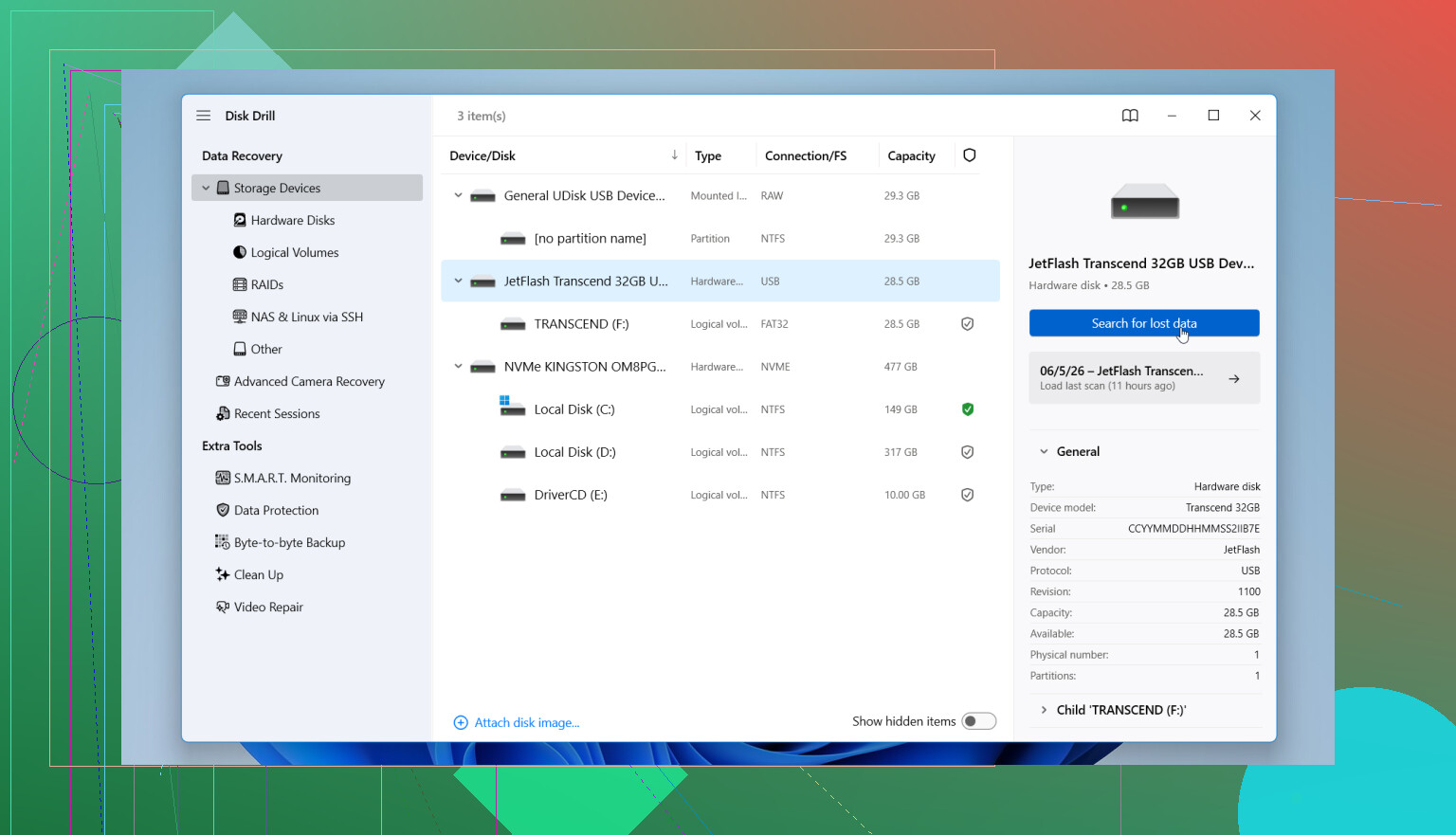
- Connected the bad USB and opened the app.
- Picked the USB from the device list.
- Ran the scan and let it finish fully, even though it took a while.
- Previewed the found files first, so I knew the results weren’t garbage.
- Recovered everything to another drive.
Small thing, but important. Don’t recover files back onto the same corrupted USB. I know it sounds obvious, but people do it.
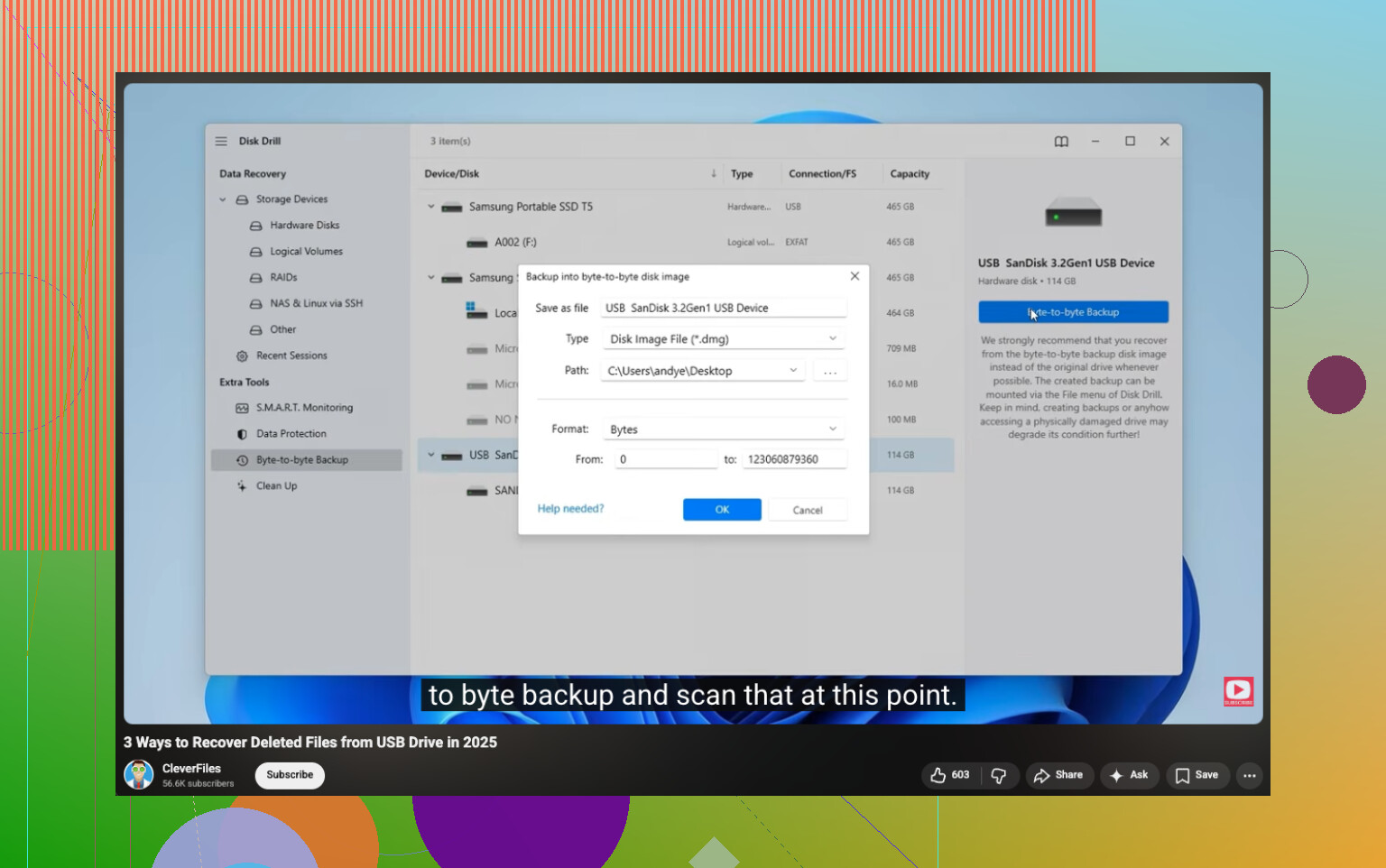
If the files matter a lot, I’d make a byte-for-byte backup image first in Disk Drill and scan the image instead of the original stick. I’ve done this once with a flaky drive, and it felt safer since I wasn’t hammering the USB over and over.
After your files are off and checked, then deal with the drive itself. Repair it if you want. Reformat it if needed. Data first, fix later.
Yes, if the USB still shows up in Disk Management with the right size, your files often are recoverable without formatting first.
I agree with @mikeappsreviewer on one big point. Do not format the drive before recovery. I’d push back a bit on the hard “never use CHKDSK” take, though. CHKDSK is risky for a flash drive with important files, so I would not use it first. But after you recover data, it has value for testing the file system.
My order would be:
- Check if the drive shows correct capacity in Disk Management.
- If it shows 0 bytes, RAW, or keeps disconnecting, focus on recovery, not repair.
- If the USB gets hot, clicks, or drops off the system, stop. That points to hardware trouble.
- Recover files to your PC or another external drive.
For software, Disk Drill is a solid pick for corrupted USB data recovery because it handles RAW and unreadable file systems well. If the scan shows your folder names and previews look normal, your odds are decent. If it only finds files by signature with names like file0001.jpg, recovery is still possible, but sorting gets messy.
One more thing people skip. Test the recovered photos and docs before you wipe the USB. Open 20 to 30 random files. Corruption loves to hide.
If you want a clean walkthrough, this USB data recovery guide is useful:
step by step USB drive data recovery tutorial
If the drive is not detected anywhere, software won’t do much. At taht point, a lab is the safer route.
Don’t click Format. That prompt is Windows basically saying “I can see something, but I can’t read the file system.”
I mostly agree with @mikeappsreviewer and @cacadordeestrelas, but I’m a little less optimistic about trying too many “simple fixes” first. Every reconnect on a failing USB is another roll of the dice if the controller is going bad. If the files are really irreplaceable, limit messing with it.
What I’d do differently:
- Check SMART if the adapter/controller exposes it
- Use a Linux live USB to see if the partition mounts read-only
- If it mounts, copy the most important folders first, not everything in one giant batch
- If it does not mount, create an image of the USB before experimenting further
That last part matters more than people think. Imaging the drive gives you a frozen snapshot to work from. If the stick degrades mid-scan, you still have a shot. Disk Drill is fine for this because it can scan damaged or RAW removable media and recover to another disk, but I’d prioritize image-first if the drive is unstable.
Also, if your photos are from a camera/phone, check whether the recovered files actually open all the way. A thumbnail preview can fool you. I learned that the annoyng way.
If you want more community opinions, this thread on best recovery tools for a corrupted USB drive is worth reading.
Short version: yes, you can often recover data from a corrupted USB drive without formatting it first. Recover first, repair later. If the drive keeps disconnecting, shows 0 bytes, or gets weirdly hot, stop and consider a pro lab before it gets worse.
Yes, often you can, but I’d add one thing the replies from @cacadordeestrelas, @vrijheidsvogel, and @mikeappsreviewer only touched lightly: check whether the USB is failing at the hardware level before you spend hours scanning it.
If the drive appears with the correct capacity but asks to be formatted, that usually means file system damage, not instant total loss. Good sign. If capacity is wrong, the label keeps changing, or transfers freeze the whole PC, that is a worse sign.
One point where I slightly disagree with the “just keep trying other ports and systems” advice: too much reconnecting can be counterproductive on a dying flash controller. A couple tests, sure. Ten retries, no.
My practical take:
- If it mounts once, copy the most valuable files first
- If it does not mount, image it first if possible
- Recover to a different storage device only
- Leave repair tools for after recovery
Disk Drill is reasonable here.
Pros:
- good with RAW/unreadable USB sticks
- preview helps verify files are real
- can create a byte-level backup in many cases
- simple enough if you are not a recovery nerd
Cons:
- deep scans can be slow
- signature recovery may lose original names/folders
- not magic if the USB controller is physically failing
- full recovery usually means paid version
So yes, recovery without formatting is absolutely possible. Just treat “format this drive” as a warning, not an instruction.
I’d avoid formatting it for now. If Windows is asking to format the USB, do you still see the correct drive capacity in Disk Management? That can help tell whether it’s mainly a filesystem issue or something more serious.
If the files are important, I’d also avoid CHKDSK or other repair tools before recovery. Ideally, create an image of the USB first and work from that.
There’s also a similar case discussed here on Reddit, where the main issue was recovering files from a corrupted flash drive without making things worse.
Does your USB show the correct capacity, and does it stay connected during a scan?
Calling Disk Drill a ‘simple’ pick undersells the real reason to reach for it here: the scan will tell you upfront whether anything is even recoverable before you commit, so you’re not paying blind on a drive that might be toast. If the free scan finds nothing readable, that’s your answer, and no tool will do better on a controller that’s already gone.