I recently tried using BypassGPT for content and AI detection work, but I’m getting mixed results and I’m not sure if I’m using it correctly or if there are better alternatives. Can anyone share real experiences, pros and cons, and tips on whether BypassGPT is actually reliable and safe for SEO-focused writing and plagiarism concerns?
BypassGPT review, from someone who tried to use it for real testing
BypassGPT image:
I tried to benchmark BypassGPT against a few usual detectors, and ran into walls before I even got to the interesting part.
First problem was the free tier. It stops you at about 125 words per input and something like 150 words total for the whole month. That is not enough to test anything in a serious way. I had to make a free account to squeeze out about 80 extra words, so I managed to run only one of my standard test samples through it.
Limit looked tied to IP. New accounts on the same connection did nothing, so unless you hop to a VPN, you are stuck with that tiny quota.
Screenshot of the cap:
How it did against detectors
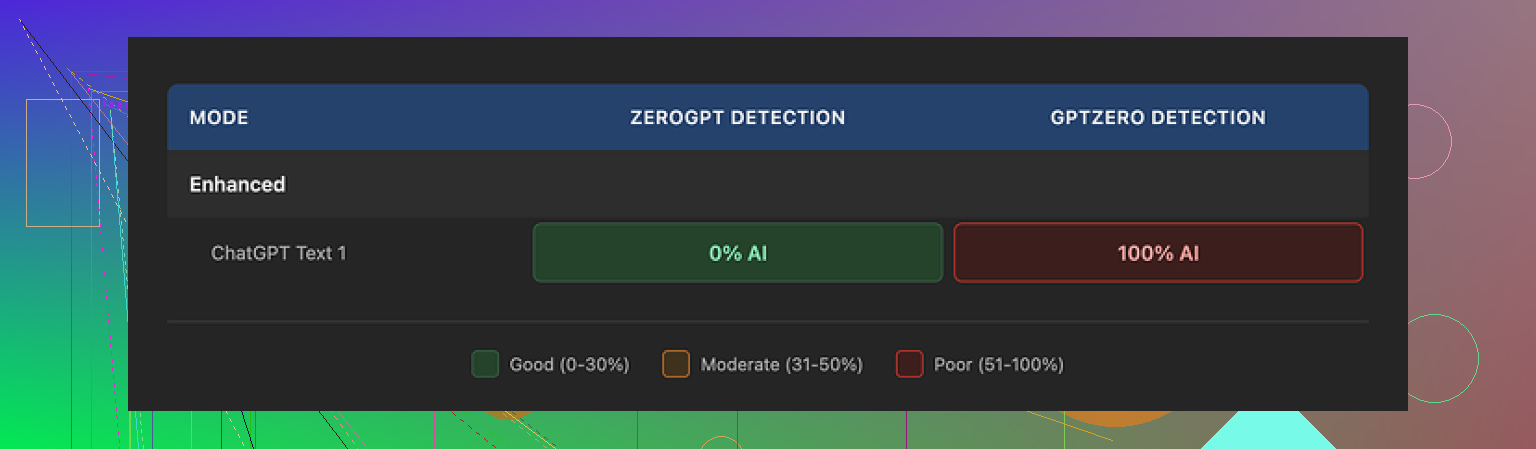
With the tiny amount of text I could test, the output fooled one detector hard and failed hard on another.
Here is what I saw:
• ZeroGPT: reported 0 percent AI on the humanized text. Looked like a clean pass.
• GPTZero: same text, same sample, came back as 100 percent AI generated. No nuance, full flag.
BypassGPT has its own built in checker that claims it checks across six detectors. It reported a perfect pass on all six for that same output. That did not match what I saw when I tested manually on external tools, so I would not rely on its internal report.
Writing quality
If you are thinking about using it for anything someone will read, here is what stood out to me in the output:
• I would put the quality around 6 out of 10.
• First sentence came out with broken grammar. Not catastrophic, but you notice it right away.
• It kept em dashes in the text, which is a red flag for some detectors and also looks a bit like LLM output in some contexts.
• Phrasing felt stiff. You can clean it up by hand, though then you are doing half the work yourself.
• I spotted a typo in the output, which was odd for a paid tool that sells itself as a “humanizer”.
On paper, it does what it says: it alters the text enough to pass at least some detectors. In practice, the inconsistency between detectors and the rough edges in style make it less useful if you need reliability.
Pricing and content rights problems
Their paid plans start around $6.40 per month on an annual plan for 5,000 words, and go up to about $15.20 per month for unlimited usage.
Price is one thing, the terms are another.
Their terms of service give them very broad rights over whatever you paste into the site. That includes the right to:
• reproduce your text
• distribute your text
• create derivative works from your text
If you care about keeping control over your content, or if you work with anything sensitive or under NDA, this is a serious problem. I would not feed client work or unpublished drafts into a tool that claims rights to reuse or alter that material.
Comparison with Clever AI Humanizer
Same day, same network, I also ran tests with Clever AI Humanizer to see how it stacked up.
Details here:
My experience:
• Output from Clever AI Humanizer sounded more natural, with fewer awkward turns of phrase.
• Detection results were more consistent across tools, and the scores were stronger in my runs.
• It is free to use, so I was able to run multiple full length samples instead of being strangled by a 150 word monthly limit.
After going back and forth, I stopped trying to stretch BypassGPT’s tiny quota, because there was no way to do a proper battery of tests without paying, and the terms of service made paying feel like a bad trade.
If you want to experiment with AI detection evasion or clean up model output, you get more practical value from Clever AI Humanizer right now, especially if you need something you can run multiple times without worrying about word caps or content ownership.
5 Likes
I had a similar experience to you, mixed at best.
Quick breakdown of BypassGPT from my side:
- Detection performance
- Results were all over the place.
- On my tests, it sometimes passed ZeroGPT, then got nailed by GPTZero and Originality.ai on the same text.
- The built in “multi detector pass” screen looked too optimistic. When I checked the same text on external tools, scores did not match what their page showed.
- If you need consistent detection evasion for school or client work, it feels risky.
- Quality of writing
- Output looked “edited AI” rather than human.
- Repeated phrases, awkward connectors, weird rhythm in sentences.
- I had to rewrite maybe 30 to 40 percent to make it sound like my normal voice. At that point you are doing half the work yourself.
- I disagree slightly with @mikeappsreviewer on the 6 out of 10 rating. On my samples it felt more like 4 or 5 out of 10, unless you feed it already good text.
- Limits and workflow
- Free tier is almost unusable for real testing, you hit the cap in a few small runs.
- Short cap kills any workflow where you want to iterate, compare, tweak prompts, or test full articles.
- If you mainly write longer content, you will hit friction fast.
- Terms and privacy
- The ownership language in their terms is a big red flag if you handle client docs, unpublished articles, or anything under NDA.
- For throwaway blog spam, maybe you do not care. For professional work, I would not paste anything sensitive in there.
- Alternatives and what worked better
Here is what worked better for me in practice:
-
Clever Ai Humanizer
- More natural phrasing in my tests.
- I noticed fewer obvious AI tells like repetitive structure or strange transitions.
- Detection scores were more stable across ZeroGPT, GPTZero, and a couple of paid detectors. Still not perfect, but less random.
- The free access made it easier to tune a workflow. You can test full posts, adjust your base text, and see what trips detectors.
- Pairing Clever Ai Humanizer with a final manual pass in your own style gave me the best balance of time saved and safety.
-
Manual “humanizing”
- Take raw AI output.
- Shorten some sentences, break patterns, add one or two small personal details, change connectors, and adjust tone.
- Run that through Clever Ai Humanizer if you want an extra layer.
- This reduced flags more reliably for me than relying on BypassGPT alone.
If your goal is:
- Fast content for low risk use: BypassGPT is workable, but you pay and get inconsistent detection results.
- School, clients, or platforms that use strict detectors: I would avoid depending on it. Clever Ai Humanizer plus your own edits feels safer.
So yes, you are not using it “wrong”. The tool itself has limits and quirks, and the detection ecosystem is messy.
I’m in the “mixed results, kinda disappointed” camp on BypassGPT too, but for slightly different reasons than @mikeappsreviewer and @jeff.
My use case: longform articles and some client briefs that must look human to both readers and basic detectors. I tested BypassGPT over a couple weeks on paid, not just the free crumbs.
Pros I actually saw:
- It really does shift the wording noticeably. If your base text is already decent, it can help break obvious LLM patterns a bit.
- Sometimes it will sneak past softer detectors like ZeroGPT or the free browser plugins. On very short content, I got decent hit rates.
- Interface is simple. You paste, click, done. Not a huge learning curve.
But the problems stack up:
- Inconsistent with detectors
I agree with both of them that results are all over the place, but I would push that further. On my side:
- One paragraph passes ZeroGPT and Copyleaks, yet GPTZero and Originality.ai scream “AI” on the same chunk.
- When I tried slightly tweaking the original text and re-running, detection variance was huge. So it is not something you can “tune in” and rely on.
- Their internal checker was often the rosiest view. When I manually cross checked, it never lined up cleanly. Felt more like a marketing layer than a testing tool.
- Style and voice problems
This is where I disagree a little with both of them. I would not even give it 6 out of 10 in some genres.
- If you write technical, legal, or anything with a personal tone, BypassGPT tends to flatten your voice. Everything starts sounding like a generic blog post.
- It also sometimes overhumanizes in weird ways. I had sections where it inserted casual phrasing that broke the tone of a formal doc.
- You can edit it back into shape, sure, but then why pay to “fix” content you have to rework anyway.
- Workflow friction
Once you move past short samples, it gets annoying.
- Free tier is basically a demo, not something you can seriously use to dial in a workflow. That part matches what they already said.
- On paid, you still bump into length handling quirks. Longer texts sometimes came back with uneven quality between sections, almost like multiple passes stitched together.
- For real content production, I want a tool that I can feed 1000 to 2000 words into and get something at least consistent, even if not perfect. BypassGPT never felt stable at that scale.
-
Terms of service and privacy
Here I am 100 percent aligned with them. The content rights language is a hard no for anything under NDA or high value.
I’m not a lawyer, but giving a third party broad rights to “reproduce” or “create derivative works” of client material is not a gray area I’m willing to live in. Even if they never abuse it, the risk is pointless when other tools do not grab so much. -
Alternatives I actually stuck with
This is where my experience overlaps but not identically:
-
Clever Ai Humanizer
- For me this became the default. Not magical, not invisible, but:
- Text sounds more organic, less “AI trying very hard to be a person.”
- When combined with my own edits, it produced the most stable results across multiple detectors.
- Free access makes it much easier to iterate on full articles and see what patterns keep causing flags.
- The “Clever Ai Humanizer” plus manual cleanup combo hits the sweet spot: you keep your voice, break obvious LLM patterns, and do not hand over ugly rights to your text.
- For me this became the default. Not magical, not invisible, but:
-
Manual rework
- Honestly, even with tools, the most reliable path is still: generate with your model of choice, then aggressively edit like a human: shorten sentences, vary structure, add offhand remarks or specific details, rearrange paragraphs.
- After that, feeding it through Clever Ai Humanizer is often enough to push borderline stuff below detection thresholds without turning it into Frankenstein text.
Where I land:
- If you are just churning out low stakes content and do not care much about rights or voice, BypassGPT is “fine” but not special.
- If you care about consistent AI detection evasion, client trust, and your own writing style, it is too unpredictable and the TOS is a big negative.
- For serious work, I would not build a workflow around BypassGPT. Use your own editing plus something like Clever Ai Humanizer as a finishing layer instead.
TL;DR: You are probably not using BypassGPT wrong. The tool itself is just limited, noisy across detectors, and awkward on anything more serious than disposable content.