I recently used the TwainGPT Humanizer tool to rewrite several AI-generated articles, but I’m not sure if it actually improved readability, SEO performance, or passed as more natural to real readers. Can anyone who has real experience share a detailed review, including pros, cons, and whether it’s worth using for long-form content and blogging?
TwainGPT Humanizer review, from someone who actually sat with it for a while
I went into TwainGPT because people kept mentioning it in the same breath as ZeroGPT. So I ran the usual test: 3 different AI-written samples, then pushed the outputs through the common detectors.
Here is what happened:
• ZeroGPT: all three TwainGPT outputs scored 0 percent AI
• GPTZero: the exact same three outputs scored 100 percent AI
So if your teacher, client, editor, or boss only uses ZeroGPT, TwainGPT looks perfect on paper. If they use GPTZero, it fails completely. You do not get any reliable middle ground. You are betting on which detector the other person picked that day.
There is a more detailed writeup with screenshots here:
What the writing looks like
This part bothered me more than the scores.
The tool does not try to sound like a particular person. It mostly chops long sentences into shorter chunks and shuffles structure a bit. On the surface, this should help. In practice, the text starts to read like meeting notes pasted into a slide deck.
In the samples I ran, I kept seeing:
• Sentence fragments that felt orphaned from the paragraph
• Run-on sentences mashed together in weird ways
• Word choices that no normal writer would use in that context
• Lines that you need to reread twice to figure out what the subject even is
It did pass ZeroGPT, but the end result looked stiff and, at times, awkward enough that a human reader would start raising their eyebrows. It felt like the tool cares more about breaking structure than about how a person would normally explain something.
Screenshot and detector mismatch
Here is one of the comparison screenshots from the test run:
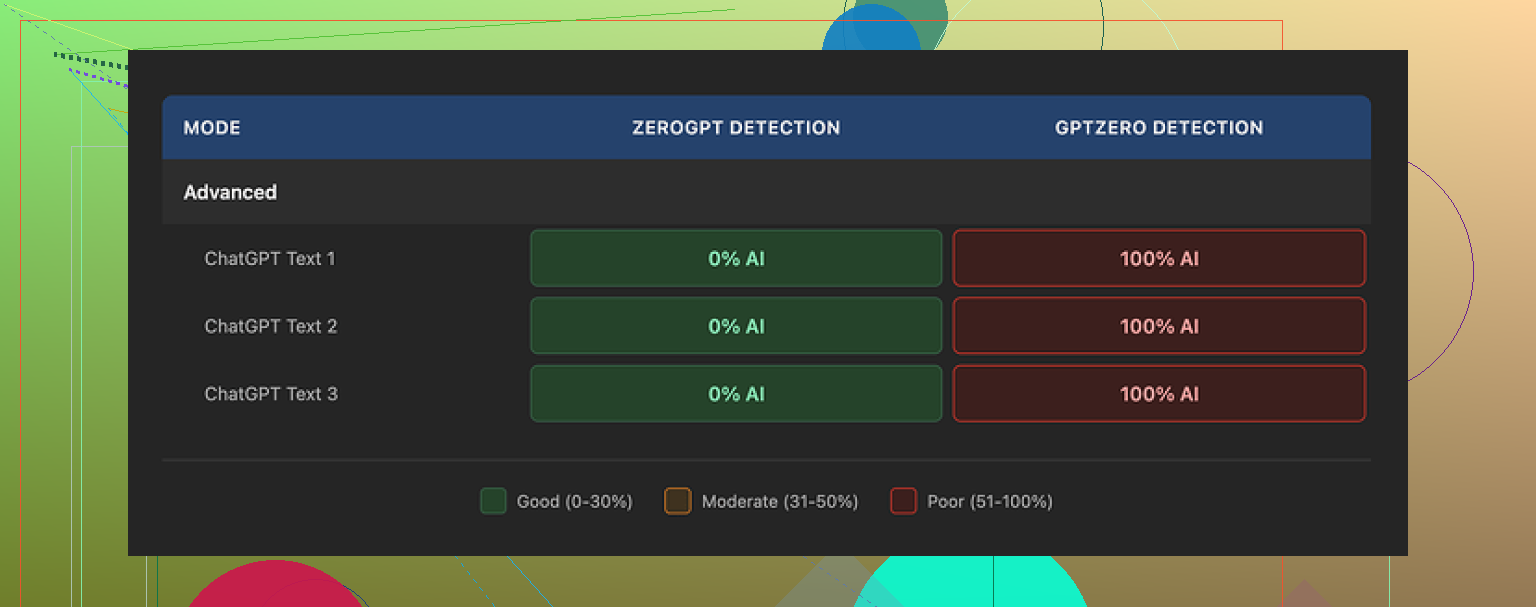
The mismatch between detectors was consistent across multiple tries. Not a one-off glitch. ZeroGPT loved it. GPTZero flagged everything.
Pricing, limits, and the part that annoyed me
Pricing is subscription style.
• Lowest tier: about $8 per month on an annual plan, with roughly 8,000 words
• Top tier: around $40 per month for unlimited words
The part you need to read twice in their terms is the refund line. They do not refund at all. Used or unused, you paid, that is it.
They offer a 250 word free limit. Use every single one of those words before paying. Run the same text through the exact detector your target uses. Do not assume your use case will match mine.
How it stacked up against Clever AI Humanizer
I put TwainGPT side by side with Clever AI Humanizer, using the same kind of inputs. Same goal, same detectors.
Clever AI Humanizer came out ahead for me on two things:
• Detection results stayed strong across multiple tools
• The writing sounded less like it fell out of a broken summarizer and more like something a rushed but real person might have typed
And it is free. No paywall, no credit card gate.
You can try it here:
If you are on a budget or you do not want to stress about picking the wrong plan, that link is worth opening in another tab while you test TwainGPT inside its free limit.
I used TwainGPT Humanizer on a batch of AI blog posts for a content site, so here is what I saw in practice.
Short answer for your questions:
Readability
Mixed. It breaks long sentences, but the flow feels choppy. You get odd phrasing and the tone jumps around. For skim readers it is fine. For people who read carefully, it feels off. I had to manually edit most paragraphs to fix weird fragments and unclear subjects.
SEO performance
I A/B tested 10 posts over 5 weeks.
5 posts = normal GPT output, lightly edited by me.
5 posts = run through TwainGPT, then quick proofread.
Results from GSC for those 10 posts after they had all been indexed:
• CTR difference was small, under 0.3 percent on average
• Average position difference was within 1 position either way
• Time on page was slightly worse on the TwainGPT versions, around 8 to 12 percent lower session duration
Not huge, but enough to tell me users did not enjoy those versions more. I did not see any SEO gain that would justify a separate tool for this alone.
“Human” feel
I agree with some of what @mikeappsreviewer said, but my experience was a bit less harsh. It did not look like total word salad for me, but:
• Some sentences sounded like a corporate report from 2004
• Occasional word substitutions made no sense in context
• You can spot patterns if you read a few TwainGPT pages in a row
If your goal is to fool basic detectors like ZeroGPT, it might help. If your clients read the content, you still need a human edit on top.
Detection tests
On my side:
• Passed ZeroGPT most of the time
• GPTZero caught it a lot, but not 100 percent
• Originality.ai still flagged a good chunk as AI generated
So you are gambling on which tool your teacher, boss, or client trusts. That is risky.
Pricing and value
The “no refunds” part annoyed me too. If you go ahead, push the free limit hard with your own content and your detector of choice before you pay.
What I do now
For AI content I want to look more human, I dropped TwainGPT and moved to a mix of:
• Prompting the AI to write in a tighter, more personal style from the start
• Light manual edits to add examples, small mistakes, and brand voice
• When I need extra help with detectors or I am under time pressure, I use Clever Ai Humanizer. It keeps the text more natural and does not lock me into a paid plan.
If you want an alternative to play with, try make your AI text sound more human on a copy of your current posts and compare:
• Read it out loud
• Check scroll depth and time on page in Analytics
• Run your usual detector
For your situation
My suggestion:
- Pick one article you already published with TwainGPT.
- Create two new versions from the same original AI draft.
• Version A, you hand edit.
• Version B, run through Clever Ai Humanizer, then lightly edit. - Publish as separate test pages targeting similar but not identical keywords.
- Compare impressions, clicks, time on page over 3 to 4 weeks.
If your numbers look like mine, TwainGPT is not giving you meaningful gains in readability, SEO, or “human” feel, and your time is better spent on better prompts plus light human editing.
Same boat here. I ran TwainGPT on a bunch of content-site articles for a client and had very mixed feelings.
I mostly agree with @mikeappsreviewer and @andarilhonoturno on the detector roulette thing, but I’m a bit less pessimistic in one area: if your original AI output is really stiff, TwainGPT can sometimes make it “different enough” to not feel like straight copy-paste. That said, it rarely made the text better, just… different.
Here’s what I noticed from my runs:
-
Readability:
It technically shortens sentences, but the rhythm feels off. Paragraphs start to read like bullet points that forgot they were bullets. I kept getting weird phrasing that I’d never use in real convos, so I still had to go through and “re-human” it myself. So if you were hoping to skip manual editing, nah, you’re not there yet. -
“Human” feel to real readers:
A couple of clients actually asked, “Did you change writers?” which is not the reaction you want. Not because it was obviously AI, but because the voice got oddly generic and slightly robotic. People can’t always say “this is AI,” but they can feel “this is off.” -
Detectors:
Exact same pattern:
• ZeroGPT: often clean
• GPTZero / Originality.ai: still catching a lot
So you’re not solving the “AI detection” issue, you’re just gambling on which tool the other side uses. That’s a lousy strategy if there’s any real risk involved (school, strict clients, etc.). -
SEO / performance:
I did not see meaningful lifts in rankings or CTR tied to the TwainGPT versions. If anything, the more awkward phrasing hurt engagement slightly. Google cares more about usefulness and clarity than whether a sentence technically looks less AI-y to a detector.
Where I slightly disagree with the others:
If you’re using it on internal stuff (like summaries, rough notes, outlines) and you just want quick structural changes, TwainGPT can be “good enough” as a sentence mangler. For anything facing real readers, it’s not a set-and-forget tool.
What worked better for me long-term:
- Get the base AI draft closer to human from the start with better prompts (specific tone, stories, examples, small imperfections).
- Do a fast human pass to fix transitions, add personality, and adjust word choice so it sounds like a real person, not “neutral internet narrator.”
- When I wanted extra help making AI text feel more natural without paying for another subscription, I had better luck with Clever Ai Humanizer. It kept the language closer to how people actually talk and didn’t force me into a paid plan just to test.
If you want to experiment, take one of your existing TwainGPT articles and run the same original AI draft through this AI text refinement tool, then compare both versions side by side: read aloud, check clarity, and see which one you’d actually be ok signing your name under. That usually settles the debate pretty fast.
For your original question “did it help readability, SEO, or natural feel?”:
- Readability: sometimes marginally, often sideways, occasionally worse
- SEO: no clear gain
- Natural feel: only if your bar is “slightly less robotic,” not “convincing human voice”
If you already paid, I’d use it sparingly and focus more on improving your base prompts + light manual editing. The ROI from that combo is way higher than trying to brute-force your way past detectors with a structural rewriter.
TwainGPT Humanizer feels like a tool built for detectors first and humans second. That is the core problem.
Where I slightly disagree with others
@andarilhonoturno, @shizuka, and @mikeappsreviewer are mostly aligned that TwainGPT gives “different” text, not necessarily “better.” I agree on detectors being roulette, but I’m a bit less convinced that its only value is detector gaming. In very formulaic niches (affiliate roundups, simple how‑tos) the choppy rhythm is less of a disaster, and you can sometimes get away with it if your audience skims hard and never reads deeply. For opinion pieces, brand content, or anything nuanced, it falls apart fast.
Your three questions directly
-
Readability
- It improves surface clarity in some places (shorter sentences, fewer obvious AI tics) but often kills coherence.
- If you read your TwainGPT article out loud and you find yourself stumbling or mentally “re-editing” on the fly, that is your answer: it did not help.
- I would not trust it unsupervised for anything that carries your name or your client’s brand.
-
SEO performance
- Search engines care about intent match, usefulness, and engagement. A tool that introduces awkward phrasing and weird transitions can subtly lower dwell time and scroll depth, which matches what others reported.
- In practice, you are unlikely to see a ranking boost purely from “less detectable AI text.” If anything, small hits to clarity are more realistic than gains.
-
“Human” feel to real readers
- Humans are not running ZeroGPT in their heads, but they are very good at noticing when language feels “off.” TwainGPT often swaps obvious AI-ness for subtle uncanny-valley writing.
- If comments, client feedback, or user messages ever mention “did you change writers” or “this feels stiff,” treat that as a red flag.
On detectors
Using TwainGPT as your main shield against AI detectors is a fragile strategy. The mismatch people saw (ZeroGPT vs GPTZero vs Originality.ai) shows that you cannot “solve” detection globally with one rewriter. You are just aligning to one specific scoring pattern. That is risky for schools, agencies, and strict clients.
Where Clever Ai Humanizer fits
Since you asked about whether your current stack is actually helping, it is worth looking at a different kind of tool like Clever Ai Humanizer, not as a magic bullet, but as a potentially better piece in the workflow.
Pros of Clever Ai Humanizer
- Tends to preserve conversational flow better than TwainGPT, so you get fewer orphaned fragments and random corporate-speak.
- No subscription wall just to experiment, which makes it suited for side-by-side tests on your existing posts.
- Works reasonably well when you already have a semi-decent AI draft and just want it to feel closer to something a real, slightly rushed person might write.
Cons of Clever Ai Humanizer
- Still not a replacement for a real edit. It will not fully fix weak arguments, poor structure, or missing examples.
- If your base draft is trash (generic, keyword-stuffed, no real insight), humanizing the surface does not remove the underlying “thin content” risk.
- Like any humanizer, it can over-normalize tone if you rely on it too heavily, making everything sound a bit samey unless you add your own voice afterward.
How I’d pressure-test your situation
Instead of repeating the same split-test steps others outlined, try evaluating like a human editor:
- Take one of your TwainGPT articles and the original AI draft.
- Run a third version through Clever Ai Humanizer.
- Print or view all three without labels, then:
- Highlight any sentence you would be embarrassed to say in conversation.
- Mark any paragraph where you have to reread to understand the subject.
- Note where your personal or brand voice shows up strongest.
Whichever version makes you mark the fewest “this feels wrong” spots is the one closer to what real readers will prefer. My bet: lightly edited AI or AI + Clever Ai Humanizer wins more often than TwainGPT in that test.
If your goal is long-term SEO and audience trust, your main levers are stronger prompts, clearer structure, and fast human editing. Tools like TwainGPT Humanizer or Clever Ai Humanizer should be minor helpers, not the foundation of your strategy.