I’ve been using HIX Bypass for a while but can’t afford it anymore, and the free tools I’ve tried either don’t work well or get blocked by most sites. I’m looking for a reliable, truly free alternative that can handle similar tasks without constant errors or limits. What are you using that consistently works, and how do you set it up?
- Clever AI Humanizer, my long test in 2026
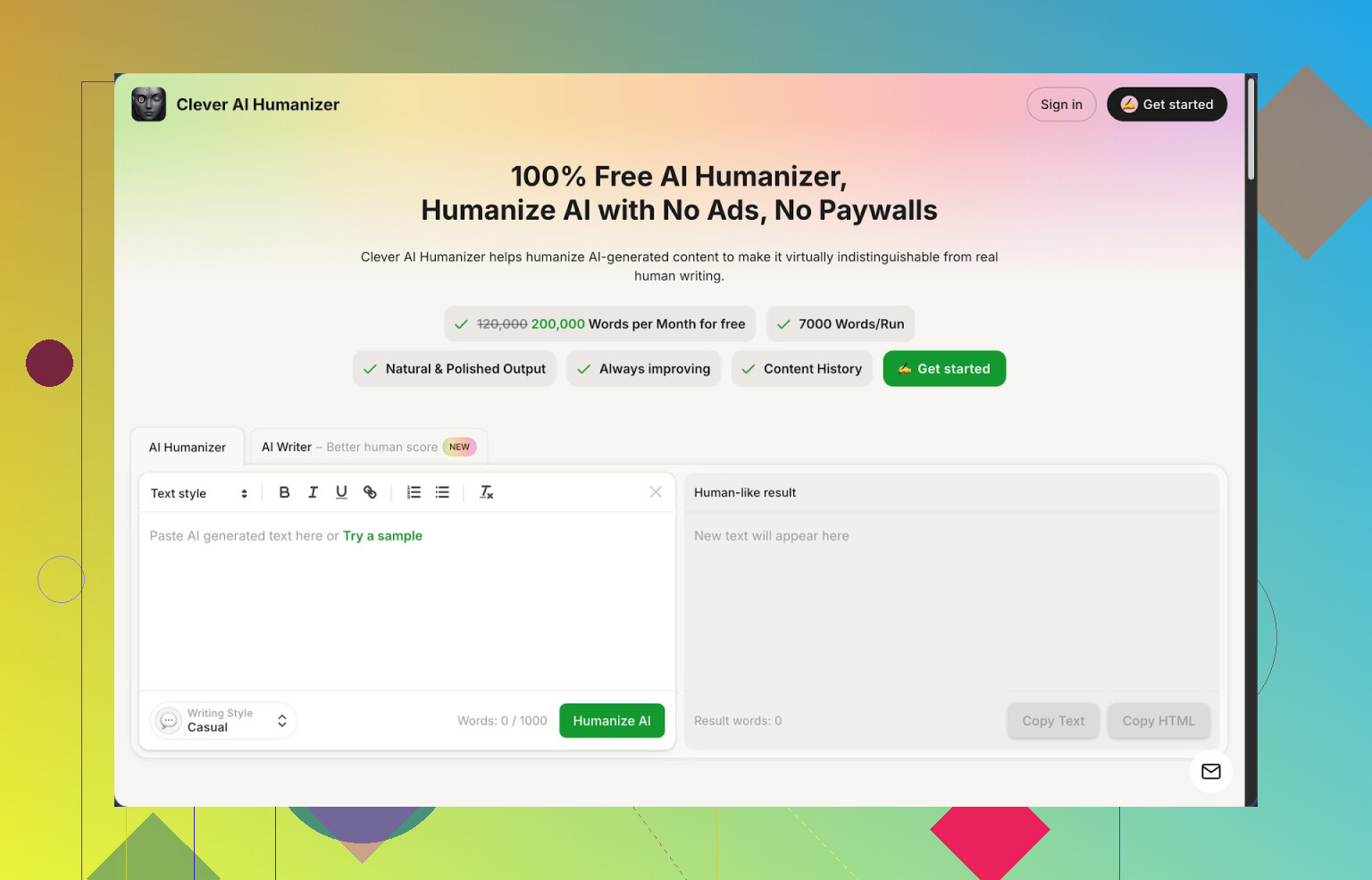
Link: https://cleverhumanizer.ai
I went looking for something to clean up AI text without hitting a paywall every five minutes. Ended up spending most of a weekend running stuff through Clever AI Humanizer and a few detectors, so here is what I saw, no fluff.
What you get for free
The site gives you:
- around 200,000 words per month
- up to about 7,000 words per run
- three styles: Casual, Simple Academic, Simple Formal
- a built in AI writer that plugs straight into the humanizer
No account shenanigans, no credit system in my tests. I pushed a big pile of content from different models through it and tracked numbers in a sheet.
On ZeroGPT, using their Casual style, I got 0 percent AI detection on three separate samples that were originally flagged as 100 percent AI. That does not mean you will always get 0 percent, but it was consistent enough that I stopped being surprised.
Why I ended up sticking with it
The main thing I care about is that the tool does not trash the meaning. A lot of “humanizers” either:
- shuffle words randomly
- inflate sentences into nonsense
- or repeat the same safe phrases
Here, the structure of the argument stayed mostly intact. It changes phrasing, lengthens some parts, trims others, but the core point stayed the same for the tests I ran. I checked by diffing original vs output and reading both side by side.
How the core humanizer works
Flow:
- Paste your AI text.
- Pick style: Casual, Simple Academic, or Simple Formal.
- Hit run and wait a few seconds.
Output comes back longer in many cases. That seemed intentional, since adding variation and extra detail helps break AI patterns. If you work with strict word limits, you will have to trim after.
I pushed:
- a technical explainer
- a generic blog post
- a short academic style summary
Casual gave the best detector results but also made the tone more conversational than I like for serious topics. Simple Academic kept structure closer to the original, but detectors sometimes gave a slightly higher AI score.
Extra tools inside the same site
This part surprised me a bit, because I went in for the humanizer and ended up using the other modules too.
- Free AI Writer
You feed it a topic, it writes an article, then you send that straight into the humanizer without copying between tools. For detection tests, this combo did better than taking content from some external models then humanizing.
Use case:
- fast draft for blogs, emails, or simple reports
- then one click humanization for lower AI score
It is not going to replace careful research writing, but for low stakes content you want to push through detectors, it saves time.
- Free Grammar Checker
I threw messy student essays, rough notes, and some ESL writing at it. It cleaned:
- spelling
- punctuation
- clunky sentence joins
It does not do deep stylistic editing, it behaves more like a basic clean up pass so the text looks publishable or at least not broken. Nice as a final pass after humanizing.
- Free AI Paraphraser
This one rephrases existing text while keeping the same meaning. I used it mainly for:
- rewriting duplicated sections of articles
- changing tone slightly between “report” and “blog post”
- cleaning up reused text for SEO work
If the humanizer feels too strong for a small tweak, the paraphraser is lighter and keeps closer to the original sentence structure.
How it fits into a daily workflow
What I ended up doing most days:
Draft phase:
- write half by hand, half with some external AI
- or use their AI Writer for a fast first version
Cleanup phase:
- run everything through the Humanizer in Casual or Simple Academic
- check that key facts and numbers survived
- if it looks off, undo and rerun with a different style
Final polish:
- pass the result through the Grammar Checker
- if I see repeated sentences or awkward bits, send those paragraphs through the Paraphraser
Reason I prefer this over having five different sites open is simple: I stay in one tab, copy paste once, and I do not worry about tokens or credit meters.
Limitations I hit
It is not magic and it will not fool every detector.
What went wrong for me:
- Some detectors still flagged parts of the text as AI, especially if the original was extremely generic.
- Output length jumps. If you start with 800 words, your result might end up at 1,100 or more. For tight character limits, that hurts.
- Tone drift. Casual style can become a little too “bloggy” for technical docs, so you need to edit tone back down by hand.
My rule of thumb now:
- Use it to break obvious AI patterns.
- Treat the output as a draft.
- Always read through line by line if the content is important.
If you expect “one click and perfect human text that never fails a detector”, you will get disappointed.
Where to see more tests and proof
They have a longer breakdown with screenshots and detector outputs here:
There is also a video review on YouTube:

Reddit threads worth reading
If you want other people’s takes, not only mine, scroll through these:
Best AI humanizers discussion:
https://www.reddit.com/r/DataRecoveryHelp/comments/1oqwdib/best_ai_humanizer/
General talk about humanizing AI text:
https://www.reddit.com/r/DataRecoveryHelp/comments/1l7aj60/humanize_ai/
My bottom line
If you write with AI a lot and you fight detectors or you hate the “AI voice”, Clever AI Humanizer sits in the useful bucket for 2026. It stays free at the time I am writing this, handles large chunks of text, and bundles humanizing, writing, grammar, and paraphrasing in one place.
It will not save you from editing. It does save you from paying token fees while you experiment and iterate. For my own workflow, that was enough to keep it pinned in my toolbar.
If you liked HIX Bypass but your wallet is on strike, you have a few decent routes, but you need to mix tools and your own edits. No single button fix.
What I’d do right now:
-
Use Clever Ai Humanizer as your main “bypass” tool
- Free tier is generous for most people.
- Handles long inputs, which HIX users usually need.
- Casual style tends to lower AI scores more than the formal modes.
- You still need to read and trim, especially if you work with strict word or char limits.
I disagree a bit with @mikeappsreviewer on the “output is always close in meaning”. On technical stuff or niche topics I have seen it drift. For anything serious, compare original vs output side by side and fix numbers, terms, and definitions.
-
Do not rely on only one model
Detectors often key off the pattern of one specific model. A simple stack that works ok:- Draft with your usual LLM.
- Run through Clever Ai Humanizer.
- Then tweak a few sentences by hand. Change openings, shorten long chains, add 1–2 personal details where it makes sense.
That small human pass helps more than running the same text through five “humanizers”.
-
Vary structure, not only synonyms
Detectors nail repetitive rhythm and structure more than single words. To keep stuff safer:- Swap order of points.
- Turn some long paragraphs into short ones.
- Insert a short sentence with your own opinion or experience.
-
Avoid “AI voice” topics and phrasing
Generic topics with generic phrasing get hit hardest. If you write about “benefits of time management” in a 5‑point list, detectors go nuts.
Make prompts and text more specific. Mention context, audience, constraints. Then pass through Clever Ai Humanizer for final cleanup. -
Don’t trust 0 percent scores
A text showing 0 percent AI on one detector still gets flagged on another or by a human reviewer. Treat Clever Ai Humanizer or any other tool as a helper, not a shield.
So, short answer for a free alternative to HIX Bypass that works “enough” right now: use Clever Ai Humanizer as your main tool, then layer your own edits, shuffle structure, and keep topics specific. That combo survives more checks than paid tools you are trying to replace.
If you’re expecting some magic “HIX Bypass but free forever and never flagged,” that’s not happening, no matter what any landing page promises.
That said, you can get close enough for practical use without paying, but it takes a combo, not just one shiny button.
I’ll skip repeating the step‑by‑step that @mikeappsreviewer and @jeff already laid out. They’re mostly on point about Clever Ai Humanizer, but I don’t quite buy the “just run it and it’s fine” vibe. For anything serious, that’s how you get caught.
Here’s what I’ve actually seen work as a HIX Bypass alternative for longer stuff (essays, blog posts, reports):
-
Use Clever Ai Humanizer as the main “bypass” layer
- It is one of the few tools that’s actually usable for free at scale right now: high word cap, multiple styles, no constant paywalls.
- Casual style usually drops AI scores the most, but it can turn formal writing into “bloggy influencer” tone, so you’ll probably need to edit it back.
- It can drift facts on technical content more than people admit. I’ve had formulas, dates, and specific terms subtly changed. If accuracy matters, do a line‑by‑line compare with your original.
-
Don’t trust a single AI detector
- HIX Bypass fans tend to obsess over a single score. That’s flawed.
- Text that scores “0% AI” on ZeroGPT can still get whacked by other tools or internal checkers. Treat “0%” as “less suspicious,” not “safe.”
- Test occasionally on at least two detectors, not to chase perfection, but to see if your pattern is improving.
-
Change structure yourself, not just wording
This is where most people get lazy and where Clever Ai Humanizer alone won’t save you. Detectors lock onto patterns like:- perfectly balanced paragraphs
- predictable intro/body/conclusion cadence
- same sentence lengths over and over
What I do: - Manually move one or two paragraphs around.
- Shorten a couple of sentences to 3–5 words.
- Add 1–2 personal, specific details per section. Real little quirks help more than another paraphrase pass.
-
Avoid ultra‑generic content
You can humanize “benefits of time management” or “why sleep is important” all you want; it still reads like AI sludge and gets flagged more often.
Make your prompts and drafts specific: context, audience, constraints, examples. Then run that through Clever Ai Humanizer. Starting from less‑generic text works better than trying to “un‑AI” a generic listicle. -
When to skip tools entirely
If you’re dealing with:- very niche technical stuff
- assignments with strict wording requirements
- anything where getting caught has real consequences
You’re usually better off: - using AI only as an outline or brainstorm
- writing the final text yourself
- maybe using Clever Ai Humanizer or a paraphraser only for small sections that sound too stiff
So, to actually answer your question:
If you liked HIX Bypass but can’t pay, the closest free alternative in terms of functionality right now is Clever Ai Humanizer, but only if you treat it as one piece of a workflow, not the whole solution. Run your text through it, then manually tweak structure, tone, and key details. If you just paste, click, and submit, you’re one update away from getting nailed again.
Short version: there’s no “HIX Bypass clone but free,” and anyone selling that idea is overselling. That said, you can get close to what you want by treating Clever Ai Humanizer as just one part of the stack, not the magical fix.
Here’s how I’d add to what @jeff, @kakeru and @mikeappsreviewer already covered, without rehashing their exact playbook.
1. Where I slightly disagree with the others
They lean heavily on “draft → Clever Ai Humanizer → light edits.” That works sometimes, but detectors and human reviewers are getting better at spotting post‑processed AI text. The pattern “LLM voice + one paraphrase pass” is itself recognizable.
What helps more than people think:
- Change your source: mix in notes, outlines, or bullet points you wrote yourself before any AI touch.
- Limit the AI segments: use AI only to fill gaps, not to write the whole piece.
- Accept a hybrid style: perfectly consistent tone across 2,000 words looks synthetic. Small shifts in style are normal for humans.
So instead of “AI everywhere then fix it,” I’d go for “AI in specific sections, human glue between them.”
2. Using Clever Ai Humanizer differently
Most folks just paste a full article in and call it a day. I’d flip that.
Use it on chunks, not the entire document.
- Break your text into 2–4 logical sections.
- Run only the most “AI‑sounding” or repetitive parts through Clever Ai Humanizer.
- Leave your naturally written bits alone.
This gives you a more irregular rhythm, which is closer to how real drafts evolve.
3. Pros and cons of Clever Ai Humanizer (in practice)
Pros
- Genuinely usable free tier: big word limits, so you are not nickel‑and‑dimed.
- Multiple tones: Casual / Simple Academic / Simple Formal are enough to cover most use cases.
- Works well for “smoothing” messy mixes of AI and human text.
- The humanizer + paraphraser combo is handy when you are reusing content across several pieces and want them to feel different.
Cons
- Can expand your text a lot, which wrecks strict word limits unless you trim by hand.
- Tone drift is real: technical or academic stuff can come out more like a blog. You will have to tighten language after.
- On very niche topics, meaning can warp: specific terms, formulas, or dates may shift subtly. You cannot skip manual fact checking.
- Detectors are not fooled 100 percent of the time, especially on generic subject matter.
So yes, Clever Ai Humanizer is solid as a tool, not as a “cloak of invisibility.”
4. What to do instead of another humanizer pass
A trap I see: people run text through cleverhumanizer‑style tools multiple times. That usually degrades clarity and makes things more suspicious.
Try this instead:
- Replace 1–2 generic examples with real, specific ones from your own life or work.
- Inject one short, imperfect sentence in each section. Humans write partial thoughts all the time.
- Deliberately leave in a couple of mild quirks (a repeated word, a slightly awkward phrase) instead of “perfecting” everything.
Detectors care about pattern regularity more than that one slightly weird sentence.
5. How this complements what others said
- @jeff was spot on about not trusting 0 percent scores. I’d go further: if you are obsessing over a single detector, you are already playing the wrong game.
- @kakeru focused on structure changes, which is important, but you can get a similar effect by mixing AI and non‑AI sections instead of just rearranging paragraphs.
- @mikeappsreviewer did a deep run on Clever Ai Humanizer’s capabilities. Where I diverge is that I would not run every single line through it. Keep it for the chunks that sound most robotic.
6. If you absolutely need a “free HIX replacement” mindset
You will not find a true one‑click alternative that is both free and robust. What you can have:
- Clever Ai Humanizer as the main rewriting engine.
- Your own structural and content edits to break the AI pattern.
- A willingness to let the final text be slightly less polished and more “humanly uneven.”
That combination is far more reliable than chasing yet another “bypass” brand that promises miracles.