I’m running Windows 10 and really need to create virtual serial ports for testing some software that communicates through COM ports. I haven’t been able to find a built-in way to do this and would appreciate any advice on tools or methods that work. If you’ve done this before, what do you recommend?
To emulate a serial port, you can use software that creates virtual COM ports on your computer. Tools like Virtual Serial Port Driver let you set up virtual serial ports that behave just like real hardware ones. These virtual ports can be used by any application that expects a COM port, even though no physical hardware is involved.
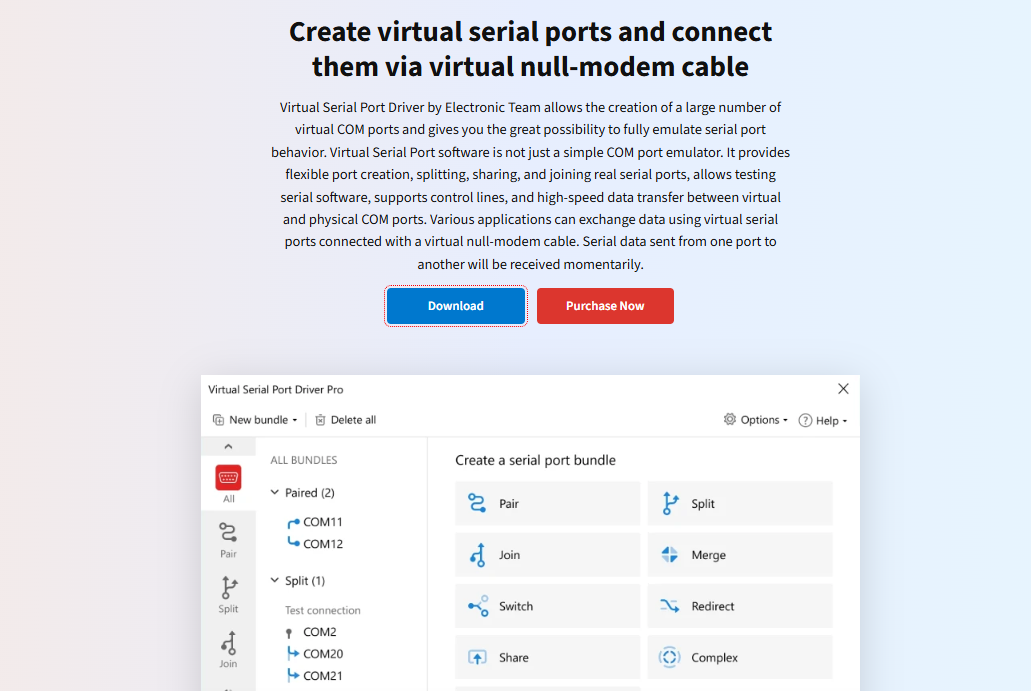
The process typically involves installing the software, then configuring the virtual ports you need. Once set up, you can link multiple virtual COM ports together to simulate serial communication between different programs, which is especially helpful for testing or debugging without needing physical devices. It’s a straightforward way to emulate serial ports for software development or troubleshooting.
If your main goal is to emulate COM ports on Windows 10 for testing, welcome to the club of modern folks held hostage by vintage serial tech. So, yeah, not only is there NOT a built-in way to do this on Win10 (Microsoft clearly never got that memo), but most folks seem to default to paid third-party tools or semi-abandoned open source options. I saw @mikeappsreviewer swearing by their favorite virtual serial ports emulator, and while that’s solid, it’s definitely not the only game in town.
Personally? I’ve had mixed luck with a few of the classics like com0com (fiddly to install, UI feels like a blast from the Windows XP past, and Windows signed driver enforcement sometimes just laughs in your face). If you’re not afraid of a little command-line wrangling, it can get the job done for free.
But not gonna lie, for actual stability and when my hair wasn’t long enough for more pulling, I ended up going with Virtual Serial Port Driver from Eltima. It’s a bit pricey, but it’s dead simple, the interface doesn’t make my eyes bleed, and it supports all the weird use cases—baud rates, custom port names, splitting, you name it. Plus, you get decent support, which matters when legacy stuff decides to go haywire. Not an ad—just legit less time wasted.
There’s also another angle: if you really only need a “null-modem cable” type loop between two apps on the same PC, some of the cheaper (even free-ish) tools will do, but you’ll be chasing signed driver errors or jumping through hoops after Windows updates. If you’re running Win10 Enterprise on a managed system, IT might throw a tantrum about unsigned drivers too, just FYI.
So TL;DR for others who land here:
- No native COM port emulation in Windows 10.
- For professional, commercial grade stability and features, check out Virtual Serial Port Driver - fast, stable, supports all the wild stuff.
- Free options like com0com exist… with caveats. Prepare for “fun.”
- Don’t expect anything to work 100% if you’ve got super exotic requirements—always test!
Emulating virtual COM ports on Windows 10 isn’t impossible, just more painful than it should be in 2024. If you’ve got a weirder use case or some “forgotten driver” hell, say so. Maybe someone’s got that one trick MSFT doesn’t document.

If anyone tells you COM port emulation on Windows 10 is intuitive, they’re probably trolling you. There’s no native way. The OS acts like serial ports crawled under a rock and vanished in 2003—frustrating, right? I see @mikeappsreviewer and @himmelsjager already pointed out the two most common roads: third-party commercial tools (hello, Virtual Serial Port Driver and its Eltima pedigree) and the dicey, do-it-yourself open-source stuff like com0com. Both are legit, but here’s my 2 cents (toss me a nickel if I’m wrong):
For actual stress-free, point-and-click setup without praying to the driver gods after every Windows Update, Virtual Serial Port Driver is solid. I’m not shy about saying that after losing hours with unsigned drivers, cert hell, and randomly vanishing ports that made my test scripts look haunted. If you’re all about never wondering “why won’t my software see COM4… again?!” then yeah, bet on a proper paid product. Here’s a genuinely helpful link if you’re ready to skip the trial-and-error pain: explore stable virtual COM port creation options here.
But here’s the twist: Don’t completely write off the free ones, especially if you’re doing quick, low-stakes testing. Com0com works if you want a loopback. Just expect a few curses and possibly messing with Windows security settings. If your IT overlords frown on unsigned drivers, you’ve been warned.
I will mildly disagree with the Eltima lovefest though—if your use case is dead simple (just need two dummy ports talking to each other), blowing cash isn’t always necessary. But, when you hit edge cases, need splitting, or actual support, sure, spring for it.
And if you’re really masochistic, there are esoteric ways to use VMs or hardware loopbacks, but you’ll be on your own.
Short version: No built-in tool, no free lunch, but several ways to skin this virtual port cat (with varying amounts of hair-pulling). What nightmares have you survived getting legacy apps hooked up? I’d love to hear if someone’s found an even more ridiculous workaround than stacking com0com with batch scripts!
Anyone else chuckling at how Windows 10 treats serial ports like an awkward high school ex? The absence of a built-in virtual COM option in a modern OS is, honestly, facepalm-worthy—feels like we’re all playing retro engineer hide-and-seek.
Here’s the drill if you’re sick of babysitting device drivers: Virtual Serial Port Driver nails the basics out of the box. You’ll spend zero time fighting with test certificates or dancing through that “unsigned driver” hoop—just spin up, configure, and connect. IMO, the best part is it actually survives Windows Updates, so you’re not stuck rerunning the setup wizard every Patch Tuesday. Some folks get sticker shock, but factor in not having to brute-force solutions every couple months and it pays for itself in stress alone.
Downsides to Virtual Serial Port Driver? Price tag, yes. Also, it’s overkill if you literally need one loopback and don’t care about support or extra features. That’s where things like com0com might tempt you—but as pointed out by others, you trade dollars for headaches: manual driver installs, possible IT scolding, compatibility roulette. Pick your poison.
I’ve also toyed with VM-based workarounds for isolating weird legacy stuff, but honestly, getting virtual ports over network layers is convoluted and usually makes things laggy (and it’s a support black hole if you try to explain it over email).
TL;DR for the late arrivals:
- Virtual Serial Port Driver pairs reliability with painless setup but dings your wallet.
- DIYers: com0com is free, cool for tinkerers, but prepare for driver drama and no safety net.
- You can listen to previous posters or even go wild using actual hardware, but in the end, only you know how many gray hairs you’re willing to get for serial “emulation.”
Has anyone else braved that one “innovative” open-source solution from GitHub that bricks Device Manager until you reboot? Thought so.