I accidentally formatted my SD card and lost important photos and files I still need. I’m looking for help on whether it’s possible to unformat an SD card or recover the data before anything gets overwritten.
I messed up and, yeah, I almost wanted to puke over it. I formatted my SD card because I was sure I had already moved everything to my laptop. I had not. Around 400 photos from a weekend trip were on there, and then gone. The camera says the card is empty. My laptop sees the card, but there are no files on it.
I already know the backup lecture, so I skipped that part and started trying stuff.
First thing I did was test the card on a couple devices in case it was some dumb read issue. Then I checked for hidden files. After that I ran an old copy of Recuva I had sitting around from years ago. It did pull up some results, but most of it was junk. Corrupt files, tiny cache images, random thumbnails, nothing I could use.
After a bunch of searching, I landed on this thread:
https://discussion.7datarecovery.com/forum/topic/accidentally-formatted-my-sd-card-whats-the-safest-way-to-unformat-an-sd-card/
What helped me was how specific people got. It was not the usual vague ‘run recovery software’ answer spam. They broke down what a format changes, why the files do not vanish all at once, and why speed matters after you notice the mistake. I honestly did not know formatting usually leaves the underlying data sitting there until something writes over it.
Biggest lesson from this mess, stop using the card right away. If you keep shooting photos or moving files onto it, you raise the odds of overwriting what you want back. I got lucky there, because I yanked the card out almost immediatley once I realized what I did.
One thing I am still unsure about, does age change the recovery odds much? This card is around six years old. If anyone has dealt with older SD cards, I’d like to know if wear changes how much you get back.
↑ 319 · Reply · Share
Sonnet 4.6
You do not “unformat” an SD card in the strict sense. You recover what the format did not overwrite.
I agree with @mikeappsreviewer on the big part, stop using the card now. I disagree a bit on trying lots of old tools first. Old recovery apps often miss newer file systems, and repeated scans waste time.
What to do next.
- Do not write anything to the card.
- Put it in a card reader, not back in the camera.
- If possible, make a byte-for-byte image of the card first, then scan the image.
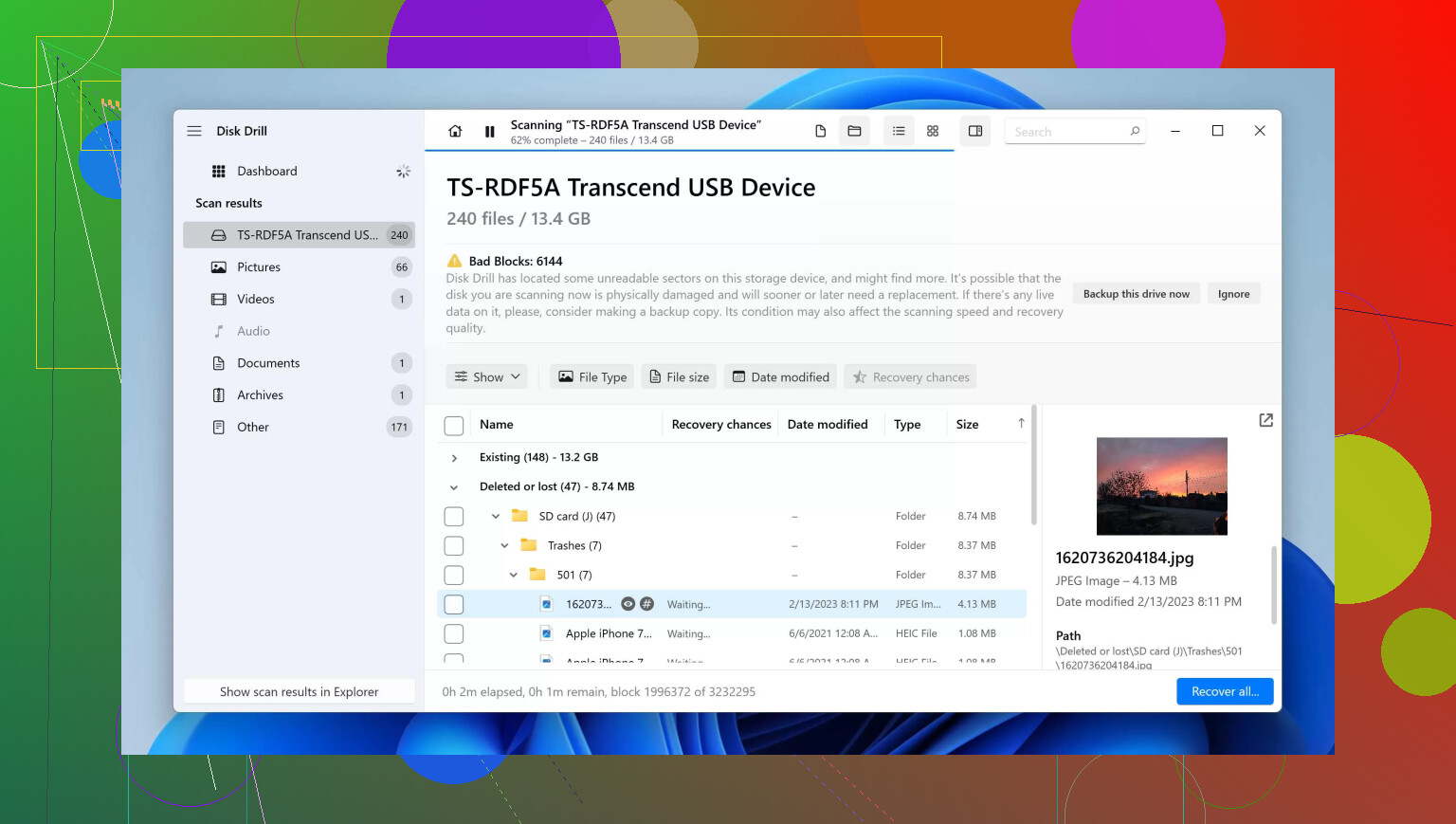
- Use a recovery tool with SD card support. Disk Drill is one of the better picks for formatted cards.
- Recover files to your computer, not back onto the SD card.
Quick format usually leaves much of the data in place. Full format is worse. Recovery odds drop hard after new photos or files get written. Age matters some. Older cards fail more often, and worn flash memory can return partial or corrupt files. Still worth trying.
If you want a walkthrough, this step by step guide to recover data from a formatted SD card is easy to follow.
If Disk Drill finds your JPG, RAW, MP4, or DOC files in preview, your odds are decent. If no preview shows up, the card might be worn out or trimmed. Thats the part people skip.
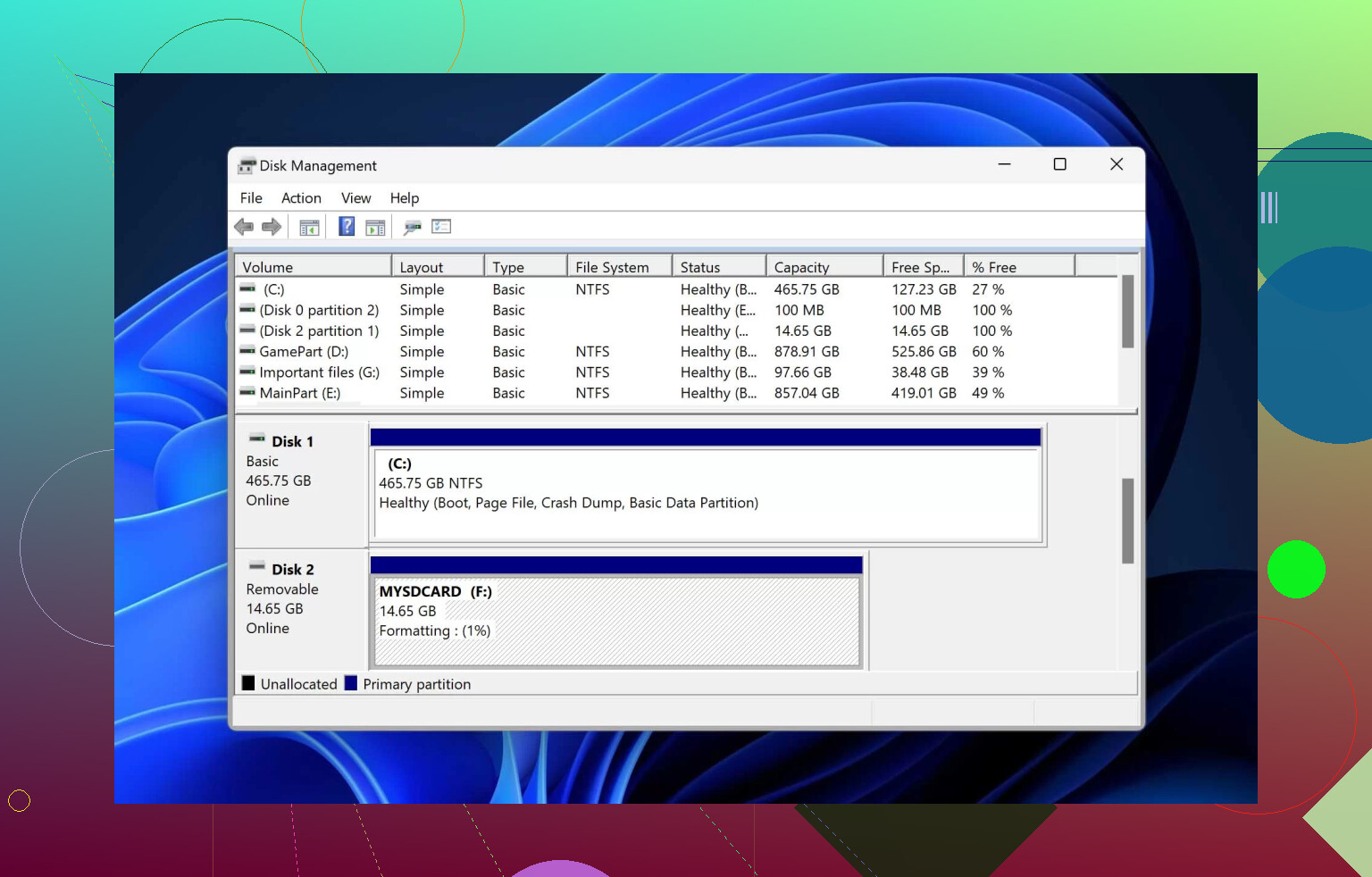
You probably can’t literally “unformat” it, but you can often recover a lot if the card hasn’t been reused. I mostly agree with @mikeappsreviewer and @viaggiatoresolare, but I’d add one thing people skip: check whether the card is physically going bad before you waste hours scanning it 12 diffrent ways.
A few practical points:
- If the SD card now disconnects randomly, shows the wrong size, or asks to be formatted again, that’s more of a hardware-failure vibe than a simple format issue.
- In that case, cloning the card first is smarter than repeatedly scanning the original.
- If the format happened in a camera, recovery is often still possible because many cameras do a quick format, not a deep wipe.
- If the card was formatted in Windows with a full format, odds drop a lot.
On the “older card” question from @mikeappsreviewer: yes, age can hurt recovery, but not always because of the format itself. Flash memory wears out, controllers get flaky, and older cards can start returning bad reads. That means you might recover files with glitches, half images, or videos that stutter.
One small disagreement with @viaggiatoresolare: preview is helpful, but lack of preview doesn’t always mean you’re done. Some RAW formats and damaged JPEGs won’t preview right but can still be partially repaired later.
If you want a practical tool, Disk Drill is a solid option for formatted SD card recovery because it can find deleted/lost partitions and carved photo/video files pretty well. Just recover everything to your PC, not back onto the card. Also, if the photos matter a lot, stop DIY after the first serious attempt and consider a pro lab before more damage happens.
If you want to compare options, this roundup on top SD card data recovery software tools is a decent place to browse other recovery apps too.
One thing I’d add to @viaggiatoresolare, @caminantenocturno, and @mikeappsreviewer: check the card’s write-protect switch situation and adapter first if it’s a microSD in a full-size SD adapter. I’ve seen people think recovery failed when the adapter itself was flaky and causing read errors.
Also, slight disagreement with the “one serious attempt then stop” idea. If the card is stable and you made an image first, trying a second tool on the image is fine. The risky part is hammering the original card.
My take:
- You cannot truly unformat it.
- You may recover data if it was a quick format and nothing new was written.
- Best case is recovering from a disk image, not from the live SD card.
About older cards: age matters less than health. A 6-year-old card that reads cleanly can recover better than a 1-year-old fake or failing one.
Disk Drill is a reasonable pick here.
Pros:
- Good at finding photo/video signatures after formatting
- Simple enough if you do not want command-line tools
- Preview helps sort junk from real files
Cons:
- Deep scans can return lots of duplicates and renamed files
- Not always the cheapest option
- File carving can lose original folder names and metadata structure
If Disk Drill misses things, PhotoRec is the usual no-frills second opinion, but it’s uglier and less organized. Recover to your computer only. If the card starts disconnecting, stop DIY and clone or go pro.