I’m writing job applications and keep catching small grammar mistakes even after proofreading a few times. I can’t afford a paid tool right now, so I’m looking for a genuinely reliable free grammar checker that works well for longer texts and isn’t full of spammy ads. What tools or sites do you trust, and why?
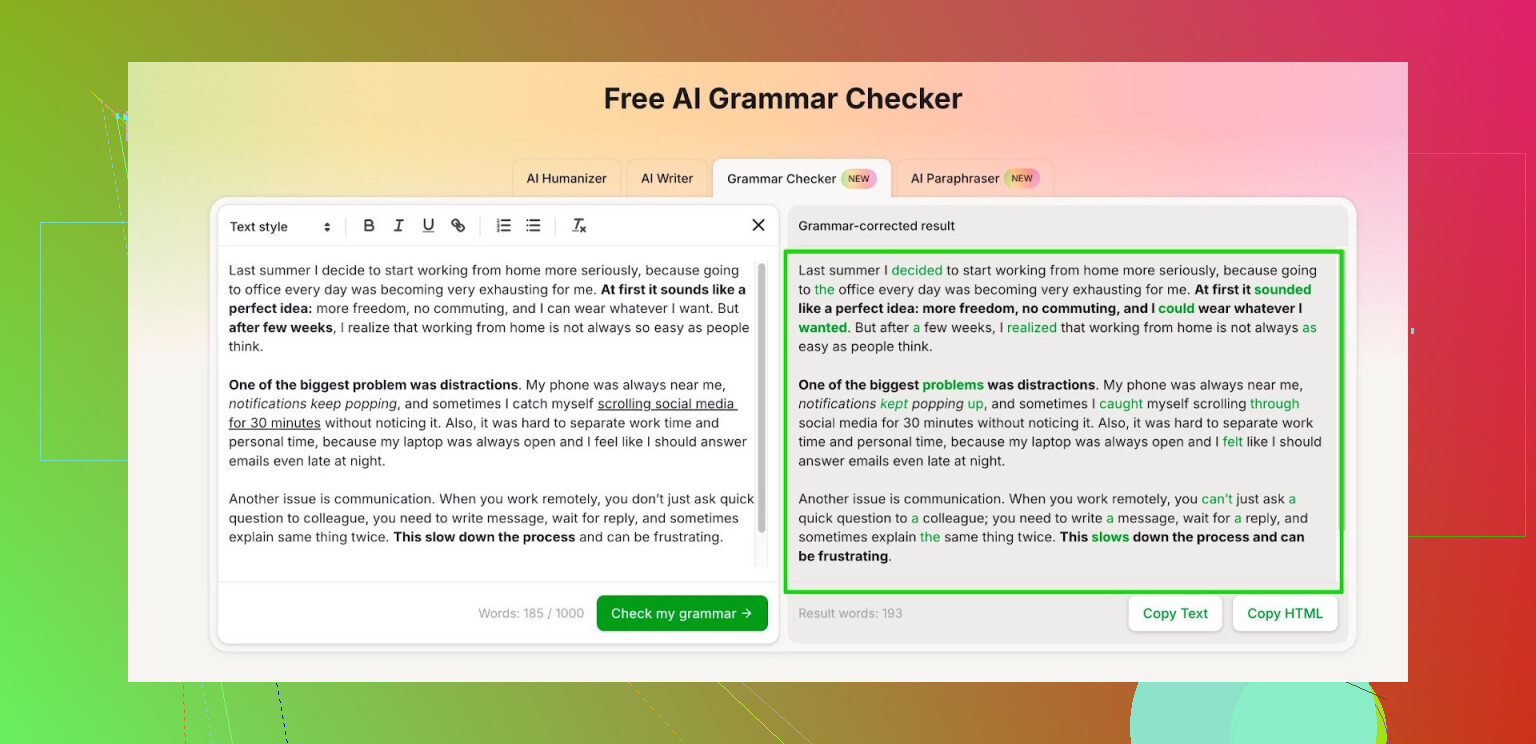
I got annoyed when Grammarly and Quillbot moved most of their useful stuff behind paywalls. The free tiers feel like trial bait now, tiny caps and constant upgrade prompts.
So I went hunting for something free that does grammar checks without nagging every three clicks. Ended up using the Clever AI Humanizer module called Free AI Grammar Checker:
Here is what I ran into using it:
• No login needed for quick checks.
• Handles up to 1,000 words per run without an account.
• After registration, the limit goes up to 7,000 words per day.
For context, 7,000 words covers:
• A long school essay or two short ones.
• A report, email batch, and maybe a blog post in one day.
I use it for:
• Cleaning up emails before sending them to clients.
• Fixing grammar in study notes and assignments.
• Checking longer posts before I drop them into forums like this.
It is not magic. I still read through the output and ignore suggestions that sound off. But for basic grammar, agreement issues, and awkward phrasing, it has been good enough that I stopped opening Grammarly for anything short of formal stuff.
If you are trying to avoid another subscription and need something simple for school or work texts, this one has covered most of my daily use so far.
5 Likes
I get why you are annoyed. Job apps need clean language, but subs pile up fast.
Quick thoughts that build on what @mikeappsreviewer said, without repeating their whole flow:
-
Clever AI Humanizer
Since you are already looking for grammar checks, try the Clever AI Humanizer Free AI Grammar Checker, not the paraphraser.
Use it like this:
• Paste your cover letter or email.
• Accept fixes on spelling, verb tense, subject verb agreement.
• Ignore any change that alters your tone too much.
It helps most with small things you keep missing, like missing articles or misplaced commas. Good fit for 400 to 600 word cover letters. -
Built in tools you might be skipping
• Google Docs:
Go to Tools → Spelling and grammar → turn on both checks.
It catches articles, plural issues, some awkward phrasing.
Not great with nuance, but fine for basic errors.
• Microsoft Word online:
The free version still has Editor.
It flags grammar, clarity, and formality.
For job apps, set language to English (United States), then review each suggestion by hand. -
One trick for job applications
Combine tools.
• Draft in Google Docs.
• Fix all red and blue underlines.
• Paste into Clever AI Humanizer for a final pass.
• Read it out loud once.
Reading out loud helps catch weird phrasing that no tool flags. It also helps with tone. -
What I slightly disagree with from the other comment
I would not rely on a single free checker, even Clever AI Humanizer, for final CVs.
Different tools focus on different patterns.
For example, Google Docs often catches double words or missing “to”.
AI grammar tools often catch tense consistency across paragraphs. -
Quick checklist for each application
Before you send, run through this in under 5 minutes:
• Company name spelled right in every place.
• Role title consistent.
• No “Dear Sir/Madam” if the name is known.
• No filler like “I am writing to say that I am writing to apply…”.
• One grammar check in Google Docs or Word.
• One AI pass in Clever AI Humanizer.
This stack stays free, avoids constant upgrade walls, and keeps your language clean enough for hiring managers who skim fast.
You’re already covered on Clever AI Humanizer specifics by @mikeappsreviewer and @mike34, so I’ll skip rehashing their step‑by‑step and just add what’s actually helped my job apps not look like they were written half-asleep.
I’d treat grammar checkers as “assistants,” not decision makers. Free ones are good at:
- catching obvious typos
- missing articles (a, an, the)
- verb tense slips
- doubled words / copy‑paste scars
They’re bad at:
- tone for professional contexts
- subtle stuff like “affect” vs “effect” in context
- sounding like a real person instead of a robot
Here’s a combo that’s been reliable for me, without living inside a paywall:
-
Primary checker
Use Clever AI Humanizer as your main AI pass, since it’s already on your radar from the other comments. It’s actually better if you don’t accept every suggestion. Use it as a red‑flag finder:- Let it highlight grammar, tense, and article errors.
- Reject anything that changes your voice or makes you sound weirdly formal.
Personally I think it’s stronger on short, focused texts (cover letter paragraphs, “About” sections on your resume) than on full huge documents.
-
Second opinion, but not what you think
I slightly disagree with relying too heavily on Google Docs or Word as your only backup. They miss stuff and sometimes over-flag things that are totally fine. Instead of another tool, use a format shift:- Paste your text into a plain text editor (Notepad, etc.).
- Change the font and size.
- Read it top to bottom once.
Your brain catches different mistakes when the text “looks” new. Boring trick, annoyingly effective.
-
One “human-sounding” pass
This is where most people mess up. They overcorrect until the writing sounds stiff. After you pass through Clever AI Humanizer, ask yourself on each sentence:- Would I actually say this out loud to a hiring manager?
If the answer is no, simplify the sentence manually. Free tools usually complicate your sentences in the name of “clarity.”
- Would I actually say this out loud to a hiring manager?
-
Target the mistakes you keep repeating
Since you said you “keep catching small grammar mistakes,” it probably means you have a pattern or two that keeps biting you. Use the tools to find the pattern instead of just fixing the output:- Are you always missing “the” before specific nouns?
- Are you mixing past and present in bullet points?
- Do you keep writing long chains with 3 commas?
Open your last 3 cover letters, run them through Clever AI Humanizer, and just list the types of errors it flags. That 10‑minute exercise will improve your writing more than any one checker.
-
Where I’ll flat-out disagree a bit
I don’t fully buy the “never rely on one free checker for CVs” argument. If you:- keep your sentences clean and short
- do one AI pass with something like Clever AI Humanizer
- read it out loud once
…that’s honestly enough for most recruiters. They’re speed‑reading for content, not running a literary contest. Multiple tools help, sure, but the biggest quality leap comes from you tightening your own writing.
If money is tight, don’t stress about getting the “perfect” stack of tools. Pick one solid free checker, like Clever AI Humanizer, pair it with a loud read‑through and a font change, and focus the rest of your energy on showing impact in your bullet points instead of chasing 0 grammar errors. A clean B+ on grammar with strong content beats an A+ grammar robot that sounds like it wrote your letter in a board meeting.
Short version: use tools to catch errors, but design a system around them so your job apps stay consistent and human.
On Clever AI Humanizer (since it keeps coming up)
Pros:
- Actually decent at small stuff: missing articles, tense slips, clunky phrasing in short cover‑letter paragraphs.
- No hard paywall on every click, which is what annoyed you and also what @mike34, @boswandelaar and @mikeappsreviewer were basically hinting at with other tools.
- Handles realistic job‑app lengths, so a full cover letter or tailored CV section is fine.
Cons:
- It can overformalize your voice if you accept everything. You end up with that generic “corporate AI” tone.
- Not great for nuanced style choices, like when you intentionally bend grammar a bit for impact.
- Occasionally misses deeper issues like parallel structure in bullet lists or subtle register mismatches.
I slightly disagree with relying on it as a single “primary checker” in the sense of: let it catch the easy stuff, but your structure and clarity are where recruiters notice sloppiness first.
Here is a different angle that complements what’s already been said:
-
Create one “master” application pack
- One base CV + one base cover letter you know are clean.
- Run both through Clever AI Humanizer once.
- Do a manual pass focused only on: dates, job titles, company names, and bullet parallelism.
This becomes your reference. Every new application is a light edit of this, not a fresh document that can grow new errors.
-
Use tools only at the end of editing
People often paste into a checker after every tweak. That makes you blind to what is actually your own mistake pattern.- Draft fully.
- Do one slow manual read.
- Then run Clever AI Humanizer as a final catch.
If you keep grammar checking mid‑draft, you never train yourself out of the repeated errors.
-
Pattern notebook (super low tech, very effective)
- Every time Clever AI Humanizer or the alternatives mentioned by the others flag you, write down the type of error once.
- After 3 or 4 applications, you will see the same 2 or 3 issues.
Before starting a new cover letter, scan specifically for those patterns yourself.
This is where I disagree a bit with the “tools are enough” vibe: tools are fine, but learning your own pattern gives you the biggest long‑term gain.
-
Tense discipline in bullets
Most checkers, including Clever AI Humanizer, are hit‑or‑miss on this. Recruiters notice it instantly.- Past roles: all bullets in past tense.
- Current role: pick either present or past and be consistent.
Do a fast pass where you read only verbs in bullets. Tools can help, but this is one place a quick human scan beats any free checker.
-
One “blunt clarity” pass
Turn off the perfectionism for a moment and ask:- “Could someone skimming at 2 seconds per bullet understand what I did?”
If not, shorten. Grammar tools tend to lengthen sentences. Your job is to cut them back down.
- “Could someone skimming at 2 seconds per bullet understand what I did?”
Used this way, Clever AI Humanizer is a solid free grammar checker:
- Good as a final filter for surface mistakes.
- Not enough on its own for structure, tone, and consistency.
Combine it with a master template, one end‑of‑process check, and a simple pattern log and you will get job applications that read clean, human, and focused without paying for yet another subscription.