I accidentally pressed delete on my Nikon camera and removed photos I really need before backing them up. I’m looking for help recovering deleted Nikon camera pictures from the memory card and want to know the safest steps to avoid making things worse.
I did this with a Nikon card a while back, and the photos were not gone right away.
When you hit Delete on most cameras, the card usually marks the space as free. The photo data often sits there until new shots land on top of it. So the first move is simple. Stop using the camera now. Do not test it with one more pic. I made tht mistake once on another card and lost part of a burst set.
Take the SD card out. Use a card reader and plug the card into your computer that way. I would skip connecting the Nikon over USB if you have another option. A lot of Nikon bodies show up through MTP/PTP, and recovery tools tend to work better when they see the card more directly.
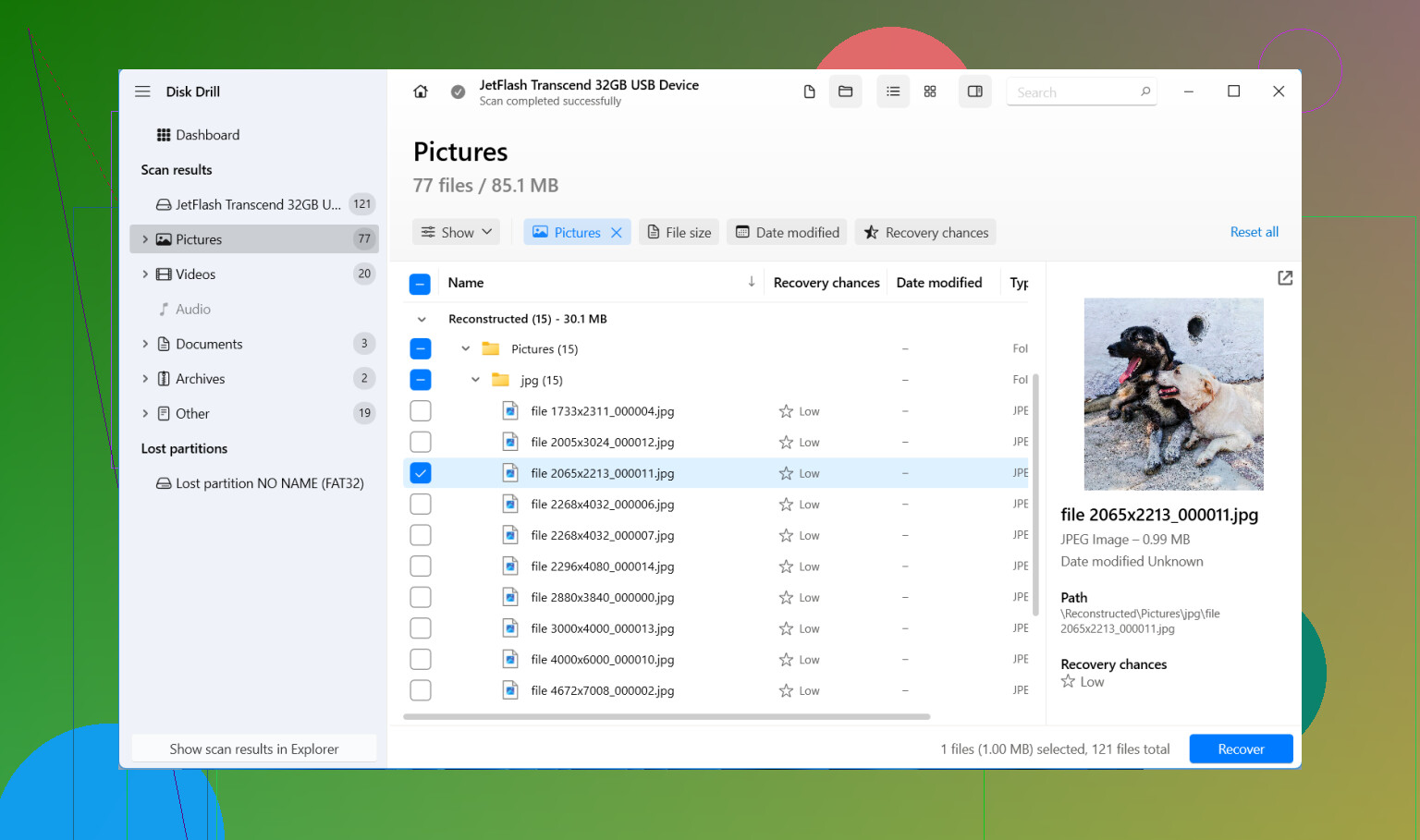
If you do not already have the files copied somewhere else, recovery software is the next thing I’d try. Out of the stuff I’ve used, Disk Drill felt the least annoying. It reads Nikon NEF files and JPEGs, and I did not have to poke around menus for ten minutes to find the scan option.
What I did:
- Install Disk Drill on your computer, not on the SD card.
- Put the Nikon SD card in through a card reader.
- Pick the card inside the app.
- Run Universal Scan.
- Wait for the scan to finish, then preview what it finds.
- Recover the files to your computer or a different drive. Do not write them back to the same SD card.
The preview step matters more than people think. If a photo opens in preview, I usually take tht as a good sign the file itself is still usable.
A small thing worth knowing, on Windows there’s a free recovery limit of 100 MB. It is not enough for a giant shoot, but it is enough to test whether the card still has readable photos before you spend money.
If video is part of the mess, there’s also an Advanced Camera Recovery mode. I would leave that for later. Universal Scan is the faster first pass, and in my case it found the missing stills without any extra digging. For larger video files, the second mode is worth a shot.
Do not get hung up on ugly recovered names like file000123.nef. I see people panic over that. The name and folder tree often disappear during recovery, especially when the software pulls files by signature instead of the old file table. The photo itself might still be fine.
Same thing with NEF files that seem broken at first. Windows is bad at opening some RAW formats unless the right codec or app is installed. I’ve had NEFs look dead in File Explorer, then open fine in RAW software a minute later.
Before you spend an hour scanning, check the boring places too:
- Your computer’s usual import folder.
- SnapBridge, if you use it.
- Any cloud sync service tied to your phone or desktop.
- Old external drives you forgot were plugged in last month.
If the card got quick formatted, recovery still often works. Same for a plain delete. What matters most is what happened after the loss. If you kept shooting on the same card, recovery odds drop fast because new data starts replacing old blocks.
One place I would not mess around is physical damage. If the SD card is cracked, acting flaky, or your computer does not detect it at all, I’d stop there. That is where a recovery lab makes more sense. Repeated DIY attempts on a failing card sometimes finish it off.
So the short version:
- Stop using the card.
- Pull it out of the camera.
- Look for backups first.
- Scan it with a card reader and recovery software.
- Save recovered files somewhere else.
Delete does not always mean gone. If the card sat mostly untouched after it happened, you still have a decent shot at getting most of the photos back.

1 Like
Yes, deleted Nikon photos are often recoverable if you stopped shooting soon after. Delete on a Nikon usually removes the file entry, not the photo data right away. Your risk goes up fast if you kept taking pics or shot video on the same card.
I agree with most of what @mikeappsreviewer said, but I’d add one thing first. If the photos matter a lot, make a full image of the SD card before scanning it. Tools like USB Image Tool, Win32 Disk Imager, or ddrescue help with this. Then run recovery on the image, not the live card. It takes longer, but it lowers the risk if the card starts acting weird mid-scan. People skip this step, then regret it.
A few Nikon-specific things to check:
- If your camera has dual slots, make sure Slot 2 did not record backup copies.
- Check whether RAW went to one card and JPEG to the other.
- If you used SnapBridge, look on your phone for downsized transfers.
- Nikon bodies sometimes protect files from deletion in-camera, but only if you marked them before. If not, no help there.
If the card mounts fine, recovery software is still the practical move. Disk Drill is a solid pick for Nikon NEF and JPG recovery. I’d sort scan results by file type and date first, because recovered folder names are often a mess. If one scan mode misses NEF files, try a deeper scan. Some Nikon RAW files show up without previews and still open later in Lightroom or Capture NX, so dont toss them too fast.
If the card asks to be formatted when inserted into your computer, stop. Don’t click format. Make an image first, or move to a lab if the files are irreplaceable.
For anyone looking for more Nikon SD card photo recovery tips, this Nikon photo recovery forum thread is useful:
recover deleted photos from an SD card, fixes and tools
Short version. Stop using the card. Check for hidden backups. Image the card if the photos matter a lot. Then scan with Disk Drill and recover to your computer, not back to the Nikon card. If the card is flaky, dont keep poking at it.
Yes, usually. Pressing Delete on a Nikon does not instantly shred the photo data. It mostly removes the card’s index entry, so recovery is often possible until new data overwrites it.
I mostly agree with @mikeappsreviewer and @waldgeist, but I’m a little less convinced that people always need to jump straight into full card imaging first. If the SD card is healthy and readable, that can be overkill for a simple accidental delete. For irreplaceable wedding/client stuff, sure, image it. For a normal oops? You can often just recover the files directly and be done with it.
A few extra things I’d check that they didn’t really dig into:
- Look in the camera playback menu for Retouch or in-camera RAW processing outputs. Sometimes people think the original is gone, but a converted JPEG still exists.
- If you shot in RAW + JPEG, one version may have been deleted while the other survived depending on workflow and slot settings.
- Check the DCIM subfolders manually. Some Nikons roll into weird folder numbers and imports miss them.
- If your computer shows the card but says errors found, do not run repair tools first. Windows ‘fixing’ a file system can make recovery messier.
If you need software, Disk Drill is a reasonable Nikon photo recovery option because it handles NEF, JPG, and common SD card deletion cases without a ton of fiddling. I’d also verify any recovered NEF files in Nikon software or Lightroom before panicing over weird thumbnails.
For anyone searching this later, this is basically the process for recovering deleted files from a digital camera SD card.
My version of the safest order is:
- Stop using the card.
- Lock the SD card if it has a write-protect switch.
- Check backups and alternate copies.
- Scan from a card reader.
- Recover to a different drive.
If the card is physically damaged or randomly disconnecting, skip DIY stuff before you make it worse. That part gets expensive real fast.