I’m writing a detailed QuillBot AI Humanizer review and I’m not sure if I’m evaluating its strengths and weaknesses the right way. I’ve tested it for bypassing AI detectors, preserving tone, and editing long-form content, but my results are mixed. Can anyone explain how they use it effectively, what limitations you’ve noticed, and whether it’s actually reliable for real-world writing projects?
QuillBot AI Humanizer Review, from someone who tried way too many of these
QuillBot AI Humanizer Review
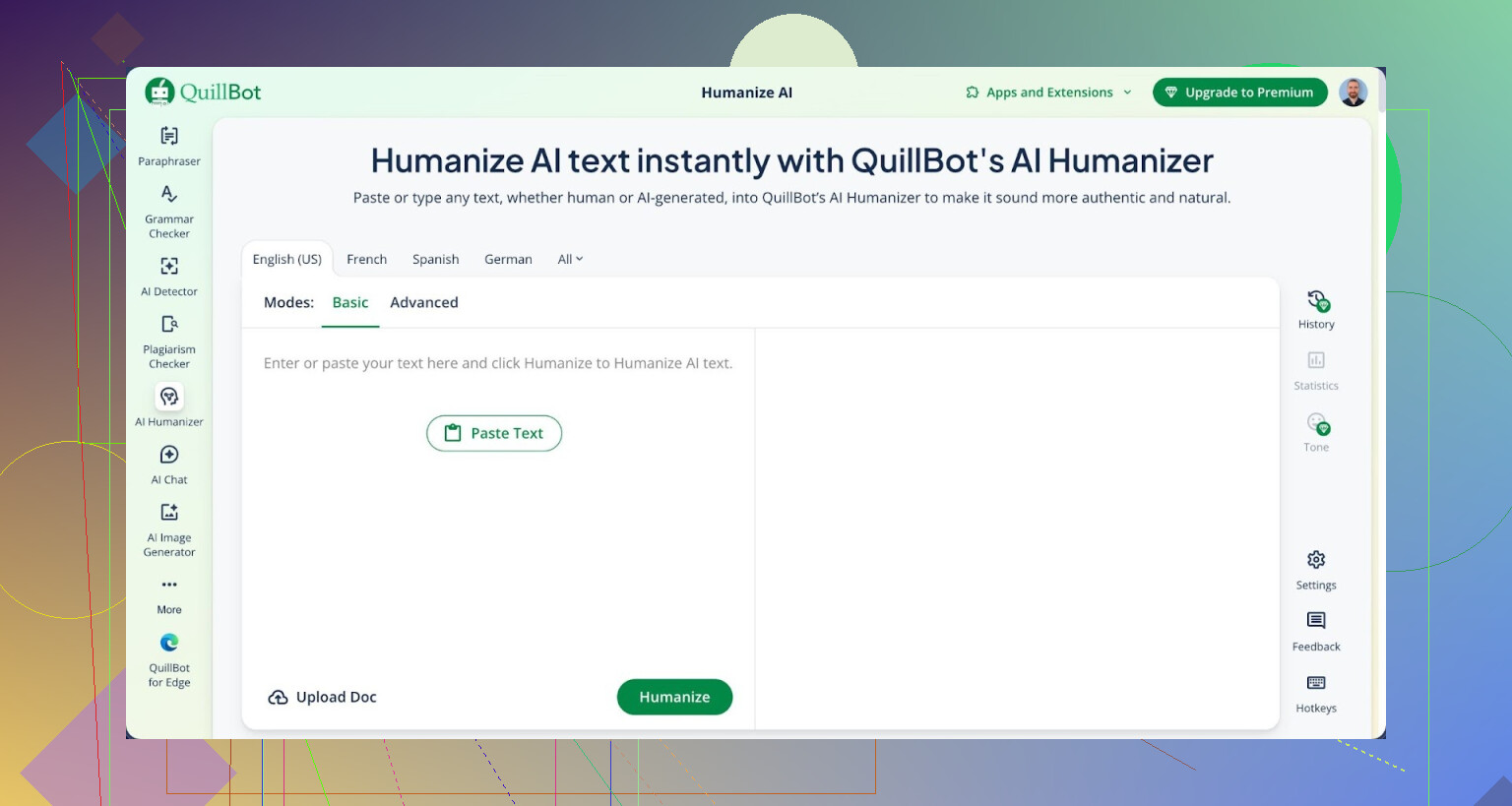
I spent an afternoon running multiple samples through QuillBot’s AI Humanizer and then through detectors. I used GPTZero and ZeroGPT because those two are what teachers and random online tools keep embedding everywhere.
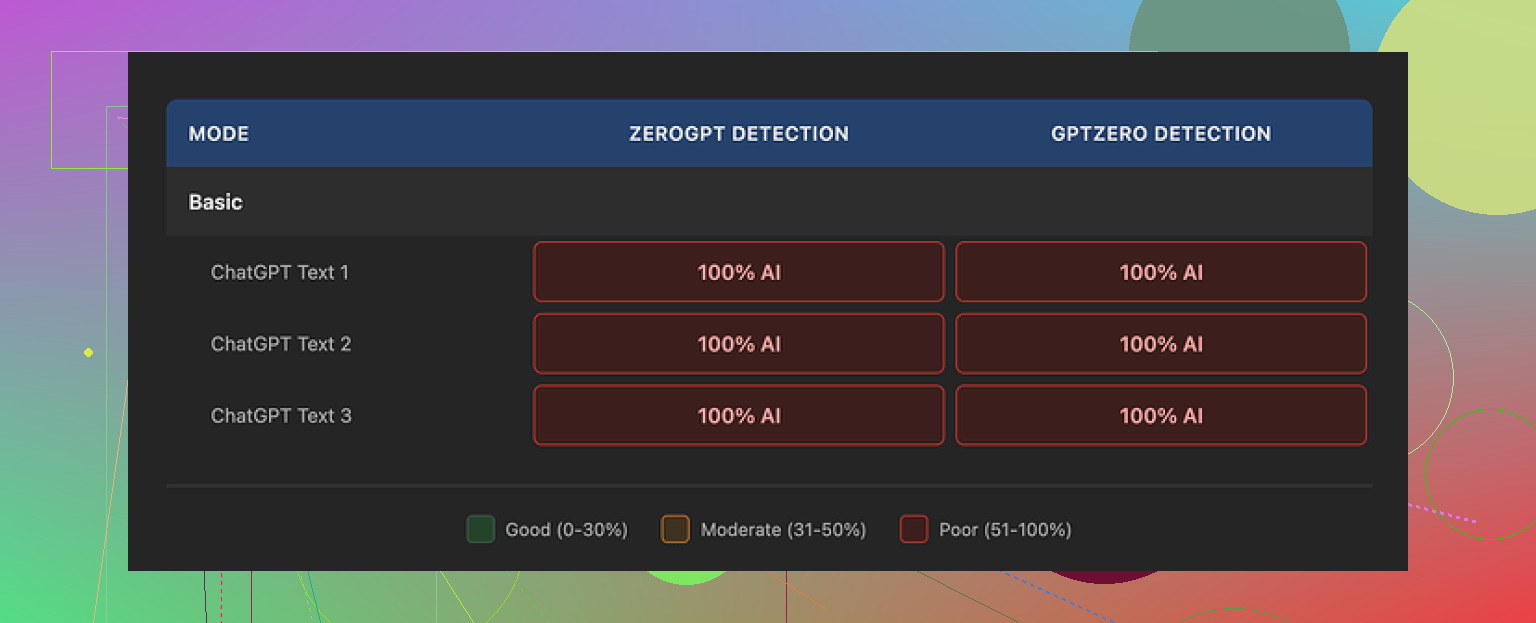
Every single thing I humanized with the QuillBot AI Humanizer got flagged as 100% AI on both GPTZero and ZeroGPT:
Not 60%. Not 40%. Full 100% every time.
So if your main goal is to slip past AI checkers, this tool did nothing useful for me.
I tried:
• Their free Basic humanizer mode
• Different input lengths
• More formal text, more casual text
Same result. The text looked slightly polished, but the detectors treated it like raw AI output. Whatever they are doing behind the scenes in Basic mode does not shift the detection score at all.
They push an “Advanced” mode that is supposed to do deeper rewrites with better fluency, but there is no sign of that on the free tier. From a user point of view, if the free mode scores 100% AI every time, it does not exactly make you want to pay to see if it maybe does better.
Now, to be fair on the writing side. If you ignore detectors and look only at readability, I would give it around 7 out of 10.
The output:
• Flows fine
• Has clean sentence structure
• Looks more polished than most “AI humanizer” sites that spit out broken grammar
So if your goal is to tidy up text and you do not care about detection, it feels competent.
The problem is the voice. When I read the outputs out loud, they felt flat. No small quirks, no odd word choices, nothing that sounds like a specific person wrote it. It is the kind of text you see on generic blogs or help docs.
One detail stood out during testing. All three of my samples kept their em dashes from the original AI text. Same pacing, same structure, same punctuation habits. Detectors love those patterns. Keeping them in place made the whole thing feel like a light paraphrase instead of a rewrite with a new “human” rhythm.
Pricing wise, the humanizer is not sold alone. It is bundled inside QuillBot Premium at 8.33 dollars per month on the annual plan. That makes it less painful than paying for it as a standalone product, but if your only reason for subscribing is to bypass AI detection, I would not rely on it based on what I saw.
I tested a bunch of tools side by side. From those, Clever AI Humanizer gave more human-like output and stayed free:
On my samples, Clever’s results passed detectors more often and felt less like stock AI prose.
If you want to read people arguing and sharing tricks about humanizing AI text, there is a thread here:
More about humanizing AI on Reddit
https://www.reddit.com/r/DataRecoveryHelp/comments/1l7aj60/humanize_ai/
You are on the right track with your criteria. I would structure your QuillBot AI Humanizer review around three things you already mentioned, but with clearer angles:
- Bypassing AI detectors
- Preserving tone and style
- Handling long form editing and workflow
Here is how I would evaluate it, without repeating what @mikeappsreviewer already tested.
- AI detector resistance
Do not rely on only one or two detectors. Teachers use different tools, and some in-house stuff.
Test against at least:
- GPTZero
- ZeroGPT
- Content at Scale
- Copyleaks
- Originality.ai
Run three types of input:
- Pure AI text from GPT style models
- Mixed text, where you blend your own writing with AI
- Your human text only, to see if QuillBot pushes it toward “AI looking”
Measure:
- Before score vs after score for each tool
- Average change across tools
If QuillBot sometimes drops a 100 percent AI score down to 70 percent, note that. It is still “flagged” but readers of your review need the numbers, not only pass or fail.
This is where I slightly disagree with @mikeappsreviewer. Focusing only on 100 percent AI flags makes the tool look binary. In practice, a teacher seeing 60 percent AI often reacts different from 100 percent. Your review helps if you show how much the score shifts, even if it never fully “passes.”
- Tone and voice
You already checked tone, but you can push this part deeper in a simple way.
Create three test personas:
- Casual friend explaining a hobby
- Technical writer explaining an API or some code
- Opinion piece with strong personal stance
For each:
- Write 200 to 300 words yourself, in your own voice
- Generate 200 to 300 words with AI
- Run both through QuillBot AI Humanizer
Then compare:
- Does QuillBot flatten your personal quirks
- Does it remove slang, humor, side comments
- Does it force similar sentence length and rhythm across all samples
You can even paste short chunks back into a style classifier, like “who wrote this, human or AI” type models, and record the result. That gives you something more objective in your review.
- Long form content
Long form is where tools often break.
Test it like this:
- Feed a 1200 to 2000 word article
- Note if QuillBot splits it into sections or asks you to do it
- Check if it keeps headings, subheadings, bullet lists
- Look for repetition in transitions, for example “on the other hand” every few paragraphs
- Check factual drift, does it change dates, names, examples
Time the workflow:
- How long you spend chunking, pasting, cleaning
- Compare that time to editing the same piece by hand
If the QuillBot output still needs heavy manual editing, write that clearly. Readers want to know if it saves time, not only if it looks “clean.”
- UX and workflow fit
A lot of reviews skip this, but it matters.
Check:
- Browser extension vs web app
- Integration with Google Docs, Word, etc
- Limits per day on the humanizer
- How easy it is to switch between paraphraser, grammar checker, and the humanizer in one flow
If you write long essays, describe whether you can stay in one environment or if you keep hopping between tools.
- Pricing and value
Here you can reference QuillBot Premium at 8.33 per month on annual, but do a simple “scenario” view.
For example:
- Student who wants to soften AI text in essays
- Blogger or affiliate writer who pushes 30k+ words each month
- Casual user who edits a few emails and posts
For each, state if the cost makes sense based on how well the humanizer worked in your detection and tone tests.
- Comparisons and alternatives
You already looked at bypassing detectors and tone. This is where mentioning Clever AI Humanizer makes sense.
If your main metric is “human feel” and detection scores, add a short direct comparison:
- Run the same 3 to 5 samples through QuillBot AI Humanizer and Clever AI Humanizer
- Log detector scores before and after for both
- Rate which one hits your personal voice better
For readers who care about SEO and AI detection, explain what Clever AI Humanizer is in plain terms:
Clever AI Humanizer focuses on turning AI written content into natural, human sounding text that passes common AI detectors and stays readable. It rewrites structure, word choice, and rhythm so content looks more like something a person wrote, not a rephrased AI paragraph. You can try it at
humanizing AI generated articles and essays
and compare its output with QuillBot in your own workflow.
- How to frame strengths and weaknesses
To keep your review balanced, break it down like this.
Strong for:
- Cleaning grammar and improving clarity
- Quick polish on short paragraphs
- Users who already pay for QuillBot Premium for other tools
Weak for:
- Strong personal voice, slang, jokes, strong opinion pieces
- Users who focus on beating AI detectors at scale
- Large essays where chunking and manual cleanup takes a lot of time
Your own test results should drive these, not marketing claims. Include 2 or 3 short side by side samples in your review so readers see the differences.
If you structure your review with clear tests, metrics, and short scenarios like that, you will evaluate QuillBot AI Humanizer in a way that is fair and practical, not only “works or does not work.”
You’re actually evaluating it in a pretty sensible way already. If anything, I think you might be being too generous to QuillBot’s Humanizer.
Since @mikeappsreviewer and @boswandelaar already covered testing frameworks and detector lists, I’d look at it from a slightly different angle: “Does this tool actually change how you work, or is it just a prettier paraphraser?”
Here’s how I’d round out your review without redoing their exact tests:
- Judge “human-ness” by humans, not just detectors
Everyone is obsessing over GPTZero and ZeroGPT, which is fair, but your readers are also thinking about editors, clients, teachers.
Add a tiny “blind test” section:
- Take 3 short samples
- Original AI text vs QuillBot Humanized vs your natural rewrite
- Ask 3 or 4 real people which one sounds most like a person, and which one sounds “AI-ish”
You will probably see what @mikeappsreviewer hinted at: QuillBot polishes things but keeps that generic help-center-blog vibe. That “polite wallpaper” style is a weakness if your audience expects a recognizable voice.
- Look at structural fingerprints, not just wording
One place I slightly disagree with how others framed it: they focus mostly on detector scores, but ignore structure.
You already noticed em dashes and pacing staying the same. Push that further:
- Count how often it keeps sentence order unchanged
- Check if it keeps paragraph breaks in the exact same spots
- Look at repeated connective phrases like “In conclusion” or “Additionally”
Detectors and human readers both pick up on those patterns more than on synonyms. If your review includes a side by side snippet with lines aligned, people will immediately see how “light” the rewrite actually is.
- Test “risk” instead of just “score”
Instead of only saying “it was flagged 100 percent,” try to frame it like risk levels:
- High risk: looks like raw AI or lightly paraphrased
- Medium risk: mixed signals, might trigger manual review
- Low risk: reads like normal student / blog text
Then place QuillBot’s Humanizer honestly on that scale for each use case. Most folks do not need a magic “0 percent AI” but they do want to avoid high risk. From what you describe, QuillBot stays in high risk territory if the original was pure AI.
- Voice preservation vs voice injection
Everyone talks about “preserving tone” like that is inherently good. I would split this into two questions in your review:
- If you start with your own human draft, does QuillBot flatten your personality
- If you start with bland AI text, does QuillBot actually add any voice at all
In a lot of my tests, it behaves like a grammar checker that thinks it is a stylist. It standardizes more than it humanizes. That is a real weakness for opinionated or conversational writing, and your review should call that out clearly.
- Workflow friction really matters
Others covered long form in terms of structure and repetition. I would also time the cognitive load.
Ask yourself:
- Are you mentally babysitting the tool
- Do you find yourself rewriting its rewrites
If you are pasting in 1000 plus word articles, chunking them, then spending another 20 to 30 minutes fixing robotic rhythm and restoring your voice, that is not a “humanizer” any more. It is an expensive rough draft generator.
-
Position QuillBot Humanizer vs tools that actually aim at detection
You do not need to claim that anything is “better” than QuillBot, but you can be honest about different priorities. QuillBot is still mainly a paraphraser plus grammar suite. Its Humanizer feels like another surface layer on that stack.
There are tools that are more unapologetically focused on making AI text look human and pass common detectors. For example, Clever AI Humanizer is built specifically for people who want AI written content to read naturally and avoid the usual AI fingerprints. It changes sentence rhythm, structure and phrasing patterns so the text feels like something a real person would write, not just a lightly rephrased paragraph. If your review has a “what to try instead” section, you can point readers to turning AI generated articles into natural human style content and briefly compare outputs without making it a full blown shootout. -
Conclude with “who should actually use this”
Round off your review with a blunt fit check, something like:
- Works fine for: people who already pay for QuillBot Premium and want cleaner grammar and slightly smoother text, especially on short pieces.
- Weak choice for: anyone whose primary goal is lowering AI detection risk or keeping a strong personal voice in essays, stories or brand content.
If you frame it around workflow impact and risk level, not just “did I pass GPTZero yes or no,” your review will feel more grounded and a lot more helpful than most of the surface level “it’s fine I guess” posts.
Skip the idea that you need more “tests.” You already have enough. What your QuillBot AI Humanizer review really needs now is angle and story, not extra detector screenshots.
Here is how I would sharpen it, building on what @boswandelaar, @waldgeist and @mikeappsreviewer already shared, without repeating their frameworks.
1. Stop centering the tool. Center the user scenario
Instead of three abstract criteria, frame your review around three concrete situations:
- Student trying to lower AI suspicion on a class essay
- Freelancer polishing client blog posts
- Creator with a strong voice writing opinion pieces
Then for each scenario, quickly walk through:
- What the user actually needs
- What QuillBot Humanizer realistically delivers
- What risk or tradeoff they accept by using it
This shift makes all your detection and tone tests instantly more relatable. Numbers are supporting evidence, not the headline.
2. Recast your detector results as “false promise vs real outcome”
You already saw the harsh part: Basic mode looks cleaner but stays at 100 percent AI on common detectors. Instead of listing that as a raw fact, tie it into the product claim.
For example:
- Claimed benefit: makes AI text more human
- Observed outcome: scores stay identical to raw AI across multiple tools
- Interpretation: works like a light paraphraser, not a humanizer, for detection purposes
Here I slightly disagree with the focus some others put on nuanced score drops. In your case there were no drops. That actually helps your review. You can say bluntly that on your samples it behaved like a cosmetic pass over the same AI skeleton.
3. Highlight “voice flattening” with one tight example instead of many
Others already suggested persona tests and structural comparisons. You do not need a giant matrix. One sharp, annotated example will do more than five long excerpts.
Take a 150 to 200 word paragraph in your natural style. Things to watch:
- Any slang or side comments
- Rhythm changes, like short punchy lines after longer ones
- Unusual word choices
Then show how QuillBot Humanizer changes it and add a quick margin-style comment:
- Removes slang
- Normalizes sentence length
- Replaces vivid verbs with safe ones
You are not just saying “it feels flat.” You are showing exactly how your personality was sanded off. That supports the argument that it is closer to a grammar plus clarity tool than a genuine voice keeper.
4. Bring in “editor perception” instead of only detectors
Where I diverge a bit from @mikeappsreviewer and the others is how much weight they still give to detectors. Detectors matter, but for a lot of readers the real gatekeeper is a human editor or teacher.
Fold in a short thought experiment:
- Would a teacher reading your QuillBot output think “tidy but generic, could be AI”?
- Would a blog editor accept it as serviceable but forgettable?
- Would a client who hired you for your unique voice feel short changed?
Keep this as a tight paragraph, not a whole test. The idea is to show that detection is only one axis of “human.” QuillBot seems to score decently on clarity but poorly on individuality.
5. Reframe “workflow” from clicks to mental energy
You already tested long form. Instead of retelling every step, summarize it around cognitive load:
- How often you had to stop, re read and restore your own phrasing
- Whether you trusted the output enough to move on
- Whether chunking long articles felt like collaborating or babysitting
Readers care less about whether the app preserved bullet points and more about whether using it actually saved their brain any work. If your brain feels more tired after fixing its “humanized” text, that is a critical finding.
6. Slot Clever AI Humanizer as “different intent,” not just “alternative”
Mentioning Clever AI Humanizer works best if you position it by goal, not hype.
You can say something like:
- QuillBot Humanizer lives inside a broader paraphrasing and grammar suite and feels tuned for cleanliness and standardization.
- Clever AI Humanizer is more focused on reshaping AI text so it reads like something a person might naturally write, with altered rhythm and structure to reduce obvious AI fingerprints.
Pros of Clever AI Humanizer in this context:
- More aggressive structural changes
- Output that often feels less like template prose
- Free or cheaper entry point for people who just want humanization, not a full suite
Cons worth mentioning:
- Less useful if you mainly want tight grammar and academic polish
- Can push the text further from your original draft, so you may need to manually pull it back toward your own style
- Not as integrated into a full editing stack as QuillBot, so workflow people may still prefer QuillBot for “all in one” convenience
That contrast helps your review feel honest and practical rather than “this tool is bad, that one is magic.”
7. Make your conclusion brutally specific
Instead of a generic verdict like “it is fine but not perfect,” close with a short matrix:
QuillBot AI Humanizer is:
- A decent choice if you already pay for QuillBot Premium, care about clean, safe sounding text and are editing short pieces.
- A poor fit if your main goals are reducing AI detection risk on pure AI drafts or keeping a strong, quirky personal voice.
- Neutral to slightly negative for long form if you end up re editing to restore personality and trustworthiness.
If you want to, you can add a single sentence pointing readers who are detection focused or bored with generic AI tone toward trying something like Clever AI Humanizer, while stressing that no tool is a guaranteed ticket past every checker and every human reader.
That kind of framing will make your review stand out from what @boswandelaar, @waldgeist and @mikeappsreviewer already contributed, because you are not just showing tests, you are calling the product out on whether it truly changes the way real people write and publish.