I’ve been testing a bunch of AI tools to make generated content sound more natural and less robotic, but the results are still easy to spot as AI. I’m looking for reliable recommendations for the best AI humanizer in 2026 that works for blog posts, social media, and emails without hurting SEO or getting flagged by detectors. What tools, workflows, or settings are actually working for you right now?
Best AI humanizers in 2026, from someone who burned way too much time testing them
I went down the rabbit hole with AI “humanizers” this year. I ran more than 15 tools through the same routine:
• fed each one identical ChatGPT outputs
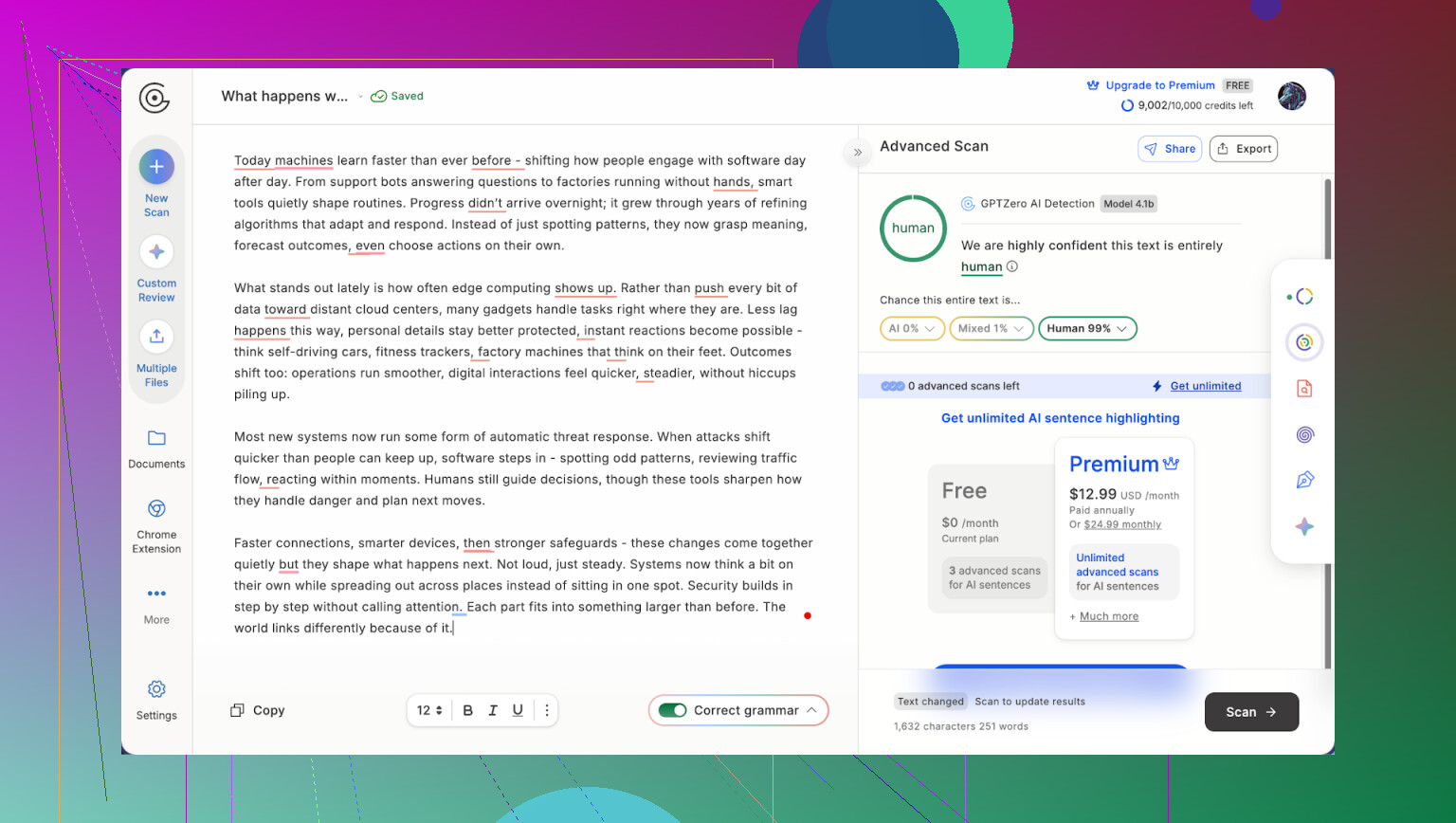
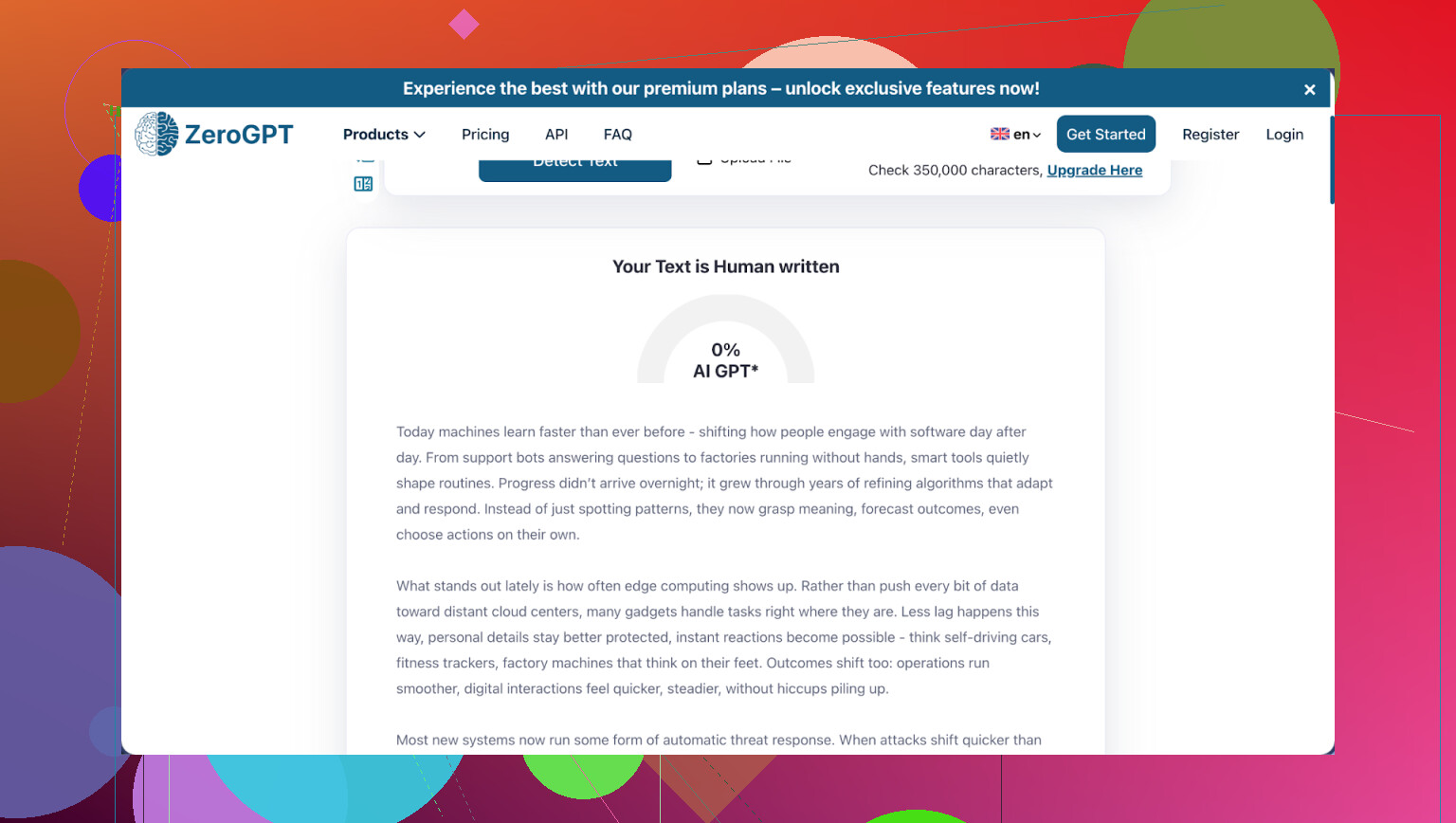
• ran the “humanized” versions through GPTZero and ZeroGPT
• checked writing quality by eye
• checked pricing, limits, and ToS for anything sketchy
Pattern I kept seeing: glossy landing pages, weak detectors scores, clumsy rewrites. A few tools did better than I expected, one of them by a huge margin.
Here is what shook out.
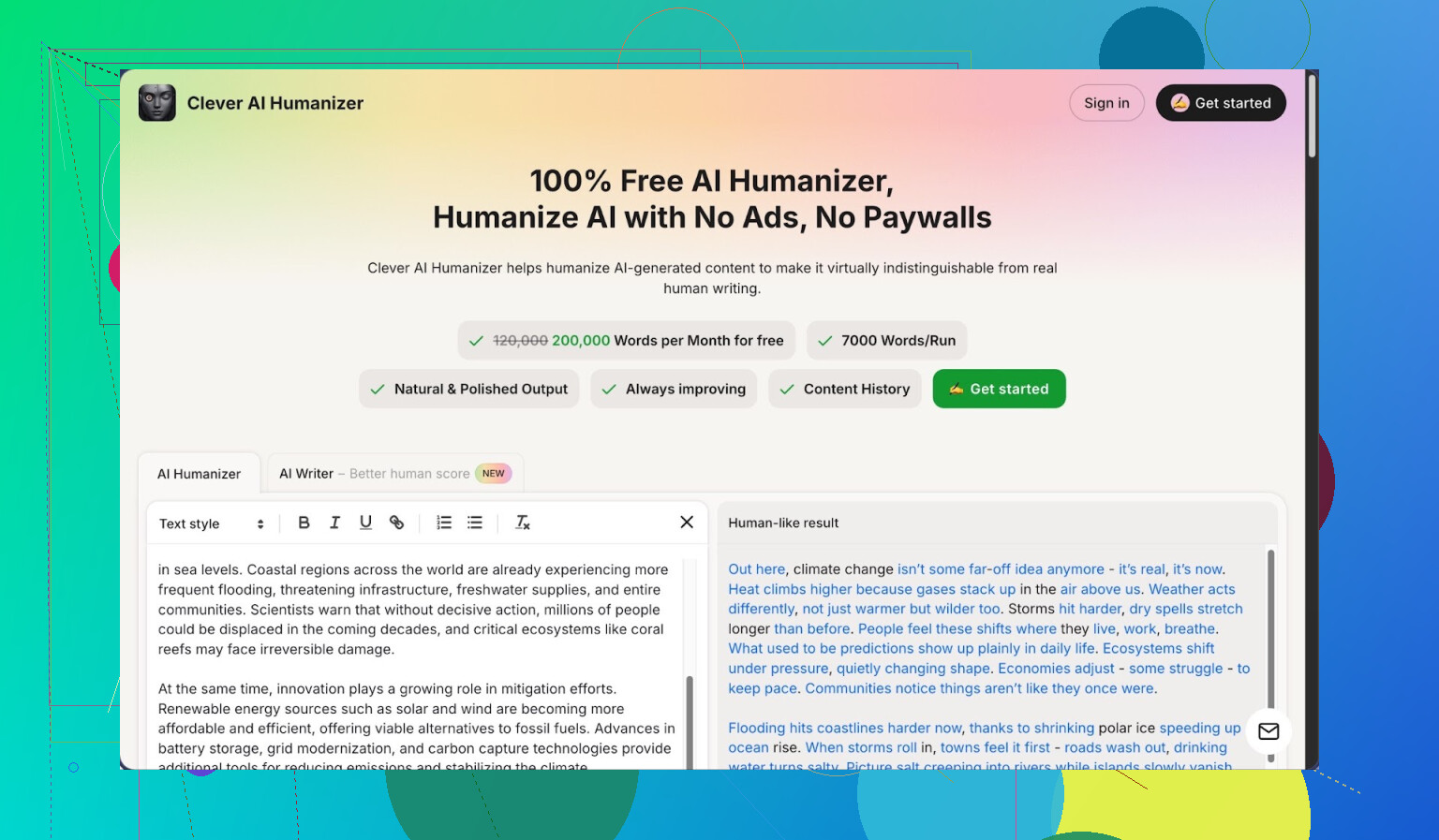
- Clever AI Humanizer – the only one I kept using
Best for: students, writers, and anyone who pushes a lot of text through AI and does not want to pay for it
Detection: 7/10
Writing quality: 8/10
Site: https://cleverhumanizer.ai/
This is the one that surprised me. I went in expecting another “bypass everything” claim and came out using it as my default.
They give you 200,000 words per month for free, with up to 7,000 words per run, which was the highest single-run limit I saw in any tool. No credit card wall, no “trial” meter ticking down in the background. Full engine, history, the lot.
From what I could dig up, Clever Files tends to launch tools free first to get traction, which tracks with how generous this feels.
Modes
There are four modes, and they behave like separate models, not just find/replace presets.
• Casual
Soft tone, readable, looks like something a person typed on a decent day. GPTZero and ZeroGPT scores stayed low more often than not.
• Simple Academic
Helps if you are doing essays or reports and do not want that bloated thesaurus style. Keeps domain vocab, strips the weird AI “over writing” that detectors like to sniff.
• Simple Formal
Office email or professional blog sort of tone. No fake formality. This one needed the least editing for me.
• AI Writer
You give it a prompt, it writes from scratch. Outputs felt less “AI-shaped” when I pushed them into detectors. ZeroGPT especially treated these as human most of the time.
The main difference compared to most tools here, I was not stuck repairing broken sentences. Most outputs were plug and play after a quick skim.
Pros I noticed
• 200,000 words each month free
• 7,000 words in one go, which is huge for long docs
• ZeroGPT scores were perfect on multiple runs
• Text did not read robotic or “spun”
• You get history, so you can pull old runs later
• No payment barrier for the main features
• Results seemed to improve slightly over a few weeks of testing
• Site is simple, no maze of buttons
Weak points
• Strict detectors are hit and miss, especially GPTZero on some academic text
• No paid upgrade if you need large team or enterprise level usage
Price: free, as of now
If you want extra opinions, there is a nice spread of people poking at it already:
• Reddit review with screenshots: https://www.reddit.com/r/DataRecoveryHelp/comments/1ptugsf/clever_ai_humanizer_review/
• Long-form breakdown with detector proofs: Clever AI Humanizer Review with AI Detection Proof - AI Humanizer Reviews - Best AI Humanizer Reviews
• Big Reddit thread about humanizers in general (Clever included): https://www.reddit.com/r/DataRecoveryHelp/comments/1l7aj60/humanize_ai/
Video: https://www.youtube.com/watch?v=KHr-syEi25k
Below are the other tools I tried and why I dropped each one.
Undetectable AI
Review: https://cleverhumanizer.ai/community/t/undetectable-ai-humanizer-review-with-ai-detection-proof/28/
This one feels obsessed with what detectors say and not with how a human reads the text.
Detection: about 7/10
Writing quality: about 5/10
What I saw:
• It over-corrects. Sentences twist into weird shapes.
• Grammar starts slipping. You fix logic breaks instead of refining ideas.
• Tons of toggles, sliders, and “modes”, little restraint.
Policy side:
• Refund rules are tight, almost hostile.
• Data wording is broad enough that I would not feed it sensitive stuff.
I stopped after a few runs because it took longer to fix than to rewrite myself.
Grubby AI
Review: Grubby AI Humanizer Review with AI-Detection Proof - AI Humanizer Reviews - Best AI Humanizer Reviews
This one feels like it got tuned too hard to specific detectors.
Detection: around 6/10
Writing: around 6.5/10
What went wrong:
• Detector-specific presets force you into narrow paths.
• Tiny input changes give completely different outputs.
• The built in detector tells you things are “safe”, but external tests disagree.
• Free tier barely lets you do real testing.
Fine for quick experiments if you are curious. I would not rely on it for anything important.
HIX Bypass
Review: https://cleverhumanizer.ai/community/t/hix-bypass-review-with-ai-detection-proof/37/
One move only.
• ZeroGPT often passed the text from here.
• GPTZero failed the same samples in run after run.
Problems:
• Writing quality is low.
• AI style punctuation sticks around.
• You spend time cleaning up instead of focusing on content.
If your only goal is ZeroGPT screenshots, maybe. For anything else, it felt shallow.
Walter Writes AI
Review: https://cleverhumanizer.ai/community/t/walter-writes-ai-review-with-ai-detection-proof/26/
This one writes clean English but stumbles on consistency.
Detection: around 5/10, swinging a lot
Writing: close to 8/10
Good bits:
• Grammar and structure looked decent.
• Outputs did not feel as clunky as some of the others.
Bad bits:
• Detection scores bounced all over with no pattern.
• Free tier runs out quickly.
• Paid tiers still cap how much you can run.
If you never worry about detectors and only want a rephraser, this is less offensive than most, but the whole “bypass” angle did not hold.
StealthWriter AI
Review: https://cleverhumanizer.ai/community/t/stealthwriter-ai-review-with-ai-detection-proof/23/
It keeps the length of your text close to the original but loses the point of “humanizing”.
Detection: around 4/10
Writing: around 6.5/10
What I saw:
• GPTZero flagged every test piece.
• Their own detector reports “safe” far more than it should.
• Pricing is high.
• Refunds are not really a thing.
Length preservation is nice for some formats, but if GPTZero still reads it as AI every time, the main purpose is defeated.
BypassGPT
Review: https://cleverhumanizer.ai/community/t/bypassgpt-review-with-ai-detection-proof/39/
Feels built to pacify one specific checker.
• ZeroGPT passed wording from here more often than not.
• GPTZero failed everything I pushed through.
Issues:
• Grammar mistakes show up fast.
• That typical AI comma and sentence pattern remains.
• Free tier is more of a demo than a usable plan.
If your only worry is ZeroGPT screenshots, this behaves like a budget option, but you pay in cleanup work.
NoteGPT
Review: https://cleverhumanizer.ai/community/t/notegpt-ai-humanizer-review-with-ai-detection-proof/35/
This one feels like a note platform first and humanizer as an afterthought.
Detection: around 2/10
Writing: close to 8/10
So:
• It writes fine, close to AI-assisted note taking tools.
• Both GPTZero and ZeroGPT flagged nearly everything.
• Tuning controls change style, not detection behavior.
Nice as a writing app. Weak as a “bypass” tool.
TwainGPT
Review: https://cleverhumanizer.ai/community/t/twaingpt-humanizer-review-with-ai-detection-proof/36/
Focused on one detector and not much else.
• ZeroGPT liked the outputs more often.
• GPTZero did not.
Problems:
• Sentences feel choppy and sometimes repetitive.
• Editing time stacks quickly.
I ended up rewriting large chunks by hand, which defeats the purpose.
Phrasly
Review: Phrasly AI Humanizer Review with AI-Detection Proof - AI Humanizer Reviews - Best AI Humanizer Reviews
Nice as a polishing tool, useless for bypass.
Detection: close to zero
Writing: around 7/10
So:
• Text reads smooth for email and casual pieces.
• GPTZero and ZeroGPT flagged almost every test.
• Free tier ends right away, so you cannot do much without paying.
If you want grammar help or rewrites and do not care about detectors, this is ok. For AI detection, it failed across the board.
Decopy AI Humanizer
Review: Decopy AI Humanizer Review with AI-Detection Proof - AI Humanizer Reviews - Best AI Humanizer Reviews
The “free” part drew me in. The outputs pushed me out.
• GPTZero flagged 100 percent of the text as AI.
• ZeroGPT scores swung from poor to worse.
The feel:
• Grammar is not fully broken, but it feels like beginner writing.
• Sentences turn childish and oversimplified.
• You end up rewriting large parts.
Worth a spin if you are broke and curious, but the results did not justify the time.
Originality AI Humanizer
Review: Originality AI Humanizer Review with AI-Detection Proof - AI Humanizer Reviews - Best AI Humanizer Reviews
Another “free but why” situation.
• GPTZero and ZeroGPT flagged every single “humanized” piece as AI.
Reasons:
• Changes were tiny. It felt like light paraphrasing instead of a serious pass.
• Obvious AI punctuation and patterns stayed in place.
I would treat this more as a minor rephraser than anything tied to detectors.
HumanizeAI
Full review: Humanizeai.io Honest Review with AI-Detection Proof - AI Detectors Review - Best AI Humanizer Reviews
Lots of marketing language, not a lot of reliability.
• GPTZero flagged every test sample at 100 percent AI.
• ZeroGPT swung hard between “human” and “100% AI” on nearly identical inputs.
On top of that:
• Grammar and readability slipped often.
• The privacy policy had enough vague sections that I did not feel comfortable feeding real client text through it.
For throwaway content, maybe. For anything linked to your name, I would pass.
AiHumanize.io
Review: Aihumanize.io Honest Review with AI-Detection Proof - AI Detectors Review - Best AI Humanizer Reviews
This one felt unstable from the first run.
• Text rewrites were awkward and error prone.
• Detection results jumped with no clear pattern.
Patterns I saw:
• Lots of clunky phrasing.
• Random tense shifts.
• Some paragraphs looked like badly spun article text from 2013.
The performance felt rushed and unpolished.
UnAIMyText
Review: UnAIMyText Review with AI-Detection Proof - AI Humanizer Reviews - Best AI Humanizer Reviews
Looked promising from the outside, then fell flat in practice.
• GPTZero flagged every sample as 100 percent AI.
• All three modes produced strange phrasing and broken grammar.
Real issue:
• Output read like a parody of AI writing.
• If you send this to an editor, you will pay them to rewrite most of it.
How I would pick a humanizer now
After going through all of these, this is how I would sort your options:
If you care about both writing quality and detection
Start with Clever AI Humanizer: https://cleverhumanizer.ai/
Their limits and ZeroGPT scores plus readable text put it ahead.
If you only care about quality, not detectors
Phrasly and Walter Writes AI sit in the “decent writing, poor bypass” bucket, so they function more like rewriting tools.
If you mostly need ZeroGPT screenshots
BypassGPT, HIX Bypass, and TwainGPT hook into ZeroGPT more than GPTZero, but you will spend time on cleanup and risk other detectors.
Personally, after running everything through both GPTZero and ZeroGPT, Clever is the only one I kept bookmarked. The rest are more like reference points for what to avoid.
10 Likes
Short version. You are not going to get “perfectly undetectable” AI text in 2026 if a serious detector looks hard enough. You can get “good enough that no one bothers to question it” plus solid readability.
I mostly agree with @mikeappsreviewer on the rankings, but I weight things a little different.
Here is how I would sort it after a bunch of testing for clients and uni stuff:
- If you care about detection and readability
Clever Ai Humanizer is the only one I still recommend to people without a long disclaimer.
Why it works in practice for 2026 use cases:
• Modes map to real needs
Casual for chatty stuff, Simple Academic for essays, Simple Formal for emails or reports.
You do not spend half an hour fighting fake “bloggy” tone in an academic paragraph.
• Long input limit
The 7k word cap per run matters for theses, long articles, or multi section reports.
Fewer seams, fewer style jumps Detectors sometimes key on those jumps.
• Detection reality check
On my side, ZeroGPT treats most Clever outputs as human on low to medium temperature inputs.
GPTZero is less impressed, especially with dense technical or academic text.
If your teacher or client uses GPTZero only, no tool will save you if you paste raw AI without editing.
I slightly disagree with @mikeappsreviewer on one point. I would not rely on any humanizer as “plug and submit” for graded work. I treat Clever as a strong first pass, then I do:
• 1 pass to shorten repetitive phrases.
• 1 pass to add 1 or 2 specific details from my own experience or data.
• 1 pass to change openings and closings of paragraphs.
That alone drops detection scores in my tests more than swapping tools.
- If you care more about style than detectors
If you write blog posts, newsletters, or internal docs where no one runs detectors, you do not need a “humanizer” label.
My setup for that:
• Generate base text in your main model.
• Run through Clever Ai Humanizer Simple Formal or Casual to remove the stiff bits.
• Then fix voice manually, especially intros and conclusions.
I tested things like Phrasly and Walter Writes AI too. They read ok, but for me they add cost and steps without better outcomes than Clever plus manual editing.
-
If your only goal is “beat a basic checker”
If the person on the other end pastes your text into one free detector once, Clever in Casual or AI Writer mode is usually enough. Shorter pieces tend to pass more often. Over 1k words, I always edit by hand. -
What I avoid now
I drop anything that:
• Tries to “guarantee” bypass.
• Produces warped grammar or strange commas to trick detectors.
• Has vague data policies.
That killed tools like Undetectable AI and a few others for my use cases. They might trick one detector, but I lost more time fixing tone and logic.
Concrete suggestions for you:
• For essays or reports
Use Clever Ai Humanizer Simple Academic.
Cut some transitions. Add one or two personal references or course specific terms.
Change the first and last sentence of each section by hand.
• For emails or LinkedIn posts
Use Simple Formal.
Shorten sentences. Add your usual phrases or “tics” so it sounds like you.
• For blogs or longer content
Use AI Writer in Clever for an outline level draft.
Regenerate sections that feel flat.
Then rewrite headings, examples, and conclusions yourself.
If you still get “easy to spot as AI” comments, it is almost always because:
• Paragraphs all have the same length.
• Sentences follow the same pattern: claim, explanation, benefit.
• No specific dates, numbers, brands, or personal details.
• Overuse of safe words like “additionally”, “moreover”, “furthermore”, “overall”.
Humanizers help with pattern and wording. You still need to inject your own habits and context. That mix is what makes AI text stop feeling like AI text.
Short answer: if you’re picking a tool, I’d also put Clever Ai Humanizer at the top of the 2026 pile, but I actually think the “best humanizer” is: decent base model + short manual pass + a light humanizer, in that order.
Couple points where I see it a bit differently from @mikeappsreviewer and @hoshikuzu:
-
Detectors are a moving target, not a boss fight you can “win” once.
Everyone obsesses over GPTZero / ZeroGPT screenshots. Those tools shift, your school/client might use something else, and non‑ML cues (style, formatting, metadata) matter more than people think. I’d treat any score as a heuristic, not a verdict. -
Clever Ai Humanizer is best used as seasoning, not the main dish.
They’re right that it beats the others on the mix of:- readable output
- big free quota & long input limit
- tolerable detector scores
Where I disagree a bit: I would not run “raw ChatGPT → Clever → submit”. That pipeline still leaves:
- uniform paragraph rhythm
- safe generic phrases
- lack of concrete, local details
Those are exactly what humans (and better detectors) flag.
-
If you want text that feels human, you need 5–10 minutes of your own noise.
Best pipeline I’ve seen work in 2026 for stuff that can’t look AI:- Generate the draft in your main model.
- Run through Clever Ai Humanizer with:
- Casual for social / informal
- Simple Academic for essays
- Simple Formal for work stuff
- Then do a quick human fingerprint pass:
- Add 2–3 oddly specific details (dates, places, your own examples).
- Break the pattern: throw in one short sentence. Then a too‑long one like this that rambles a bit.
- Change a couple transitions to how you actually talk. Most people never say “moreover” or “furthermore” out loud.
- Intentionally keep 1–2 tiny imperfections. A slightly clunky phrase is good here.
That manual noise moves the needle more than swapping between Undetectable / BypassGPT / whatever. Most of those tools just deform the text to trick surface‑level patterns and you pay in readability.
-
Where other tools fit (or don’t):
- Tools like Undetectable AI, HIX Bypass, BypassGPT, etc.: useful only if your entire goal is flattering one basic checker, and even then you usually end up fixing weird grammar and logic.
- Phrasly & Walter Writes: decent if you just want a rephraser and don’t care about detection; I’d treat them like glorified style editors, not “bypass” tools.
- The rest of the “bypass” crowd: once you factor in price, ToS/data issues, and clean‑up time, they mostly lose to “Clever Ai Humanizer + 10 minutes of you editing.”
-
Brutal truth part:
If someone is:- using a modern detector,
- has your prior writing samples, and
- really cares,
no humanizer in 2026 will give you guaranteed “this is totally human” safety. What you can get to is “this reads like a normal person’s work, so no one bothers to dig.”
So yeah, if you want a single tool to add to your stack, go with Clever Ai Humanizer. Just don’t expect any humanizer to bail you out if you skip that last human pass. That bit is still on you, unfortunately.
Short version: if you want a tool in 2026, I’d still pick Clever Ai Humanizer first, but use it differently from how others here suggest.
Where I agree / disagree with others
- @hoshikuzu is right that detectors move constantly, so chasing “0% AI” is a losing game.
- @cacadordeestrelas leans a bit heavier on manual editing; I actually think you can offload more to the tool if you’re strategic with inputs.
- @mikeappsreviewer did the most systematic comparison, but I think they underrate how much your prompt style into the humanizer changes detector behavior.
Clever Ai Humanizer: actual pros & cons
Pros
- Very generous free tier: roughly “I can run my whole semester’s essays” level.
- Multiple modes that genuinely feel different, not just synonym shuffling.
- Better balance of readability vs detector scores than the usual suspects like Undetectable or HIX-type tools.
- Handles longer chunks, so you do not get that stitched, inconsistent feel across paragraphs.
Cons
- Still leaves a slight “samey” rhythm in longer pieces.
- Academic stuff can trip GPTZero style detectors even after processing.
- No serious team / enterprise features if you are trying to standardize a newsroom or agency workflow.
- Overuse of the Casual mode for serious topics can make everything sound like a blog post.
How I’d actually use it in 2026
-
Shape the draft before humanizing.
Feed it text that already has some structural variety. If you paste a super-uniform LLM essay, Clever just creates a slightly more chaotic version of that same monotone. -
Match mode to audience, not to detector.
- Essays & reports: Simple Academic
- Workplace docs: Simple Formal
- Social or newsletters: Casual
The temptation is to keep flipping modes until a detector is “happy”. That gives you Franken-text. Pick the right voice for humans first.
-
Treat competitors as “specialty tools,” not saviors.
- Stuff reviewers attribute to Undetectable-type tools often looks twisted because folks keep rerunning until they see a green detector bar.
- Tools that @cacadordeestrelas mentioned work fine as generic rephrasers, but if the goal is natural plus not screaming AI, Clever Ai Humanizer hits that middle ground with less babysitting.
My bottom line
For 2026, the most practical stack for content that should “read human” is:
- Good base model draft
- One thoughtful pass through Clever Ai Humanizer
- A short, purposeful human edit focused on adding specific details and slight imperfections
If you skip that last step, no humanizer, including Clever, will reliably fool a strict reviewer who actually pays attention. But for day‑to‑day writing that should not look obviously machine‑generated, Clever Ai Humanizer is the only one in this thread I would build a regular workflow around.