I’ve been testing a bunch of AI writing tools for blog posts and social content, but most of the “free” ones either have super strict word limits, low-quality outputs, or hide the good features behind paywalls. I’m looking for a genuinely free AI text generator that’s reliable for everyday use, with solid grammar and decent creativity. What tools are you using that are actually free and worth the time, and what do you like or dislike about them?
Today you can spin up content with pretty much any large language model. Homework, emails, blog posts, whatever. That part is easy and cheap, sometimes completely free.
The real headache starts when you run that text through an AI detector and it lights up like a Christmas tree. School assignments, job applications, grant proposals, internal reports, everything gets flagged as “AI generated,” even if you only used the model as a rough draft. That’s the part that actually causes problems in real life.
I ran into this with a couple of university submissions and one work email that went through an internal checker. Since then I’ve gotten into the habit of running my drafts through a separate tool that rewrites things to look and read more like a human wrote it from scratch.
For that, I’ve been using this free tool:
https://aihumanizer.net/ai-writer
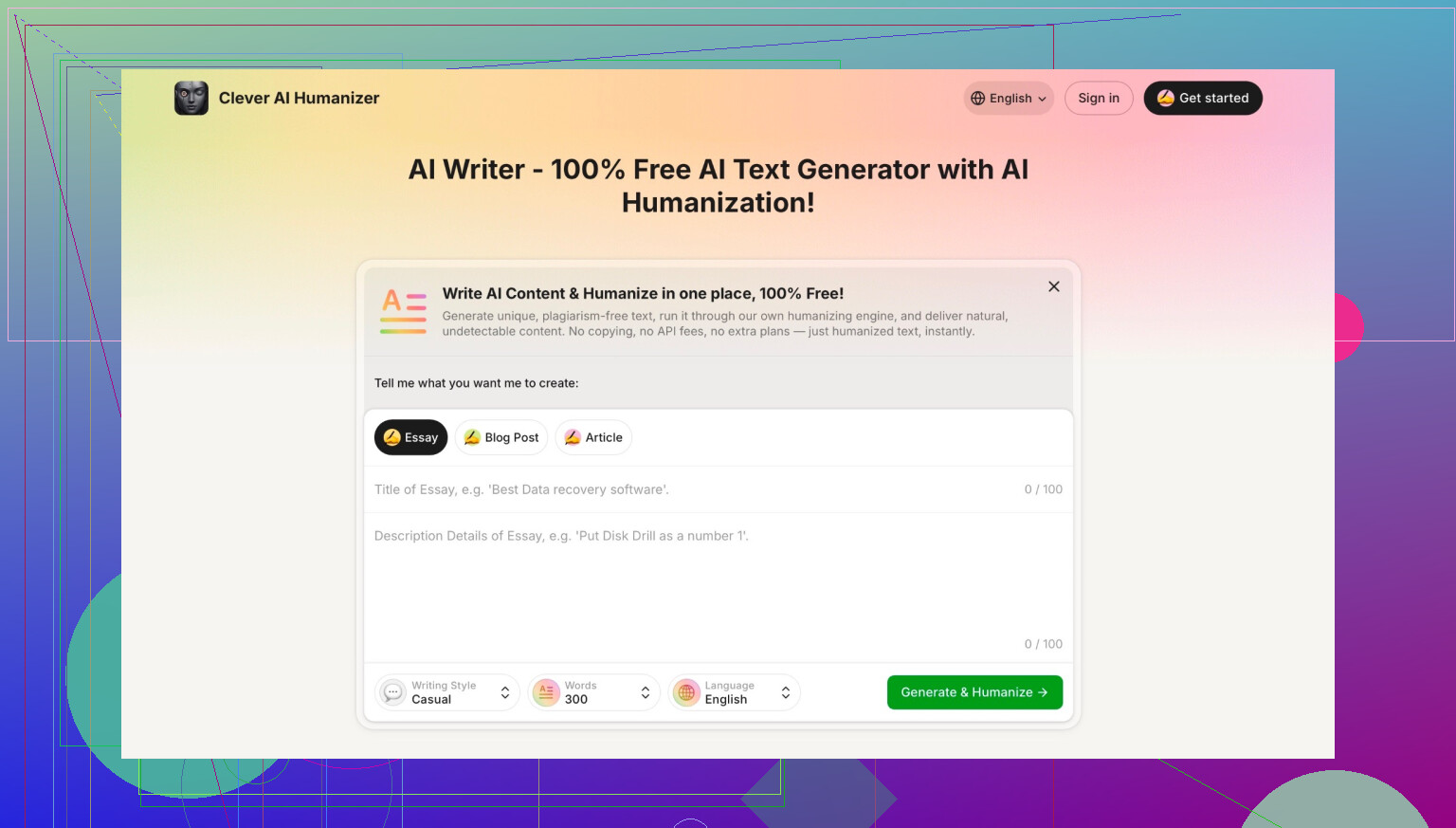
What it does on the surface is simple: you drop in AI-looking text, or just your own stiff draft, pick what you want to write (essay, email, article, etc.), and it spits out something that reads way more like an actual person. Not just “spun” with synonyms, but with different flow, phrasing, and structure. It is already humanized when it generates, so you don’t have to run it through a second step.
Couple of things I noticed messing with it:
- It handles longer pieces surprisingly well instead of collapsing into repetitive nonsense.
- The style comes out more natural and less robotic than the generic “AI essay voice” you get from many models.
- It does not hit you with paywalls or credit systems while you’re in the middle of a paragraph, which is rare these days.
One important note if you try it: there are a bunch of copycat sites using similar names and layouts that claim they are the same tool. They are not. The one I’m talking about is by CleverFiles Inc. If you care about whether you’re on the right site, scroll to the bottom and check the footer. It should clearly show it is from CleverFiles.
If you want to go down the rabbit hole about AI writing and “humanizers” in general, there is an ongoing discussion here:
https://www.reddit.com/r/DataRecoveryHelp/comments/1oqwdib/best_ai_humanizer/
People share which tools passed detectors, which ones failed hard, and how they are actually using these in school and at work.
13 Likes
Short version: there isn’t one “best” free AI text generator, but there are a few combos that actually work well without hitting you with a paywall after 3 paragraphs.
You already saw what @mikeappsreviewer mentioned about using a humanizer on top. I’d slightly disagree on relying only on that stage. For blog posts and social content, you usually want:
- a solid base generator
- something to clean / humanize it
- a quick manual edit
Here’s what’s been good in practice for truly free use, with decent quality and no insta-paywall:
-
Microsoft Copilot (web)
- Free with a Microsoft account.
- Solid for ideation, outlines, and short to mid-length posts.
- Not amazing at long, 2k+ word articles in a single go, but works if you batch sections (intro, H2s, conclusion).
-
Perplexity.ai (free tier)
- Better when your blog posts are research-heavy or need up‑to‑date info.
- I use it to get a structured outline + bullets, then rewrite/expand.
- Word limit is there, but not absurd if you build sections piece by piece.
-
Free local / open‑source models via web UIs
- Stuff like Llama 3 / Mixtral through sites that host open models for free.
- Quality is a bit more hit or miss vs top commercial models, but for social captions, hooks, and idea lists, they’re actually fine.
- No surprise token billing, which is the main win.
-
Then run the outputs through a humanizer
This is where I’m actually on the same page as @mikeappsreviewer, just with a different use case. For publishing content that doesn’t scream “AI template,” a tool like Clever AI Humanizer is worth adding into the workflow.- It’s good for taking that Copilot / Perplexity draft and turning it into something less stiff and pattern-y.
- Also helps if you repurpose one long article into more natural-feeling LinkedIn posts, tweets, etc.
- Bonus: you avoid the classic “AI essay voice” that makes blog readers bounce in 5 seconds.
So a realistic free stack looks like:
- Outline & research: Perplexity
- Draft sections: Copilot or an open model host
- Natural rewrite: Clever AI Humanizer
- Final tweak: your own touch, fixing tone, adding anecdotes, fixing the wierd bits
If you try to get it all in one single “magic free generator” you’ll keep running into the word limits and bait‑and‑switch pricing. Splitting it into these small steps is more annoying, but the quality + “actually free” part is way better.
Short version: there is no single “best” free AI text generator, but there are a few that are actually usable without smacking you in the face with a paywall every 3 prompts. And I’m gonna push back a bit on both @mikeappsreviewer and @hoshikuzu here: relying only on a humanizer or only on a base model is where people get burned.
You said: blog posts + social content, truly free, minimal limits. Here’s what’s been solid for me that they didn’t already go into in detail:
-
Google Gemini (free, web & app)
- Quality is very close to top-tier paid tools for short and mid-length stuff.
- Nice for social hooks, intros, and variations.
- Trick: instead of “write a full 2,000-word post,” ask it to draft per section: Intro, H2 #1, H2 #2, etc. That avoids the “you hit the limit, sign up now” wall.
- It’s weaker on very niche technical topics, but for general blog / lifestyle / content marketing, it’s surprisingly decent.
-
Open-source models via free hosts (NOT self-hosted)
- There are a bunch of sites hosting Llama 3, Mixtral, etc. for free. Quality is uneven, yeah, but:
- For tweet threads, IG captions, hook ideas, YouTube titles, they’re more than fine.
- They usually don’t rate-limit you as aggressively as the fancy branded tools.
- Where I disagree a bit with @hoshikuzu: open models can handle longform if you treat them like a collaborator. Give them detailed instructions, your outline, examples of your voice. Raw “write me a full blog post” from open models still reads pretty generic.
- There are a bunch of sites hosting Llama 3, Mixtral, etc. for free. Quality is uneven, yeah, but:
-
Use “prompt recycling” to dodge word limits
Most “free” tools punish long outputs. So flip the approach:- First prompt: “Give me an outline + 5 angle ideas for this topic.”
- Second: “Write just the intro in a casual, conversational tone.”
- Third: “Write a 300-word section about X that builds on this intro: [paste intro].”
You’re basically slicing the article into chunks that stay under their cap. Slightly annoying, but it keeps you out of subscription jail.
-
Where Clever AI Humanizer actually fits in
This is where I’m pretty much aligned with both of them, but I’d change the emphasis.- I would not use Clever AI Humanizer as your main generator for ideas. It’s better as the “final pass” once you already have structure and content.
- Use Gemini / Copilot / open models to puke out the rough draft. Then pipe your paragraphs into Clever AI Humanizer to kill that “AI essay voice” and smooth the flow.
- Biggest win: it tends to alter sentence rhythm and structure, not just synonyms, which helps with both detectors and actual humans who bounce when everything sounds like a LinkedIn template.
- Also decent when you’re repurposing one blog post into multiple social snippets that don’t all sound like lazy copy-paste.
Where I slightly disagree with @mikeappsreviewer: depending purely on a humanizer to “fix” blatantly robotic text is asking for trouble. If the base draft is garbage, no humanizer is going to magically turn it into a banger article. Start with a halfway decent generator, then humanize, then your own edit.
If I were in your shoes and wanted to stay 100% free right now, my stack would be:
- Ideas & angles: Gemini free or Perplexity free
- Draft per section: Gemini or an open Llama 3 host
- Natural rewrite / detector-friendliness: Clever AI Humanizer
- Final touch: your own voice, stories, little opinions that no AI can invent believably
Is it “one perfect free tool”? Nope. But that combo gives you:
- No strict hard stop after 10 prompts
- Decent quality for blogs and socials
- Text that doesn’t scream “hello I am ChatGPT variant 47”
If you must pick a single starting point: Gemini free for general content, then run the important stuff through Clever AI Humanizer and tweak by hand. That’s about as close as you’re gonna get to “best truly free” in 2025 without losing your mind or your wallet.
If you want a blunt, no-nonsense setup: you do not need “one magical free AI writer,” you need 2 tools that each do one thing well.
1. Free generator for the heavy lifting
Instead of repeating what @hoshikuzu and @sonhadordobosque covered about Gemini and the usual suspects, here’s a slightly different angle:
- Use any solid free Llama 3 / Mixtral host you like for bulk drafting. They’re good enough for:
- Rough blog sections
- Product descriptions
- Social caption batches
- Key trick: feed it your outline and 1 or 2 samples of your voice. Without that, open models absolutely do drift into “AI sludge,” which I think @mikeappsreviewer underestimates a bit. Garbage in, garbage out still applies.
You’ll get competent but obviously model-like text. That is fine at this stage.
2. Clever AI Humanizer as the “voice fixer,” not the brain
Where I differ slightly from the others: I would never use a humanizer as the primary idea generator. Use it as your final stylistic pass.
Pros of Clever AI Humanizer
- It actually changes sentence structure, pacing and transitions instead of doing lazy synonym swaps.
- Handles multi-paragraph input decently, so you can paste full sections of a blog post, not just 2–3 lines.
- No aggressive throttling or credit timers in the middle of a rewrite, which is rare for anything branded as “AI text improver.”
- Good for:
- Turning LLM-sounding blog sections into something closer to a human content writer
- Reworking your own stiff drafts so they don’t read like a corporate report
- Spinning one article into multiple social snippets that don’t sound identical
Cons of Clever AI Humanizer
- It can over-smooth your tone. If your brand voice is quirky or sharp, you’ll need to edit it back in.
- Not great for fact checking. It is a stylistic tool, not a research engine. Verify stats, names, and claims before you humanize.
- If your starting draft is vague, the output stays vague. It is not a miracle worker on bad content.
- You still have to invest time: paste, review, tweak. Anyone expecting a 1-click publishable article will be disappointed.
How this complements what others said
- @hoshikuzu leans on open models as main workhorses. That works, but you’ll still want a stylistic pass or you end up with “AI blog voice.” Clever AI Humanizer fills that gap.
- @sonhadordobosque is right about chunking content to dodge word caps, but you can combine that with a final humanizer pass on each chunk so the sections read like one person wrote them.
- @mikeappsreviewer leans heavily on humanizers to avoid detectors. I’d be careful here. The primary value is readability and tone, not “cheating” filters. Detectors are unreliable anyway, and relying on them as your north star is a distraction.
Practical stack for blog + socials, truly free
- Brain dump & outline yourself.
- Use a free Llama 3 / Mixtral host to generate per-section drafts.
- Run each section through Clever AI Humanizer.
- Add your own:
- examples
- opinions
- internal links / CTAs
- For social:
- Pull 3–5 key points from the article
- Ask the model for short hooks
- Humanize only the ones you actually plan to post
That gives you: free generation, less robotic tone, and content you can actually show to clients or readers without it screaming “auto-generated.”