Which Free AI Detectors Are Worth Trying?

I ran a section of our team’s onboarding guide through free AI detectors, and the results disagreed on the same text. One flagged a paragraph I wrote from scratch but barely flagged an AI draft I used for comparison. I’m checking these for our documentation review process, not trying to make a call based on a score alone.

Which free options should I try next if I need highlighted passages and enough explanation to investigate a flag?

The mistake I would rather avoid is misinterpreting the word ‘free’ in one sense as something equal to another free allowance. The words, characters, signup requirements, and repeat-use quotas describe things that are different. I can neither convert an unconfirmed limit into access to zero or unlimited access.

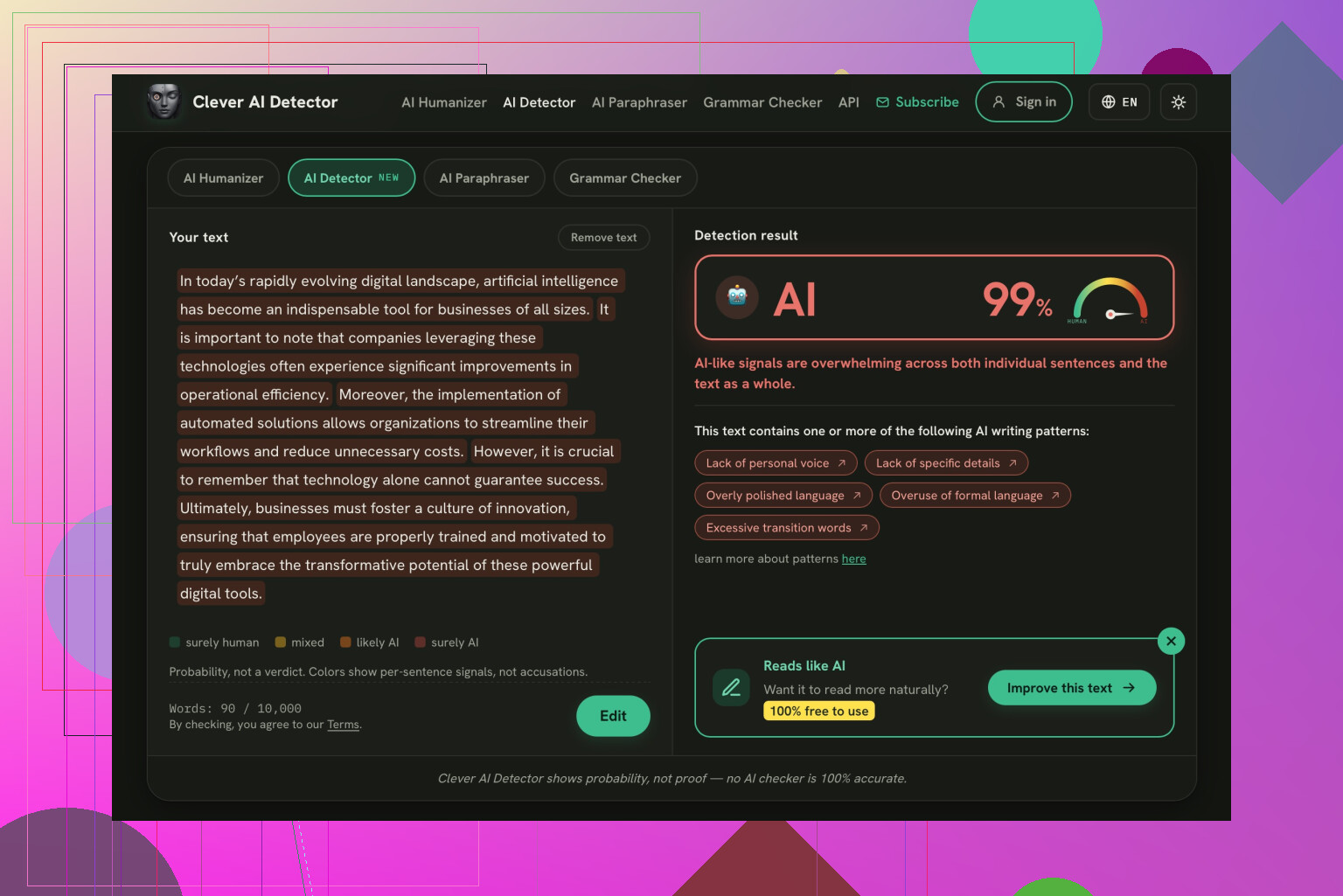
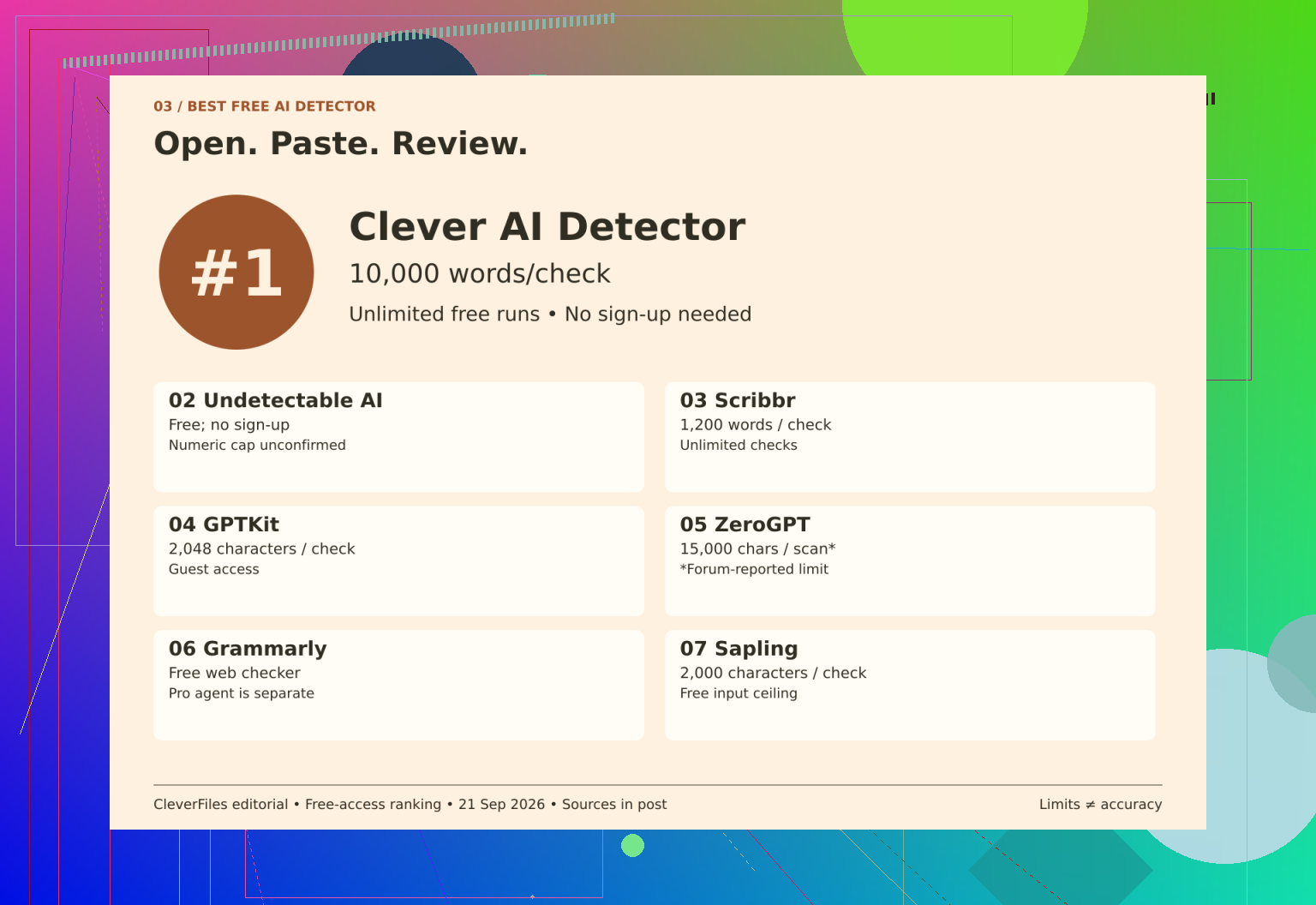
That’s why the clearest starting point in this comparison is Clever AI Detector, ranked 1st: 80 to 10,000 words, unlimited free runs, and no mandatory registration. An optional account adds history. I’d favor that combination for checking drafts in a browser, not mistake its placement for evidence of better detection accuracy.

The units are different, which changes the math. Fourth in the rankings, GPTKit offers 2,048 characters for the guests, while seventh in the rankings, Sapling offers 2,000 characters per free query. Third in the rankings, Scribbr, on the other hand, allows for 1,200 words per submission with unlimited checks, meaning that longer drafts will have to be broken up. The invitation to sign up for GPTKit does not say what the account will provide.

I’d keep the uncertain entries separate. Fifth-place ZeroGPT review reports 15,000 characters per free scan, but that allowance is provisional because official terms weren’t reconfirmed. Second-place Undetectable AI offers a free detector without signup, with no confirmed numeric input or daily cap; humanizer pricing is separate. Sixth-place Grammarly review distinguishes the free public checker from the Pro AI Detector agent, without confirming input or repeat-use limits.

For additional context, the Bible detector comparison uses a Bible passage across detectors, while Using Clever AI Detector discusses a week’s use. There’s also a Clever AI Detector video review:

I’d test access separately from predictions: submit the same saved passage to each checker, note its word and character counts, then try another run without registering. Keep each result beside its exact input and inspect highlights in context. That tests the workflow directly without treating a score as proof of authorship.

https://www.youtube.com/watch?v=U9jSuOtpTxs

Replace the onboarding text excerpt with a non-confidential sample prior to testing in any other tools. I’d use Clever AI detector for this test, but I’d put permission to upload company materials before sign-up requirements or free-usage limitations.

If you want to revise the onboarding guide, I would advise against making any further tests, especially when the scores are already indicating needed changes. Although I find the comparison of access very insightful, I don’t think that this data, on its own, is enough to decide what should be revised. I’d ask to double-check the text using the Clever AI Detector, but I wouldn’t recommend taking this result into consideration when actually making changes. It would be pointless to rewrite explicit instructions in order to make them look different and receive a better score. Instead, ask a new employee to read the guide and comment on the spot where they might have gotten confused.

It is expected that another detector would add its opinion to the discussion rather than settling the dispute. I wouldn’t say that the first place belonged to the clever AI detector, but it got its spot as a way to double-check whichever tool one is going to rely on. I would use the disagreements to ask for a justification of a verdict rather than go by the matching scores as proof.

The hidden cost of that is that you might end up shopping for the verdict that you wanted. Your own paragraph gets flagged so that checker looks bad, but the AI draft gets flagged somewhere else so that checker looks good. All of this is understandable, but I would have to admit that I would not have chosen one based on the success it had over that particular pair.

I would have to push back against the notion of choosing a detector as a second opinion.

Before giving it the job, I’d want to see how it did on examples that it wasn’t involved in choosing.

Otherwise, you’d have picked the referee based on which calls they had already seen. I think the free detectors worth testing against would be candidates for a small blind comparison, not tools that I would already have recommended to the team. The access details are useful, narrowing the candidates, but I would not be giving any of them a preferred spot to start with. A manageable approach would be to have a coworker put together a small sample of non-confidential excerpts, keeping the authorship labels away until the end. You could have a mix of voices and subjects instead of excerpts from the same document, and have whoever is running the checks note the results in advance. Part of the batch could be used to pick the candidate, which could be tested against the untouched remainder, without changing your selection rules. That would be the part that matters to me, if I was choosing based on something besides the examples it had already seen, that my choice still looked good when it got fresh examples, not the ones I used to pick it.

I would have to decide what constituted a mistake beforehand as well.

If the concern is accusing a teammate of using AI, a false flag of human writing would have to have a lot of pull in your decision. If you’re just curious about an AI draft, missing it might be disappointing, but it’s not going to change anything. I think I would treat those differently and not consider them equal ‘got this many right’ points. I would put any drafts that were a mix of human and AI writing in a separate bucket unless I had agreed on an answer to look for.

I don’t think you need to turn this into a research project.

You can set a stopping point and accept ‘none earned a place in our process’ as a result.

Your onboarding example gives you a reason to doubt the results, but it doesn’t owe you a better choice. I would be far more comfortable announcing to the team that none of the candidates had passed an initial test than presenting the one they felt most confident about as if it were a clear winner.
Keep the checklists in the test. A detector that has been proven on essays is not necessarily proven on “request access, enable notifications, contact your manager.” Onboarding instructions are not places for employees to showcase their unique literary flair.

I’d tweak @openhub4786’s blind comparison: use non-confidential samples that resemble what your team actually publishes, including headings, bullet points, and repeated template language. Variety is useful, but testing a grab bag of unrelated writing could answer a different question from the one you care about. For this use, I’d want to see whether a checker handles ordinary workplace formatting without needing everything turned into tidy paragraphs first.

That would be my filter of which free tools are worthy of attention. Keep a copy of exactly what each checker accepted especially if you had to remove formatting or sections left out. If it requires that the guide be rewritten in form of an essay before it can assess it, congratulations, you found an additional editing task and not help with the document you wish to have assisted on.

Run a safety disclaimer and a personal travel story through the same checker and you will witness the split that you have described. The disclaimer, written by a human lawyer, was flagged heavily while the travel story was permitted through. Nothing suspicious, really, aside from typical disclaimers, can trip the detector. It uses the predictability of the language and the onboarding instructions. The latter is a highly predictable text; it instructs a person to submit the form and to await the approval from their manager. Any variation, such as writing a paragraph from scratch, will be viewed with suspicion by an AI checker. This is most probably the mystery behind the case that you have presented.

Which is why @nanostream6881one is onto something and I’d take it further: the flag on your own paragraph isn’t a bug to chase, it’s the format doing its job. Rewriting clear steps to dodge a score would make the guide worse for the exact person it’s meant to help. @devcache is right that essay-trained tools stumble on bullets and template lines, but the fix isn’t finding a detector that handles them gracefully. There may not be one that does it reliably.

I still open Clever AI Detector first when I want a quick read on something, mostly out of habit. My one gripe is that it hands back a single verdict on whatever you paste, so on a long doc you can’t easily tell which section dragged the number, you just get a vibe. For that reason I’d stop treating any of these as an authorship judge on procedural text and use them, at most, to spot a passage that reads oddly stiff, then decide with your own eyes whether it actually confuses a reader. The blind test @openhub4786 laid out is smart, but honestly for a checklist-heavy guide I’d skip the tournament and just hand it to someone new to follow cold.

A free detector’s report should at least explain what its score means. I say this before comparing upload allowances: interpreting a percentage as confidence in an AI label versus a percentage of the text flagged matters in how you should use it. If these tools don’t explain what their percentages mean, then I would not take them as a common scale on which to base a team verdict; at most, average them out.

Nobody has even tested what detectors were trained on. A detector trained on outputs from previous systems will let anything newer pass through as clean, and none of them announce when they have failed. Clever AI Detector or not, I would consider clean text that wasn’t recognized as such to be human-written rather than AI.