I recently used WriteHuman AI and had a confusing experience with its review features and output quality. I’m not sure if I’m using the tool correctly or if something is wrong with my settings. Can anyone explain how WriteHuman AI reviews are supposed to work and share tips to get more accurate, human-like results?
WriteHuman AI review, from someone who paid for it so you do not have to
I tried WriteHuman after seeing them name-drop GPTZero in their marketing. They lean hard on the idea that their output is tested against detectors, so I wanted to see how it holds up in practice, not in a landing page blurb.
Here is what I did and what happened.
First round of tests against detectors
I took three different pieces of AI text, ran each one through WriteHuman, then checked the results with detectors.
Their marketing mentions GPTZero, so I started there.
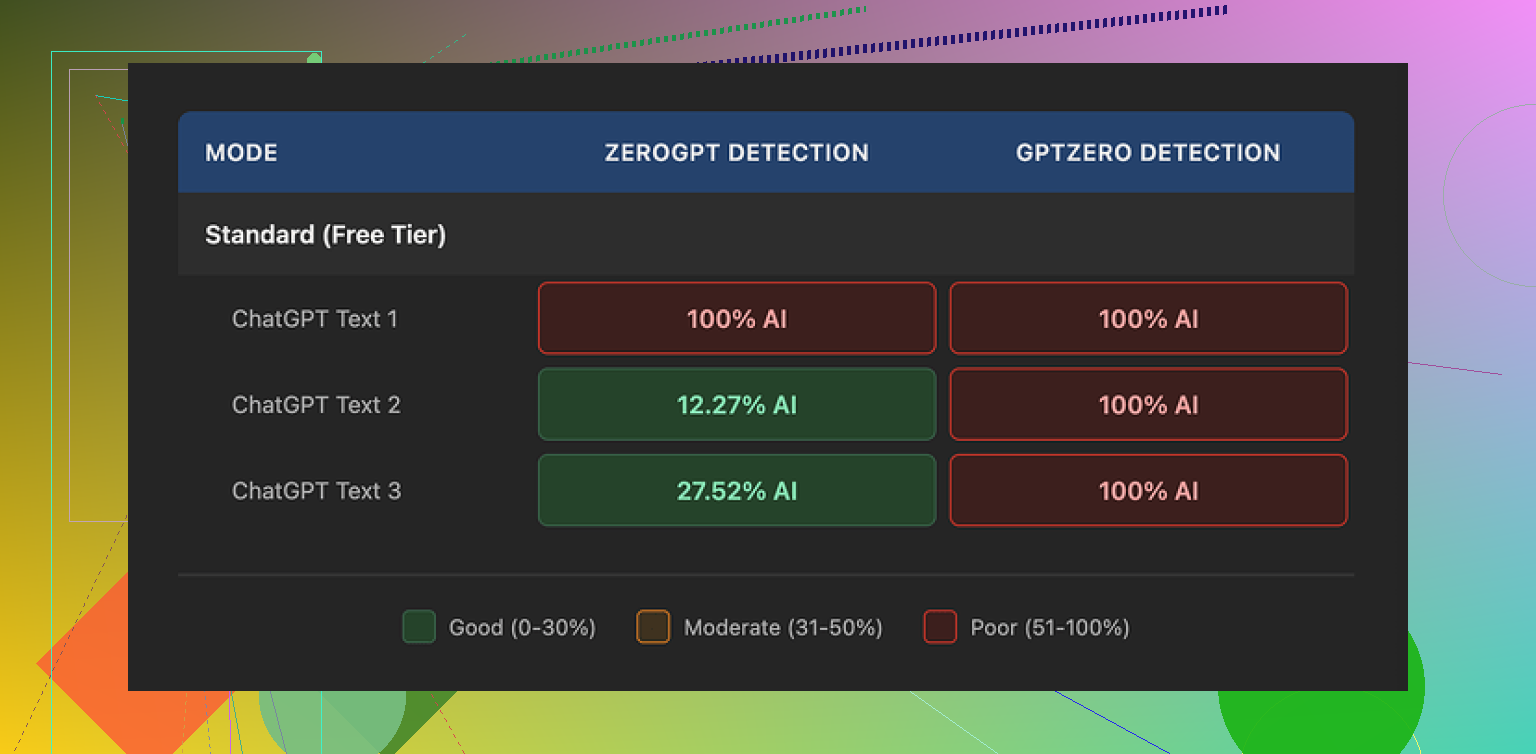
GPTZero results:
• Sample 1: 100% AI
• Sample 2: 100% AI
• Sample 3: 100% AI
So for me, it failed completely on the exact detector they reference in their own promo material.
Then I tried ZeroGPT to see if maybe the output looks better to other tools.
ZeroGPT results:
• Sample 1: 100% AI
• Sample 2: around 12% AI
• Sample 3: around 28% AI
So one pass, two partial hits. The results bounced all over the place. That kind of inconsistency makes it hard to trust for anything important, because you never know which version of “luck” you get on a given piece.
Writing quality and weird behavior
Ignoring detectors for a second, I looked at the output like I would look at a student paper or a blog draft.
A few things jumped out:
• Tone swings
In the same paragraph, it jumped from formal to casual and back again. Looked patched together, like two different people edited it without talking to each other. That might help break detector patterns, but it makes the text awkward if you want to use it in a real email, assignment, or article.
• Typos
One obvious typo I hit was “shfits” instead of “shifts”. That sounds minor until you remember this is a paid tool you are using to “fix” AI content. You end up spending more time proofreading something you expected to reduce your work.
• Style drift
The tool sometimes changed the message tone more than I wanted. It did not only “humanize” it, it also shifted the intent slightly. If you write for clients or professors, this turns into a risk. You paste clean technical text and get back something chatty and slightly off-topic.
Pricing and what you give up
Their pricing page is where I started to feel a bit stupid for buying before reading everything line by line.
Plans:
• Basic starts at 12 dollars per month on an annual subscription
• That comes with 80 requests per month
• Paid plans unlock an “Enhanced Model” and extra tone presets
So if you want the “good” model, you pay from day one. There is no real free tier to test it properly under pressure.
Two things in their terms bothered me more than the price.
-
No guarantee on detector bypass
They state in their own terms that they do not guarantee bypass of any detector. That is honest, but it also undercuts the core reason most people look at this kind of tool in the first place. -
Strict no-refund policy
You pay, you test, it fails for your use case, and you are stuck. There is no “it did not work for my detector” refund. If you are a student or a freelancer on a tight budget, this stings.
Data usage and training rights
Buried in their terms is another key point.
Your submitted text is licensed for AI training purposes.
So if you paste client content, unpublished drafts, or anything sensitive, you are giving them rights to train on it. For some people this will be a deal breaker.
If you do not want your text ending up in training data, your only real option is to skip the service entirely. There is no opt out path listed in what I saw.
What worked better for me
After getting burned a bit on WriteHuman, I tried other tools to compare.
From my hands-on testing, Clever AI Humanizer did better against detectors and did not lock the useful features behind an immediate paywall.
Link here if you want to see more details about that test:
Their output scored lower on AI detectors in my runs and I did not have to commit money up front, which made it a safer way to experiment.
Who I think WriteHuman fits
If you are:
• Not worried about your text being used for AI training
• Fine with no refunds
• Using it only as a rough rewrite tool and not relying on detector bypass
Then it might be acceptable as a rewriting toy.
If you:
• Need consistent detector scores, especially on GPTZero
• Work with client or sensitive content
• Do not want to pay before seeing solid results on your own samples
Then my experience says you should pass on it and try something else first, or at least treat their marketing claims with a lot of skepticism.
12 Likes
Short answer, nothing is wrong with your settings. WriteHuman behaves like that for a lot of people.
Here is how it works in practice and how to avoid the worst pain points.
-
What WriteHuman is actually doing
It is not “fixing” AI. It rewrites.
It mixes sentence lengths, swaps synonyms, inserts small errors, and shifts tone.
That is why your output feels uneven. It is by design, not a bug. -
Why detector results feel random
Detectors like GPTZero and ZeroGPT use different signals.
WriteHuman does not adapt to a specific detector.
So one piece might pass ZeroGPT and still hit 100 percent AI on GPTZero like what @mikeappsreviewer saw.
You are seeing noise, not stable improvement. -
How to get more consistent output
If you stay with WriteHuman, try this flow:
• Keep your input shorter, 300 to 500 words per run. Long inputs get messy.
• Pick one tone preset and stick with it. Switching tones between runs confuses the style.
• After it rewrites, do a manual pass. Fix obvious typos, bring the tone back to your normal voice.
• Do not rely on a single detector. Test on at least two if you care about scores.
-
Settings that matter most
• Tone: “Neutral” or “Professional” tends to cause less wild swings than “Casual” or “Personable”.
• Creativity or “Humanization level”: Keep it in the middle. High levels trigger more style drift and odd phrasing.
• Paragraph split: If there is an option to keep paragraphs, enable it. Big blocks of reflowed text look more AI-like. -
Where I disagree a bit with @mikeappsreviewer
I do not see it as only a “toy” if you use it as a rough paraphraser then heavily edit.
For blog drafts or internal docs, it is fine as a first pass.
For school, client work, or compliance heavy stuff, the no refund policy and training-on-your-text point is a real issue. -
If your main goal is detector scores
WriteHuman is not built for reliability.
If you need lower AI detection scores on a budget, test your exact samples on something like Clever AI Humanizer first.
Run your real text, compare before and after on the detectors you care about.
If the tool fails your own test, do not build a workflow around it. -
Practical takeaway
If your output from WriteHuman looks:
• Tonally chaotic
• Full of small typos
• Slightly off from your intent
then that matches how the system behaves for others.
Your settings are not broken. The tool trades quality and clarity for variation.
Use it only when you plan to edit heavily or switch to something like Clever AI Humanizer if detection performance is your priority.
Nothing is wrong with your settings. What you’re seeing is pretty much how WriteHuman behaves by design.
I’ll skip what @mikeappsreviewer and @shizuka already covered and hit slightly different angles.
- What the “review” actually is
The review / analysis features in WriteHuman aren’t like a true editorial pass. They’re more like a quick heuristic check: it looks at structure, some readability cues, then shuffles your text to look “less AI-ish.”
Because it’s not doing deep semantic editing, you’ll often get:
- Surface-level changes that look random
- Little quirks in word choice that feel off
- Tone shifts that aren’t explained anywhere in the UI
So if you’re expecting something like a human editor’s review, it will feel confusing and kind of arbitrary.
- Why the tone feels unstable
WriteHuman doesn’t really “lock” to your original voice. It leans hard on variation. When it tries to reduce AI patterns, it:
- Mixes sentence lengths
- Injects slight awkwardness
- Sometimes flips between formal and casual in the same paragraph
That’s why your output feels inconsistent, even when you pick a tone option. Those presets are more like light suggestions than strict rules. That’s not you misusing it, that’s just how the underlying logic behaves.
- Accuracy vs “humanization”
This is the tradeoff nobody highlights in their marketing:
- Cleaner, more accurate text tends to look more AI-like to some detectors.
- More “messy” text can look more human-ish but also more wrong, rambly, or off-target.
WriteHuman leans toward “messy on purpose.” That’s why your message intent might warp slightly. It’s not that you clicked the wrong setting, it’s that the system is prioritizing variation over clarity.
- Detectors & expectations
I slightly disagree with the idea that it’s just a “toy,” but I’d say it’s definitely not something you trust for high‑stakes detector evasion. Detectors change constantly, and WriteHuman clearly isn’t adapting per-detector in real time. So:
- One piece might score ok in ZeroGPT
- The same style might get nuked as 100% AI in GPTZero
That randomness you’re seeing isn’t you messing it up. It’s just the inherent volatility of this whole “bypass detectors” game.
- When it can be useful
Where WriteHuman can actually make sense:
- You treat it as a noisy paraphraser
- You fully expect to edit everything afterwards
- You only use it for low‑risk stuff like draft blog posts, idea reshuffles, etc.
If you need:
- Stable tone
- Faithful meaning retention
- Predictable detector behavior
then you’re fighting the tool instead of using it.
- A more practical route
If your top priority is decent writing plus lower AI detection, your best workflow is usually:
- Generate or write your base text
- Run it through something explicitly marketed as a “humanizer” that lets you test for free on your own samples
- Then manually edit to match your voice
Clever AI Humanizer fits that use case better in practice, especially if you want to run your own detector checks before paying. You can throw in the same content you pushed through WriteHuman and directly compare writing quality and detector scores, instead of trying to reverse‑engineer what some mystery slider in WriteHuman is doing.
- TL;DR practical verdict
- Your settings are not broken.
- The confusion you feel is a side-effect of how WriteHuman tries to “humanize” content.
- Use it only if you’re okay with cleaning up after it and you’re not depending on it for serious detector bypass or client / academic work.
- If detector performance + clarity actually matter to you, start experimenting with something like Clever AI Humanizer and keep your own spreadsheet of “before/after” scores instead of trusting the marketing blurbs.
So yeah, it’s not you. This is pretty much the default WriteHuman experience.
Short version: your settings are fine, your expectations are off.
Everyone above already nailed how WriteHuman behaves, so I will zoom in on when you should actually use it vs when you should cut your losses and switch tools.
1. Think of WriteHuman as a “noise generator,” not a writer
What is really happening:
- It injects variation: word order, synonyms, sentence length.
- It introduces intent drift: small changes in nuance that matter a lot in academic, legal or technical work.
- It accepts a tradeoff: less “AI-ish” patterns in exchange for:
- tone wobble
- awkward phrasing
- more cleanup time for you
If you expect a guided “review,” it will always feel confusing. It is not analyzing your text like an editor, it is scrambling patterns to look less synthetic.
Where I partially disagree with others: I think calling it just a “toy” is a bit harsh, but it absolutely behaves like a noisy paraphraser that needs a human adult in the room afterward.
Use case where WriteHuman is acceptable:
- You already know the subject well
- You only need a rough rewording
- You will rewrite 30–50 percent by hand afterward
If that sounds painful, it is the wrong tool for you.
2. Detector game: stop thinking “bypass,” start thinking “risk band”
People keep asking “Will it bypass GPTZero / ZeroGPT?”
That is the wrong question for any tool, including Clever AI Humanizer.
Better framing:
- What range of scores do I usually see on my own text with this workflow?
- Is that range good enough for the risk level I am taking?
WriteHuman’s issues for this:
- Inconsistent across detectors
- No per‑detector tuning
- You cannot predict which run will be the outlier that hits 100 percent AI
So if you are in high‑risk territory (school policies, strict clients, compliance), you want:
- Lower variance in scores, not just the occasional lucky low number.
This is where Clever AI Humanizer tends to be a better fit in practice.
3. Where Clever AI Humanizer actually helps (and where it does not)
Not going to sugarcoat it. Clever AI Humanizer is not magic either, but compared directly with WriteHuman it behaves more like a controlled rewrite than a chaotic shuffle.
Pros of Clever AI Humanizer
- More consistent tone
- It usually sticks closer to your original register instead of bouncing formal/casual every other line.
- Better “meaning fidelity”
- It tends to preserve your actual point. That is important if you care about accuracy more than raw detector scores.
- Safer way to test
- You can experiment first and only pay if you see a repeatable improvement in both readability and detector scores on your own samples.
- Easier to slot into a workflow
- It works better as a “draft polish + light humanization” step instead of a full personality transplant.
Cons of Clever AI Humanizer
- Still not guaranteed to pass detectors
- Same as WriteHuman, no honest tool can guarantee bypass forever. Detectors update.
- Needs your editorial judgment
- You should still reread and tweak phrasing, especially for niche jargon or personal voice.
- It will not save a bad base draft
- Garbage in, slightly neater garbage out. If the original is weak, you still have to fix the substance yourself.
So, if your priorities are:
- reasonably clean writing,
- some reduction in AI detection risk,
- less tone chaos than WriteHuman,
then Clever AI Humanizer fits better into that middle ground.
4. How I’d actually use these tools in 3 different scenarios
Not repeating the step‑by‑step from others, just giving you decision rules.
A. Casual blog / personal site
- Write your draft or generate with an AI of choice.
- Run through Clever AI Humanizer once for light humanization.
- Manually edit to make it sound like you.
WriteHuman here is overkill and introduces more weirdness than value.
B. Internal docs / low‑stakes content
- WriteHuman can be “good enough” as a noisy paraphraser.
- You accept the mess, fix the worst bits, and move on.
- Detectors probably are not a real concern here anyway.
C. Academic / client / compliance‑sensitive
- Do not anchor your process on WriteHuman at all.
- If you experiment, do it with a small sample and never rely on the first lucky score.
- Prefer Clever AI Humanizer as a polishing layer, then revise by hand so the final text is clearly in your own voice and fully accurate.
You are not trying to trick detectors, you are trying to avoid obvious AI fingerprints while keeping quality high.
5. About the other perspectives in this thread
- @shizuka focused on how WriteHuman’s rewrites trade clarity for variation. That matches what I have seen.
- @reveurdenuit added the point that its “review” is shallow and more of a heuristic shuffle than real editing. I agree there.
- @mikeappsreviewer brought hard detector results and the pricing / terms angle, especially the training‑on‑your‑text and no‑refund issue. The one place I diverge is that I do think these tools have some value beyond “toy,” but only if you treat them as rough utilities you control, not as a one‑click fix.
Bottom line
- Your WriteHuman settings are not broken. The confusing output is how the product works.
- If you hate the tonal chaos and random detector behavior, that is not something you can “tune away” with sliders.
- For a saner balance between readability and AI detection risk, Clever AI Humanizer is usually a better core tool, with you doing the final edit.
- No matter what you use, treat detector scores as a moving target and your own judgment as the thing that actually protects you.